Adjusting your SET UP (menus)
Learning menu selection
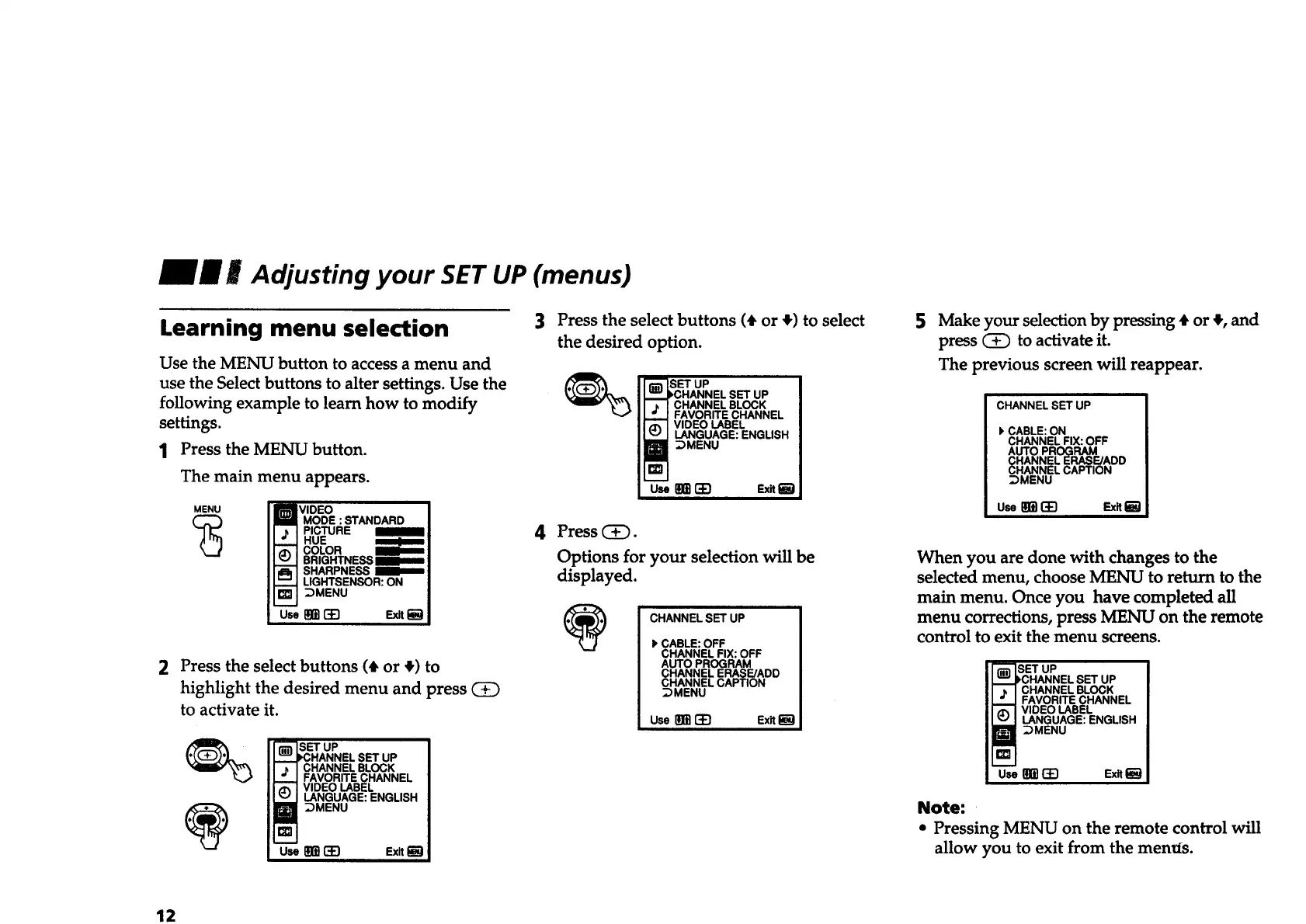
Use the MENU button to access a menu and
use the Select buttons to alter settings. Use the
following example to learn how to modify
settings.
1 Press the MENU button.
The main menu appears.
MENU
(_ MODE : STANDARD
PICTURE
HUE
COLOR
BRIGHTNESS
SHARPNESS
LIGHTSENSOR:ON
:)MENU
2 Press the select buttons (# or #) to
highlight the desired menu and press
to activate it.
SET UP
SET UP
CHANNEL BLOCK
FAVORITE CHANNEL
VIDEO LABEL
LANGUAGE: ENGLISH
:)MENU
Use _ _ Exit
3 Press the select buttons (# or #) to select
the desired option.
SET UP
,CHANNEL SET UP
CHANNEL BLOCK
FAVORITE CHANNEL
VIDEO LABEL
LANGUAGE: ENGLISH
_MENU
Use m [t) Exit
4 Press C_.
Options for your selection will be
displayed.
CHANNEL SET UP
I, CABLE: OFF
CHANNEL FIX: OFF
AUTO PROGRAM
CHANNEL ERASE/ADD
CHANNEL CAPTION
;DMENU
UseI_BI-4q Ex_l_l
5
Make your selection by pressing • or $, and
press (_ to activate it.
The previous screen will reappear.
CHANNELSET UP
CABLE:ON
CHANNELFIX: OFF
AUTO PROGRAM
CHANNELERASE/ADD
CHANNELCAPTION
:)MENU
usem(33 SxRam
When you are done with changes to the
selected menu, choose MENU to return to the
main menu. Once you have completed all
menu corrections, press MENU on the remote
control to exit the menu screens.
SET UP
_CHANNEL SET UP
CHANNEL BLOCK
FAVORITE CHANNEL
VIDEO LABEL
LANGUAGE: ENGLISH
DMENU
useBB_ F.x,_
Note:
• Pressing MENU on the remote control will
allow you to exit from the metals.
12








 To Next Page