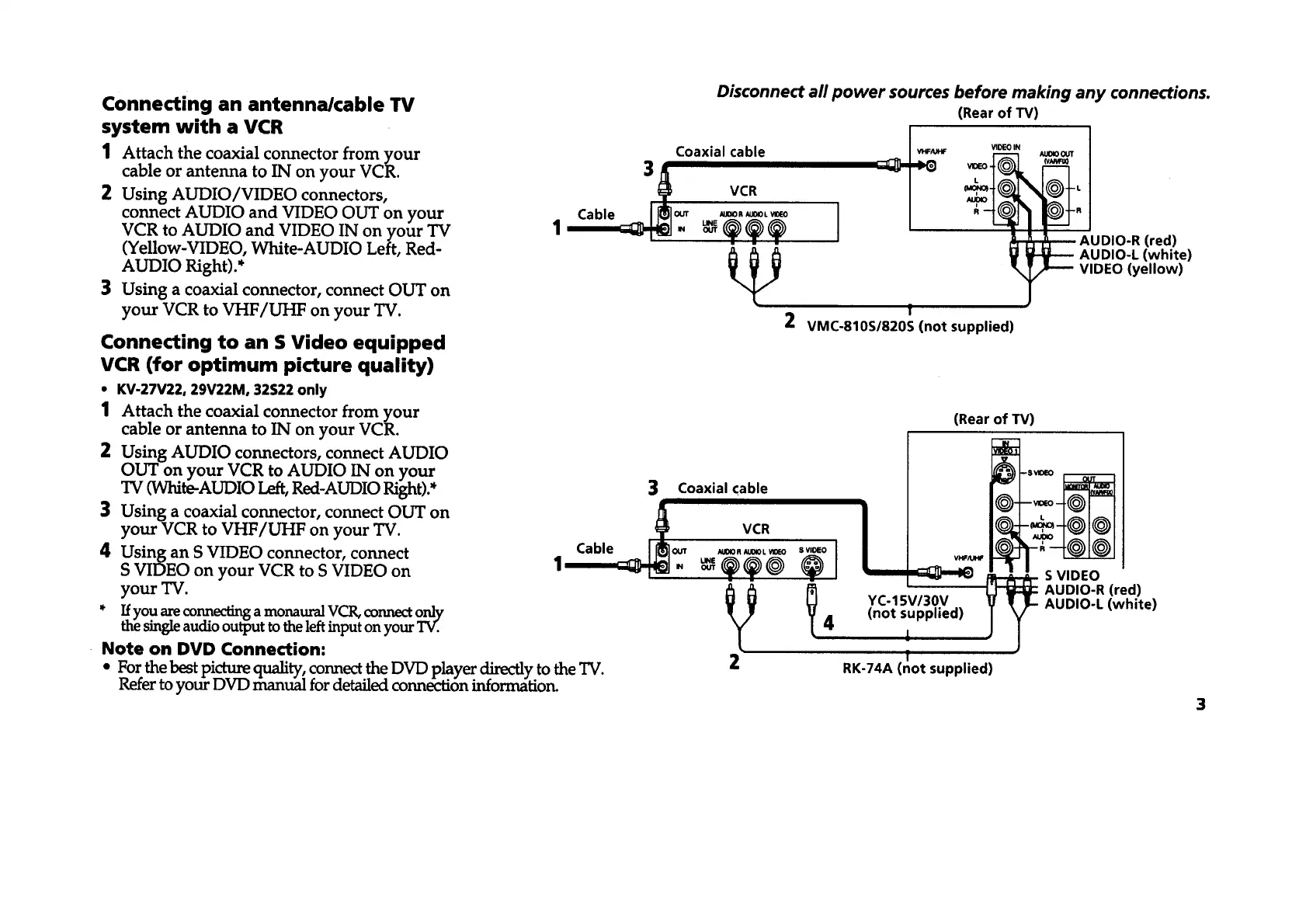
Connecting an antenna/cable TV (Rear of TV)
1 Attach the coaxial connector from your Coaxial cable _o_ _ao0_
cable or antenna to IN on your VCR. 3
2 Using AUDIO/VIDEO connectors, VCR
connect AUDIO and VIDEO OUT on your Cable II[_1out u_oR,ax0__o I
VCR to AUDIO and VIDEO IN on your TV 1 '__-_ - _ _.._ ._ I " --_-_"
(Yellow-VIDEO, White-AUDIO Left, Red- _ _ AUDIO-R (red)
AUDIO-L (white)
AUDIO Right).* VIDEO (yellow)
3 Using a coaxial connector, connect OUT on
f
your VCR to VHF/UHF on your TV. 2 VMC-810S/820S (not supplied)
Connecting to an S Video equipped
VCR (for optimum picture quality)
• KV-27V22, 29V22M, 32S22 only
1 Attach the coaxial connector from your
cable or antenna to IN on your VCR.
2 Using AUDIO connectors, connect AUDIO
OUT on your VCR to AUDIO IN on your
TV (White-AUDIO Left, Red-AUDIO Right).*
3 Using a coaxial connector, connect OUT on
your VCR to VHF/UHF on your TV.
4 Using an S VIDEO connector, connect
S VIDEO on your VCR to S VIDEO on
yourTV.
* Ifyou are connecting a monaural VCR, connect only
the single audio output to the left input on your TV.
Note on DVD Connection:
* For the best picture quality: connect the DVD player directly to the TV. 2
Keter to your DVD manual for detailed connection information.
Disconnect all power sources before making any connections.
(Rear of TV)
VHF/U_
S VIDEO
AUDIO-R (red)
AUDIO-L (white)
3 Coaxial cable
Cable /_]o_ _0._0L_o
1_- _._@ "(_° I
_/_ _ YC-15V/30V
4 (not supplied)
1
f
RK-74A (not supplied)
3








 To Next Page