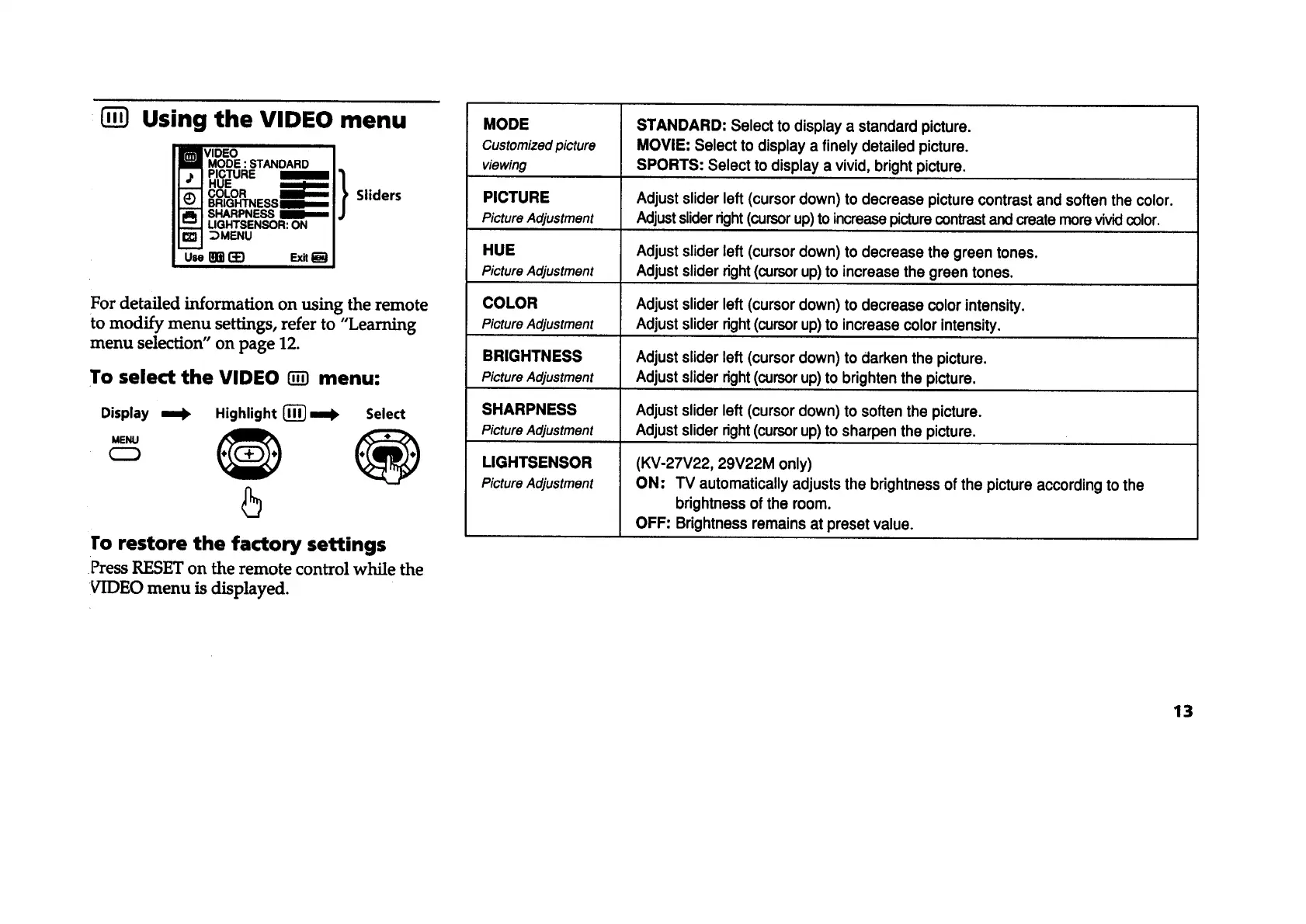
Using the VIDEO menu
VIDEO
MODE :STANDARD
PICTURE
HUE
COLOR ;
BRIGHTNESSI
SHARPNESS
LIGHTSENSOR:ON
DMENU
Sliders
For detailed information on using the remote
to modify menu settings, refer to "Learning
menu selection" on page 12.
To select the VIDEO _ menu:
Display =_ Highlight {_} m=l), Select
ro restore the factory settings
Press RESET on the remote control while the
VIDEO menu is displayed.
MODE
Customized picture
viewing
STANDARD: Select to display a standard picture.
MOVIE: Select to display a finely detailed picture.
SPORTS: Select to display a vivid, bright picture.
PICTURE Adjust slider left(cursor down) to decrease picture contrastand soften the color.
PictureAdjustment Adjust sliderright(cursorup)to increasepicturecontrastand create morevividcolor.
HUE Adjust slider left (cursor down) to decrease the green tones.
PictureAdjustment Adjust slider right(cursorup)to increase the green tones.
COLOR Adjust slider left (cursor down) to decrease color intensity,
PictureAdjustment Adjust slider right(cursorup)to increase color intensity,
BRIGHTNESS Adjust slider left (cursor down) to darken the picture.
PictureAdjustment Adjust slider right(cursorup)to brighten the picture.
SHARPNESS Adjust slider left (cursor down) to soften the picture.
PictureAdjustment Adjust slider right(cursorup)to sharpen the picture.
LIGHTSENSOR
PictureAdjustment
(KV-27V22, 29V22M only)
ON: TV automatically adjusts the brightness of the picture according to the
brightness ofthe room.
OFF: Brightness remains at preset value.
13









 To Next Page