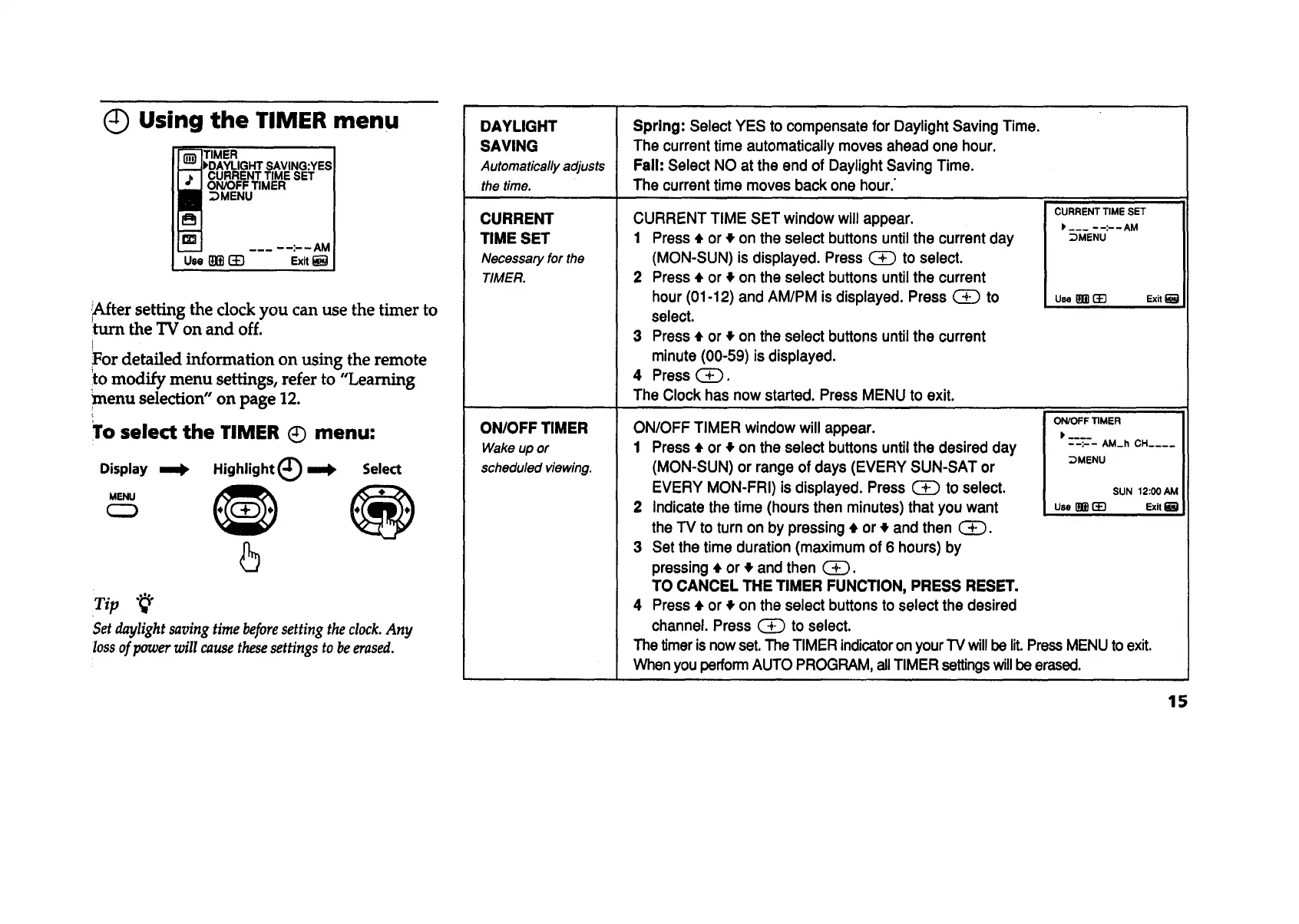
Using the TIMER menu
TIMER
"_AVING:YES
CURRENT TIME SET
ON/OFF TIMER
_MENU
_After setting the clock you can use the timer to
turn the "IV on and off.
!
Tor detailed information on using the remote
ito modify menu settings, refer to "Learning
menu selection" on page 12.
To select the TIMER (_ menu:
Display _ Highlight (_ mBik
Select
_u
Set daylight saving time beforesetting the clock. Any
loss of power will cause these settings to be erased.
DAYLIGHT
SAVING
Automaticallyadjusts
thetime.
CURRENT
TIME SET
Necessaryforthe
TIMER.
ON/OFF TIMER
Wake up or
scheduled viewing.
Spring: Select YES to compensate for Daylight Saving Time.
The current time automatically moves ahead one hour.
Fall: Select NO at the end of DaylightSaving Time.
The current time moves back one hour."
CURRENT TIME SET window will appear.
1 Press • or _,on the select buttons untilthe current day
(MON-SUN) is displayed. Press _ to select.
2 Press • or • on the select buttons untilthe current
hour (01-12) and AM/PM isdisplayed. Press (_ to
select.
3 Press • or • on the select buttons untilthe current
minute (00-59) is displayed.
4 Press _.
The Clock has now started. Press MENU to exit.
CURRENT TIME SET
I, ___ - -:- - AM
_DMENU
Use _ _ Exit I_
ON/OFF TIMER window will appear.
1 Press • or # on the select buttons untilthe desired day
(MON-SUN) or range of days (EVERY SUN-SAT or _MENU
EVERY MON-FRI) is displayed. Press (_ to select.
2 Indicate the time (hours then minutes) that you want use_ (_
the TV to turnon by pressing• or • and then (_).
3 Set the time duration (maximum of 6 hours) by
pressing • or ,_and then G_).
TO CANCEL THE TIMER FUNCTION, PRESS RESET.
4 Press • or _,on the select buttonsto select the desired
channel. Press _ to select.
The timeris nowset. The TIMER indicatoron yourTV willbe lit.PressMENU toexit.
Whenyou performAUTO PROGRAM, allTIMER settingswillbe erased.
ON/OFF TIMER
IP....
--:-- AM_h CH ....
SUN 12:00 AM
Exit
15









 To Next Page