Jr Using your New TV
Setting up the TV
#utomatically
The EASY SETUP GUIDE feature will allow you
to set the on-screen language and set all receivable
channels. The EASY SETUP GUIDE screen
appear every time you turn on the TV until you
perform AUTO PROGRAM.
The EASY SETUP GUIDE feature does not apply
for installations that use a cable box for all channel
selection.
To set up the TV manually, refer to "Using the
SET UP menu" on page 16.
Tips "_
• Performthisfunction during theday, with theantenna
and/or cableproperlyamra_Ced,to ¢asure that all available
dumnels arebroadcastingand razivable.
• After using EASY SETUP GUIDE you will stillhave the
option ofadjustingany ofthesystem settings, likeerasing
channels, through the SET UP menu (page16).
• TheTVmustbesettoTVinputtoexecuteAUTO
PROGRAM.PressANT untilthechannelnumberappa_.
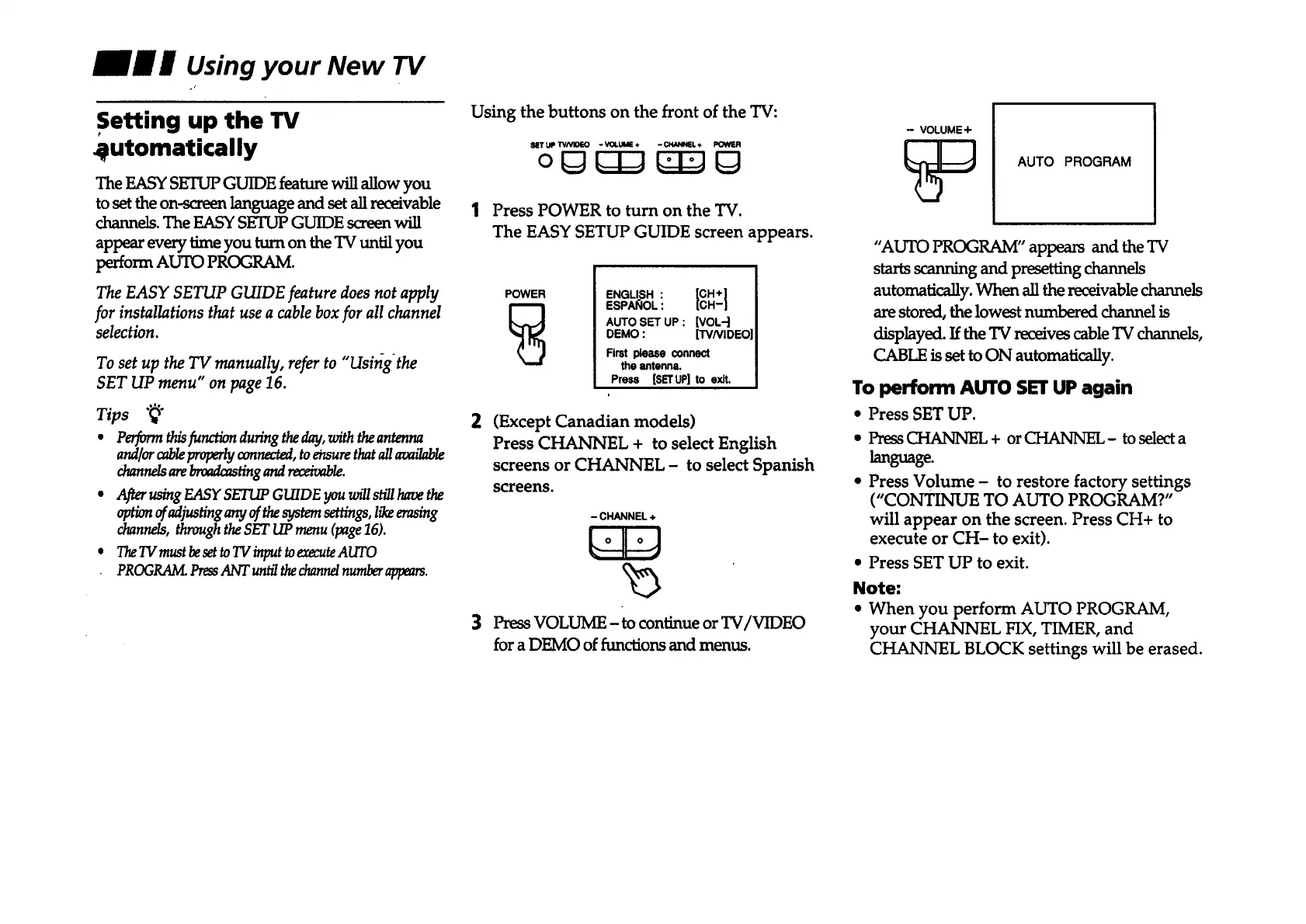
Using the buttons on the front of the TV:
NT UP TV/VllOEO -VOLUME÷ - CHAM_L ,t POWER
1 Press POWER to turn on the "IV.
The EASY SETUP GUIDE screen appears.
POWER
E.aL,S.:
ESPA_IOL:
AUTO SET UP : [VOL-]
DEMO : [TVNIDEO]
First please connect
the antenna.
Press [SETUP]to exit.
2
3
(Except Canadian models)
Press CHANNEL + to select English
screens or CHANNEL - to select Spanish
screens.
- CHANNEL +
Press VOLUME - to continue or TV/VIDEO
for a DEMO of functions and menus.
- VOLUME+
AUTO PROGRAM
"AUTO PROGRAM" appears and the TV
starts scanning and presetting channels
automatically.Whenallthereceivablechannels
are stored, the lowest numbered channel is
displayed. If the TV receives cable TV channels,
CABLE is set to ON automatically.
To perform AUTO SET UP again
• Press SET UP.
• Press CHANNEL + orCHANNEL- toselecta
language.
• Press Volume - to restore factory settings
("CONTINUE TO AUTO PROGRAM?"
will appear on the screen. Press CH+ to
execute or CH- to exit).
• Press SET UP to exit.
Note:
• When you perform AUTO PROGRAM,
your CHANNEL FIX, TIMER, and
CHANNEL BLOCK settings will be erased.









 To Next Page