_m i__' Connecting and Installing the TV (continued)
Connecting a VCR and TV with a
cable box
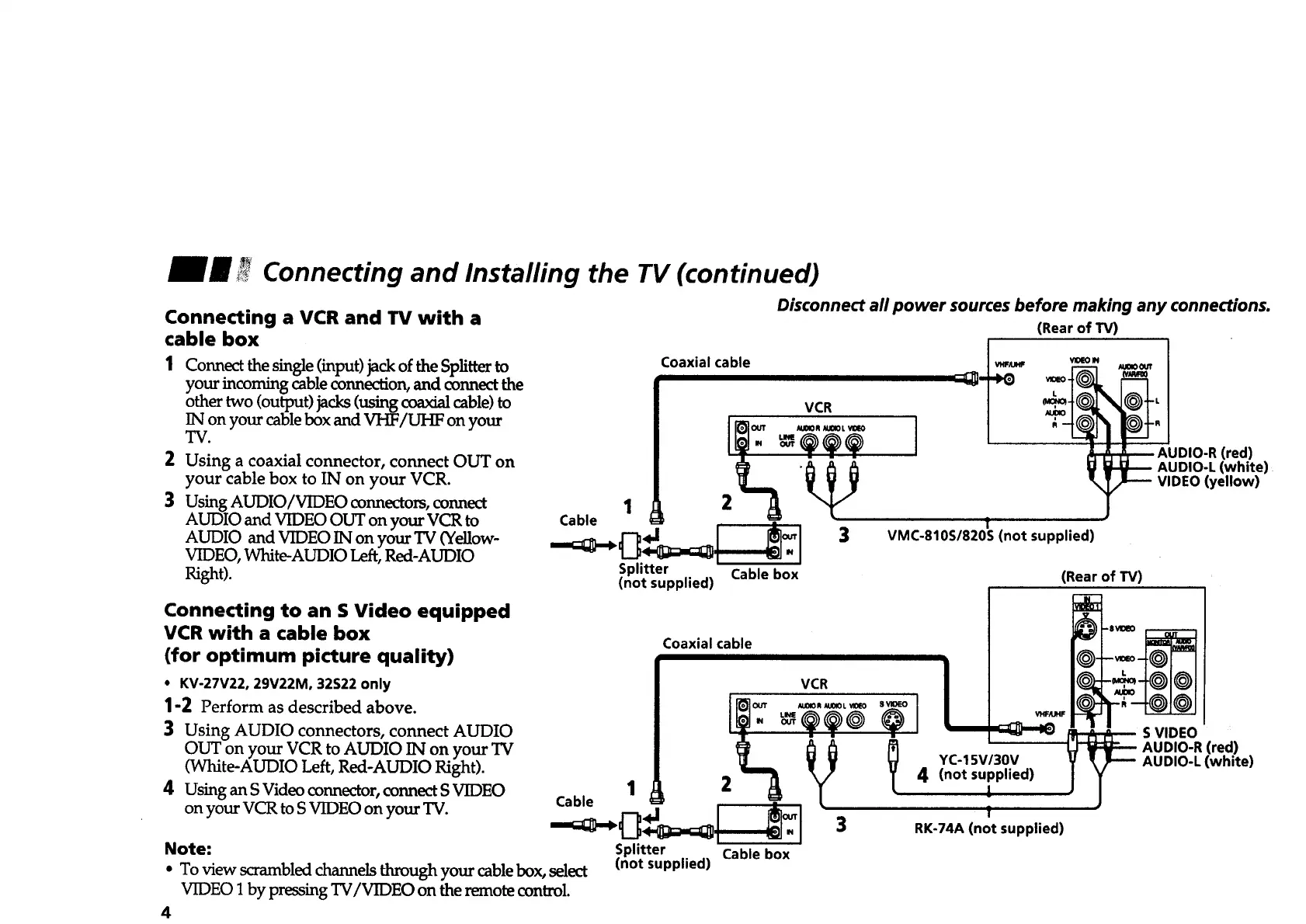
Connect the single (input) jack of the Splitter to
your incoming cable connection, and connect the
other two (output) jacks (using coaxial cable) to
IN on your cable box and VHF/UHF on your
TV.
Using a coaxial connector, connect OUT on
your cable box to IN on your VCR.
2
3 Using AUDIO/VIDEOconnectors, connect 1
AUDIO and VIDEO OUT on your VCR to Cable
AUDIO and VIDEO IN on your TV (Yellow-
VIDEO, White-AUDIO Left, Red-AUDIO
Right).
Coaxial cable
VCR
.I "o_
Splitter Cable box
(not supplied)
Disconnect all power sources before making any connections.
(Rear of TV)
] OD,O-RCred)
AUDIO-L (white)
VIDEO (yellow)
!
VMC-810S/820S (not supplied)
(Rear of TV)
Connecting to an S Video equipped
VCR with a cable box
(for optimum picture quality)
• KV-27V22, 29V22M, 32S22 only
1-2 Perform as described above.
3 Using AUDIO connectors, connect AUDIO
OUT on your VCR to AUDIO IN on your TV
(White-AUDIO Left, Red-AUDIO Right).
4 Using an S Video connector, connect S VIDEO
on your VCR to S VIDEO on your TV.
Coaxial cable
VCR
I'_OUT _UOlO R _01OL VlO_
Cable 1 4J 2 _ _
Note: Splitter Cable box
• To view s_ambled channels through your cable box, select (not supplied)
VIDFO 1 by pressing TV/VIDI_O on the remote control.
4
I
YC-15V/30V
4 (not supplied)
!
f
RK-74A (not supplied)
S VIDEO
AUDIO-R (red)
AUDIO-L (white)








 To Next Page