34
KV-34DRC430/36DRC430
KV-34DRC430/36DRC430
4-2. MEMORY WRITE CONFIRMATION METHOD
1. After adjustment, pull out the plug from the AC outlet, then replace the plug in the AC outlet again.
2. Turn the power switch ON and set to Service Mode.
3. Call the adjusted items again to confi rm they were adjusted.
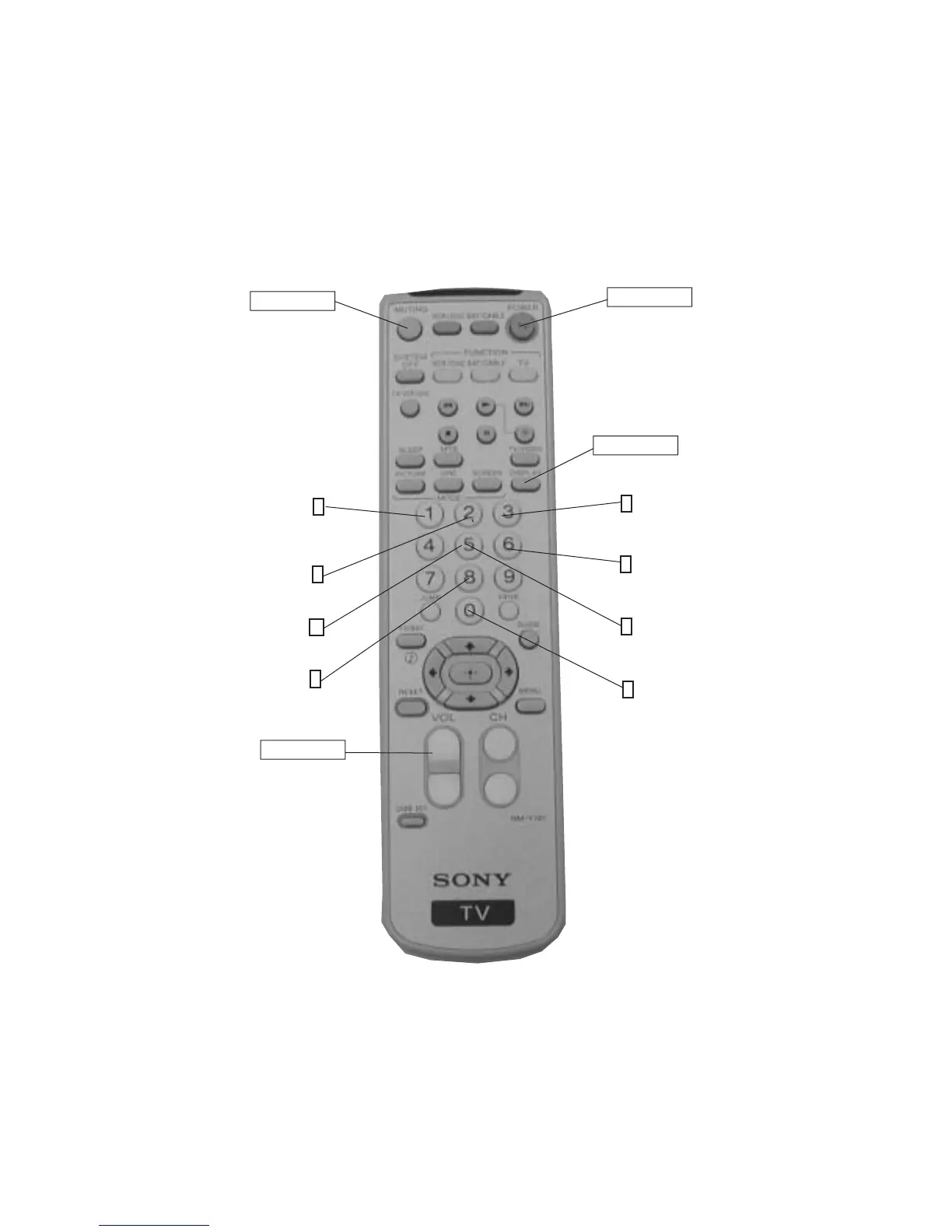
4-3. REMOTE ADJUSTMENT BUTTONS AND INDICATORS
RM-Y197
(Enter into
memory)
MUTING
POWER
(Service Mode)
Display (Item Up)
1
Device (Item up)
2
Display (Item Down)
4
(Initialize)
8
VOLUME (+)
(Service Mode)
3
Item
(Data Up)
6
Item
(Data Down)
5
(Device
(Item Down)
(Remove from
Memory)
0
DISPLAY
(Service Mode)








 To Next Page