EasyManua.ls Logo

Sony Trinitron KV-35V35 - Page 41

Sony Trinitron KV-35V35
42 pages
Print Icon
To Next Page IconTo Next Page
To Previous Page IconTo Previous Page
Loading...
SONY
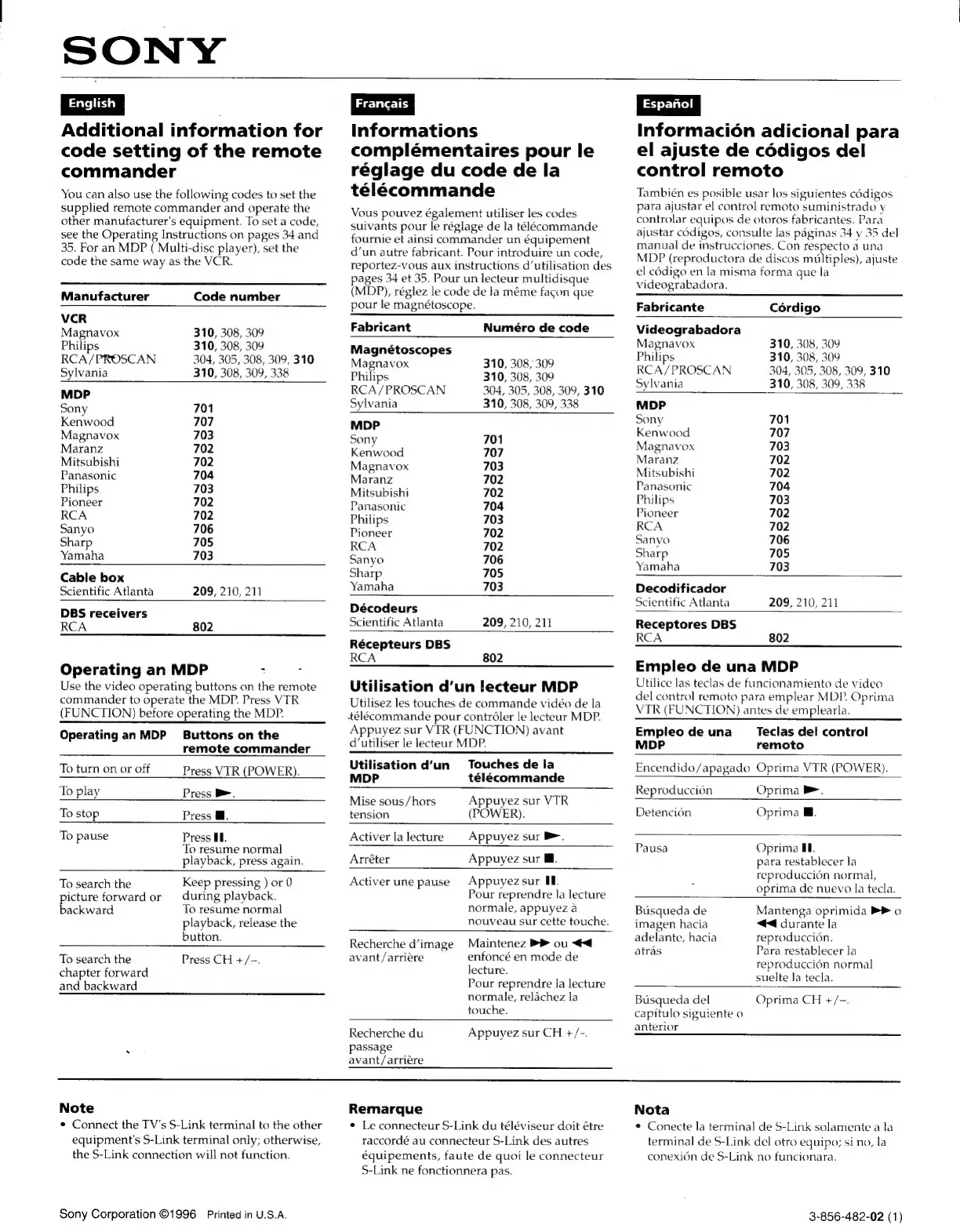
Additional
information
for
code
setting
of
the
remote
commander
You
can
also
use
the
following
codes
to
set
the
supplied
remote
commander
and
operate
the
other
manufacturer's
equipment.
To
set
a
code,
see
the
Operating
Instructions
on
pages
34
and
35.
For
an
MDP
(
Multi-disc
player),
set
the
code
the
same
way
as
the
VCR.
Informations
complémentaires
pour
le
réglage
du
code
de
la
télécommande
Vous
pouvez
également
utiliser
les
codes
suivants
pour
le
réglage
de
la
télécommande
fournie
et
ainsi
commander
un
équipement
d’un
autre
fabricant.
Pour
introduire
un
code,
reportez-vous
aux
instructions
d‘utilisation
des
Manufacturer
Code
number
VCR
Magnavox
310,
308,
309
Philips
310,
308,
309
RCA/PROSCAN
304, 305, 308,
309,
310
Sylvania
310,
308, 309,
338
MDP
Sony
701
Kenwood
707
Magnavox
703
Maranz
702
Mitsubishi
702
Panasonic
704
Philips
703
Pioneer
702
RCA
702
Sanyo
706
Sharp
705
Yamaha
703
Cable
box
Scientific
Atlanta
DBS
receivers
RCA
209,
210,
211
802
Operating
an
MDP
:
:
Use
the
video
operating
buttons
on
the
remote
commander
to
operate
the
MDP.
Press
VIR
(FUNCTION)
before
operating
the
MDP.
Operating
an
MDP
Buttons
on
the
remote
commander
pages
34
et
35.
Pour
un
lecteur
multidisque
(MDP),
réglez
le
code
de
Ja
méme
facon
que
pour
le
magnétoscope.
Fabricant
Numéro
de
code
Magnétoscopes
Magnavox
310,
308,
309
Philips
310,
308,
309
RCA/PROSCAN
304, 305,
308,
309,
310
Sylvania
310,
308,
309,
338
MDP
Sony
701
Kenwood
707
Magnavox
703
Maranz
702
Mitsubishi
702
Panasonic
704
Philips
703
Pioneer
702
RCA
702
Sanyo
706
Sharp
705
Yamaha
703
Décodeurs
Scientific
Atlanta
209,
210,
211
Récepteurs
DBS
RCA
802
Utilisation
d’un
lecteur
MDP
Utilisez
les
touches
de
commande
vidéo
de
la
télécommande
pour
contréler
le
lecteur
MDP.
Appuyez
sur
VIR
(FUNCTION)
avant
d’utiliser
le
lecteur
MDP.
Utilisation
d’un
Touches
de
la
To
turn
on
or
off
Press
VIR
(POWER).
RADE
seleeniidnda
To
play
“Fe
Press
Pe
Mise
sous/hors
Appuyez
sur
VTR
To
stop
Press
@.
tension
(POWER).
To
pause
Press
Hf.
Activer
la
lecture
Appuyez
sur
>.
To
resume
normal
|
playback,
press
again.
To
search
the
picture
forward
or
backward
Keep
pressing
)
or
0
during
playback.
To
resume
normal
playback,
release
the
button.
Arréter
Appuyez
sur
Mf.
Activer
une
pause
Appuyez
sur
Ul.
Pour
reprendre
la
lecture
normale,
appuyez
a
nouveau
sur
cette
touche.
Recherche
d’image
Maintenez
PP
ou
<<
Informacion
adicional
para
el
ajuste
de
cédigos
del
control
remoto
También
es
posible
usar
los
siguientes
cédigos
para
ajustar
el
control
remoto
suministrado
y
controlar
equipos
de
otoros
fabricantes.
Para
ajustar
codigos,
consulte
las
paginas
34
y
35
del
manual
de
instrucciones.
Con
respecto
a
una
MDP
(reproductora
de
discos
multiples),
ajuste
el
cédigo
en
la
misma
forma
que
la
videograbadora.
Fabricante
Cérdigo
Videograbadora
Magnavox
310,
308,
309
Philips
310,
308,
309
RCA/PROSCAN
304,
305, 308,
309,
310
Sylvania
310,
308, 309,
338
MDP
Sony
701
Kenwood
707
Magnavox
703
Maranz
702
Mitsubishi
702
Panasonic
704
Philips
703
Pioneer
702
RCA
702
Sanyo
706
Sharp
705
Yamaha
703
Decodificador
Scientific
Atlanta
209,
210,
211
Receptores
DBS
RCA
802
Empleo
de
una
MDP
Utilice
las
teclas
de
funcionamiento
de
video
del
control
remoto
para
emplear
MDP.
Oprima
VTR
(FUNCTION)
antes
de
emplearla.
Empleo
de
una
Teclas
del
control
MDP
remoto
Encendido/apagado
Oprima
VTR
(POWER).
Reproducci6n
Oprima
>.
Detencion
Oprima
@.
Pausa
Oprima
IL.
para
restablecer
la
reproduccién
normal,
oprima
de
nuevo
la
tecla.
Busqueda
de
imagen
hacia
adelante,
hacia
atras
Mantenga
oprimida
>
o
<4
durante
la
reproduccion.
Para
restablecer
la
To
search
the
Press
CH
+/-.
avant/arriére
enfoncé
en
mode
de
reproduccién
normal
chapter
forward
ecture.
suelte
la
tecla.
and
backward
Pour
reprendre
la
lecture
normale,
relachez
la
Busqueda
del
Oprima
CH
+/-.
touche.
capitulo
siguiente
o
Recherche
du
Appuyez
sur
CH
+/-.
anieHor
:
passage
avant/arriére
Note
Remarque
Nota
*
Connect
the
TV's
S-Link
terminal
to
the
other
equipment's
S-Link
terminal
only;
otherwise,
the
S-Link
connection
will
not
function.
Sony
Corporation
©1996
Printed
in
U.S.A.
¢
Le
connecteur
S-Link
du
téléviseur
doit
étre
raccordé
au
connecteur
S-Link
des
autres
équipements,
faute
de
quoi
le
connecteur
S-Link
ne
fonctionnera
pas.
¢
Conecte
la
terminal
de
S-Link
solamente
a
la
terminal
de
S-Link
del
otro
equipo;
si
no,
la
conexién
de
S-Link
no
funcionara.
3-856-482-02
(1)

Related product manuals