EasyManua.ls Logo

Sony Trinitron KV-35V35 - Setting Video Labels (VIDEO LABEL)

Sony Trinitron KV-35V35
42 pages
Print Icon
To Next Page IconTo Next Page
To Previous Page IconTo Previous Page
Loading...
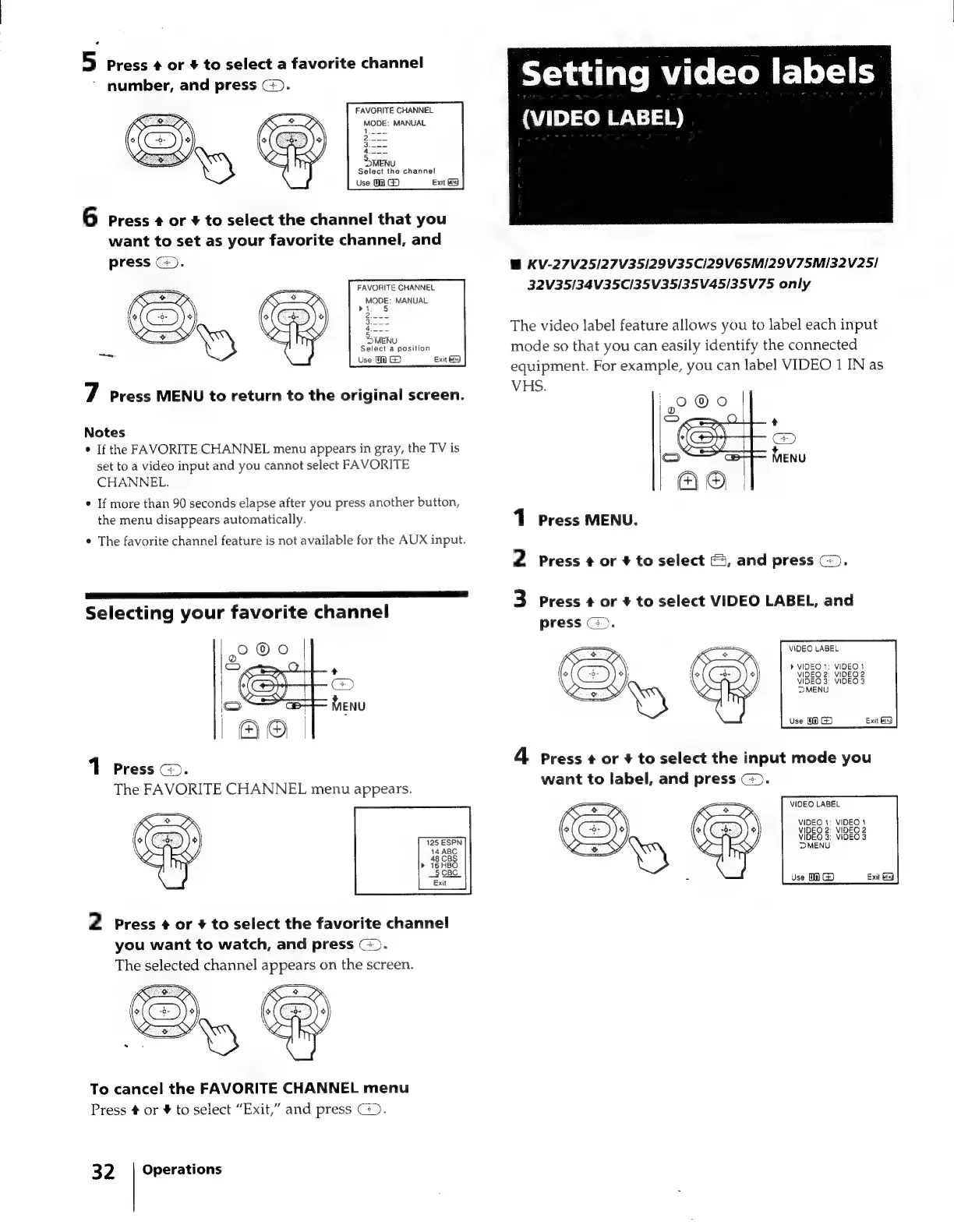
5
Press
¢
or
#
to
select
a
favorite
channel
number,
and
press
G.
FAVORITE
CHANNEL
MODE:
MANUAL
1
MENU
Select
the
channel
Use
0
Exit
GG
6
Press
¢
or
#
to
select
the
channel
that
you
want
to
set
as
your
favorite
channel,
and
press
©).
FAVORITE
CHANNEL
MODE:
MANUAL
ot.
5
MENU
Select
a
position
Use
0
G)
Exit
7
Press
MENU
to
return
to
the
original
screen.
Notes
¢
If
the
FAVORITE
CHANNEL
menu
appears
in
gray,
the
TV
is
set
to
a
video
input
and you
cannot
select
FAVORITE
CHANNEL.
¢
If
more
than
90
seconds
elapse
after
you
press
another
button,
the
menu
disappears
automatically.
¢
The
favorite
channel
feature
is
not
available
for
the
AUX
input.
Selecting
your
favorite
channel
1
Press
@.
The
FAVORITE
CHANNEL
menu
appears.
2
Press
¢
or
+
to
select
the
favorite
channel
you
want
to
watch,
and
press
>.
The
selected
channel
appears
on
the
screen.
To
cancel
the
FAVORITE
CHANNEL
menu
Press
#
or
¥
to
select
“Exit,”
and
press
>.
Operations
32
Setting
video
labels
(VIDEO
LABEL)
@
KV-27V25/27V35/29V35CI29VE5MI2Z9V75MI3Z2V25/
32V35134V35C/35V35/35V45/35V75
only
The
video
label
feature
allows
you
to
label
each
input
mode
so
that
you
can
easily
identify
the
connected
equipment.
For
example,
you
can
label
VIDEO
1
IN
as
VHS.
1
Press
MENU.
2
Press
¢
or
¥#
to
select
&,
and
press
G).
3
Press
¢
or
+
to
select
VIDEO
LABEL,
and
press
©).
VIDEO
LABEL
>
VIDEO
1:
VIDEO
1
VIDEO
2:
VIDEO
2
VIDEO
3:
VIDEO
3
MENU
Use
0
G5)
4
press
¢
or
+
to
select
the
input
mode
you
want
to
label,
and
press
©).
VIDEO
LABEL
VIDEO
1:
VIDEO
1
VIDEQ
2:
VIDEO
2
VIDEO
3:
VIDEO
3
MENU
Use
0
G)

Related product manuals