EasyManua.ls Logo

Sony Trinitron KV-35V35 - Automatic TV Setup (AUTO SET UP)

Sony Trinitron KV-35V35
42 pages
Print Icon
To Next Page IconTo Next Page
To Previous Page IconTo Previous Page
Loading...
Step
4:
Setting
up
the
TV
ieee
(auto:
SET
ve)
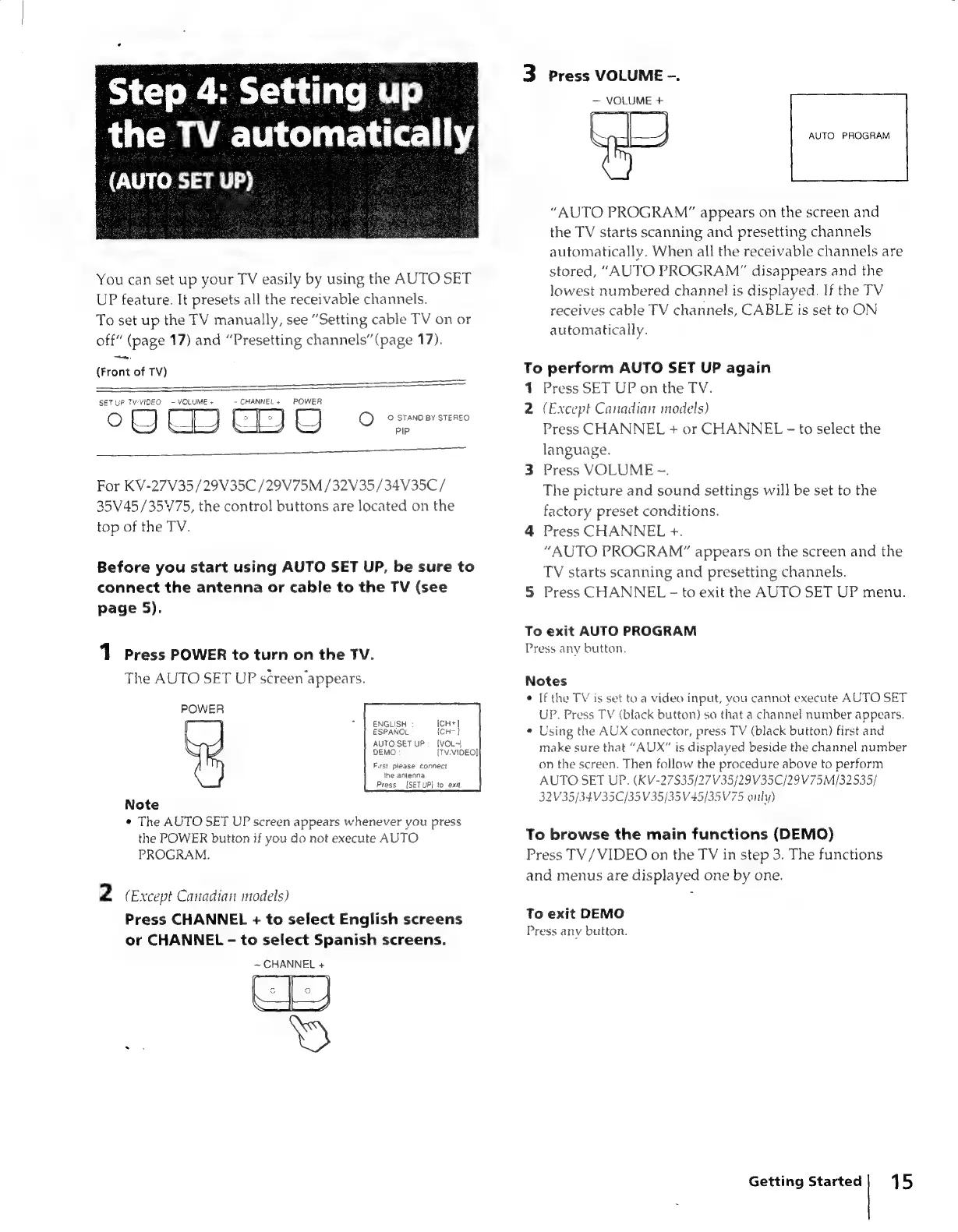
You
can
set
up
your
TV
easily
by
using
the
AUTO
SET
UP
feature.
It
presets
all
the
receivable
channels.
To
set
up
the
TV
manually,
see
“Setting
cable
TV
on
or
off”
(page
17)
and
“Presetting
channels’
(page
17).
—.
(Front
of
TV)
SETUP
TVVIDEO
-
VOLUME
+
-
CHANNEL
+
POWER
Fe
,
¢
©
STAND
BY
STEREO.
PIP
For
KV-27V35/29V35C
/29V75M
/32V35/34V35C/
35V
45/3575,
the
control
buttons
are
located
on
the
top
of
the
TV.
Before
you
start
using
AUTO
SET
UP,
be
sure
to
connect
the
antenna
or
cable
to
the
TV
(see
page
5).
1
Press
POWER
to
turn
on
the
TV.
The
AUTO
SET
UP
screen
appears.
POWER
ENGLISH
ICH+]
ESPANOL
{CH-}
AUTO
SET
UP:
[VOL-}
DEMO
(Tv,VIDEO]
Fst
please
connect
the
antenna
Press
[SET
UP}
to
exit
Note
«
The
AUTO
SET
UP
screen
appears
whenever
you
press
the
POWER
button
if
you
do
not
execute
AUTO
PROGRAM.
2
«
Except
Canadian
models)
Press
CHANNEL
+
to
select
English
screens
or
CHANNEL
-
to
select
Spanish
screens.
=e
HANNEL
+
3
Press
VOLUME
-.
VOLUME
+
AUTO
PROGRAM
“AUTO
PROGRAM”
appears
on
the
screen
and
the
TV
starts
scanning
and
presetting
channels
automatically.
When
all
the
receivable
channels
are
stored,
“AUTO
PROGRAM”
disappears
and
the
lowest
numbered
channel
is
displayed.
If
the
TV
receives
cable
TV
channels,
CABLE
is
set
to
ON
automatically.
To
perform
AUTO
SET
UP
again
1
2
5
Press
SET
UP
on
the
TV.
(Except
Canadian
models)
Press
CHANNEL
+
or
CHANNEL
-
language.
Press
VOLUME
-.
The
picture
and
sound
settings
will
be
set
to
the
factory
preset
conditions.
Press
CHANNEL
+.
“AUTO
PROGRAM”
appears
on
the
screen
and
the
TV
starts
scanning
and
presetting
channels.
Press
CHANNEL
-
to
exit
the
AUTO
SET
UP
menu.
to
select
the
To
exit
AUTO
PROGRAM
Press
any
button.
Notes
If
the
TV
is
set
to
a
video
input,
you
cannot
execute
AUTO
SET
UP.
Press
TV
(black
button)
so
that
a
channel
number
appears,
Using
the
AUX
connector,
press
TV
(black
button)
first
and
make
sure
that
“AUX”
is
displayed
beside
the
channel
number
on
the
screen.
Then
follow
the
procedure
above
to
perform
AUTO
SET
UP.
(KV-27835/27V35/29V35C/29V75M/32535/
32V35/34V35C/35V35/35V45/35V75
only)
To
browse
the
main
functions
(DEMO)
Press
TV/VIDEO
on
the
TV
in
step
3.
The
functions
and
menus
are
displayed
one
by
one.
To
exit
DEMO
Press
anv
button.
Getting
Started|
15