EasyManua.ls Logo

Sony Trinitron KV-35V35 - Page 16

Sony Trinitron KV-35V35
42 pages
Print Icon
To Next Page IconTo Next Page
To Previous Page IconTo Previous Page
Loading...
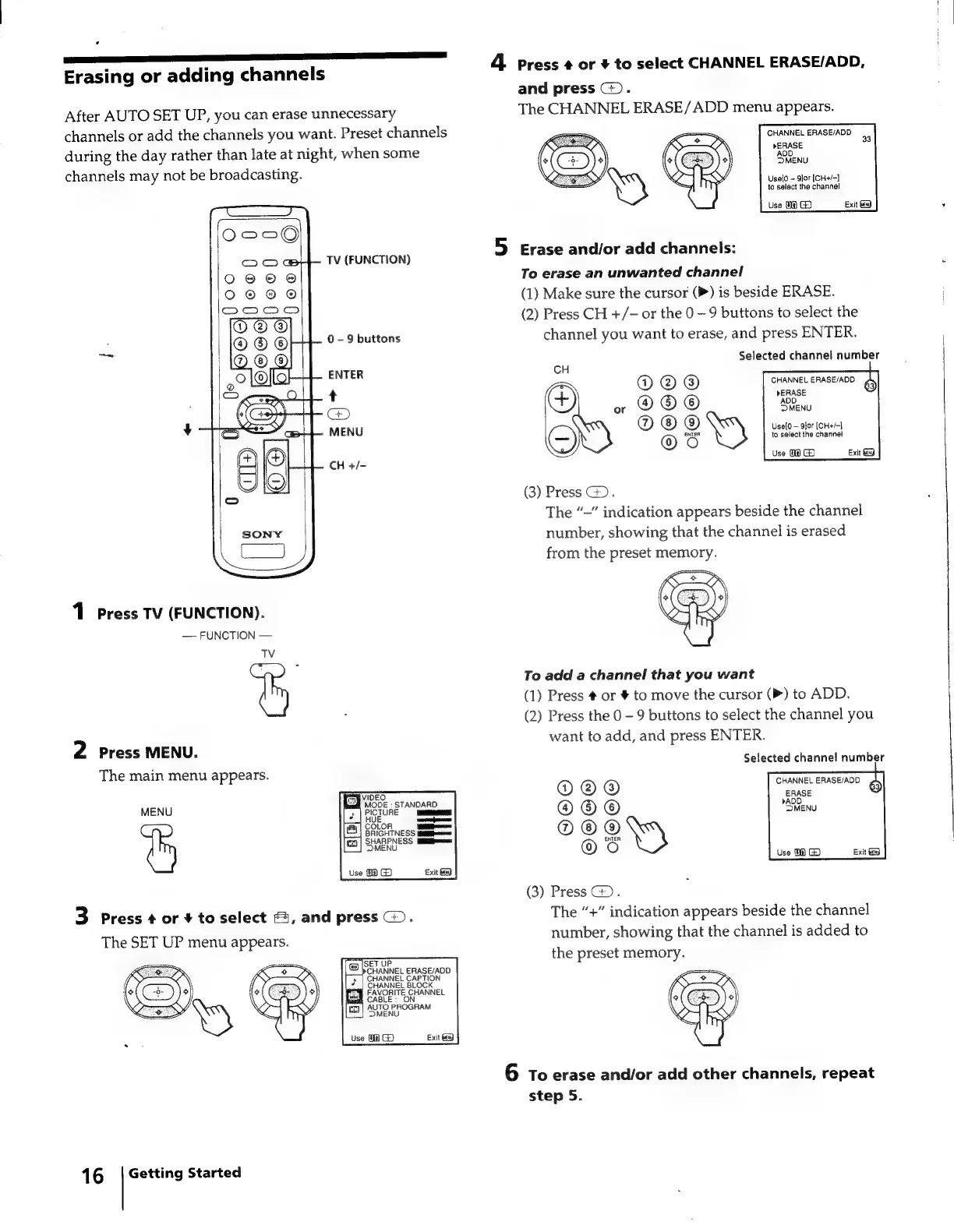
Erasing
or
adding
channels
After
AUTO
SET
UP,
you
can
erase
unnecessary
channels
or
add
the
channels
you
want.
Preset
channels
during
the
day
rather
than
late
at
night,
when
some
channels
may
not
be
broadcasting.
TV
(FUNCTION)
0
-
9
buttons
ENTER
1
Press
TV
(FUNCTION).
FUNCTION
TV
2
Press
MENU.
The
main
menu
appears.
@
VIDEO
MODE
:
STANDARD
|
2
|
PICTURE
fa
COLOR
ieee
BRIGHTNESS
yaiiemaonee
[ca
|
SHARPNESS
Mikimwen
MENU
Use
18
G)
MENU
&
3
Press
¢
or
+
to
select
,
and
press
.
The
SET
UP
menu
appears.
Exit
&d
Getting
Started
16
4
Press
@
or
+
to
select
CHANNEL
ERASE/ADD,
and
press
:
The
CHANNEL
ERASE/ADD
menu
appears.
CHANNEL
ERASE/ADD
bERASE
MENU
33
Uselo
g]or
[(CH+/~]
to
select
the
channel
Use
0@
G3
Exit
eg
5
Erase
and/or
add
channels:
To
erase
an
unwanted
channel
(1)
Make
sure
the
cursor
(P)
is
beside
ERASE.
(2)
Press
CH
+/-
or
the
0
9
buttons
to
select
the
channel
you
want
to
erase,
and
press
ENTER.
Selected
channel
number
CH
®
a
@
8
RRAELERSEARS
;
Gq)
.
OO®
a
CR
°Ss
vat
one
Eien
fo
select
the
channet
©
2
Use
0@
GD
Exit
Gg
(3)
Press
:
The
“—”
indication
appears
beside
the
channel
number,
showing
that
the
channel
is
erased
from
the
preset
memory.
To
add
a
channel
that
you
want
(1)
Press
#
or
#
to
move
the
cursor
(P)
to
ADD.
(2)
Press
the
0
-
9
buttons
to
select
the
channel
you
want
to
add,
and
press
ENTER.
Selected
channe!
number
QOO
©©OO
©©6®
Oo!
(3)
Press
G).
The
“+”
indication
appears
beside
the
channel
number,
showing
that
the
channel
is
added
to
the
preset
memory.
6
To
erase
and/or
add
other
channels,
repeat
step
5.

Related product manuals