EasyManua.ls Logo

Sony Trinitron KV-35V35 - Customizing the Channel Names (CHANNEL. CAPTION)

Sony Trinitron KV-35V35
42 pages
Print Icon
To Next Page IconTo Next Page
To Previous Page IconTo Previous Page
Loading...
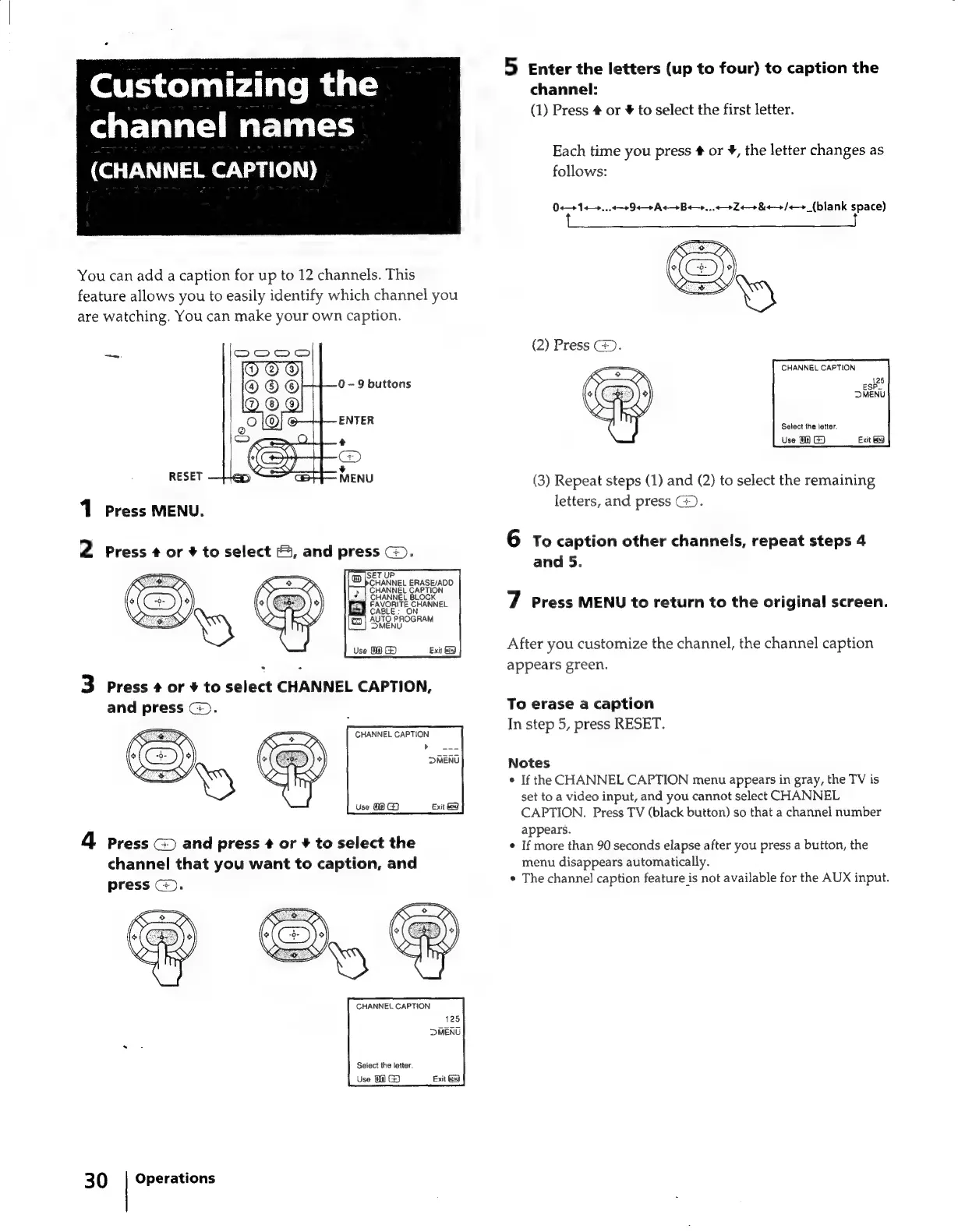
Customizing
the
channel
names
(CHANNEL
CAPTION)
|
You
can
add
a
caption
for
up
to
12
channels.
This
feature
allows
you
to
easily
identify
which
channel
you
are
watching.
You
can
make
your
own
caption.
0
-
9
buttons
ENTER
RESET
1
Press
MENU.
2
Press
¢
or
#
to
select
&,
and
press
G).
TU
ERASE/ADD
CAPTION
HANNEL
BLOCK
ct
FAVORITE
CHANNEL
CA
:
ON
(a)
AUTO
PROGRAM
MENU
Use
08
G)
.
3
Press
#
or
¥
to
select
CHANNEL
CAPTION,
and
press
G).
CHANNEL
CAPTION
»
DMENU
4
Press
and
press
¢
or
+
to
select
the
channel
that
you
want
to
caption,
and
press
©).
CHANNEL
CAPTION
125
DMENU
Select
the
letter.
Use
08
G@
30
|
Operations
5
Enter
the
letters
(up
to
four)
to
caption
the
channel:
(1)
Press
#
or
¥
to
select
the
first
letter.
Each
time
you
press
#
or
¥,
the
letter
changes
as
follows:
0+
1+...
3
94
9
At
Be...
924
&
9
/+-+_(blank
space)
(2)
Press
G).
CHANNEL
CAPTION
126
Po
MENU
Select
the
jeter.
Use
G3
(3)
Repeat
steps
(1)
and
(2)
to
select
the
remaining
letters,
and
press
G.
6
To
caption
other
channels,
repeat
steps
4
and
5.
7
Press
MENU
to
return
to
the
original
screen.
After
you
customize
the
channel,
the
channel
caption
appears
green.
To
erase
a
caption
In
step
5,
press
RESET.
Notes
*
If
the
CHANNEL
CAPTION
menu
appears
in
gray,
the
TV
is
set
to
a
video
input,
and
you
cannot
select
CHANNEL
CAPTION.
Press
TV
(black
button)
so
that
a
channel
number
appears.
¢
If
more
than
90
seconds
elapse
after
you
press
a
button,
the
menu
disappears
automatically.
*
The
channel
caption
feature
is
not
available
for
the
AUX
input.

Related product manuals