EasyManua.ls Logo

Sony Trinitron KV-35V35 - Page 29

Sony Trinitron KV-35V35
42 pages
Print Icon
To Next Page IconTo Next Page
To Previous Page IconTo Previous Page
Loading...
Setting
the
timer
to
turn
the
TV
on
and
|
Off
(ON/OFF
TIMER)
M
KV-27V25/27V35/29V35CI29VESMI2Z9V75MI32V25/
32V35/34V35C/35V35/35V45/35V75
only
You
can
set
the
TV
to
turn
on
and
off
at
the
times
you
specify:
Make
sure
the
clock
is
set
correctly.
If
it
is
not,
set
the
clock
first
(page
28).
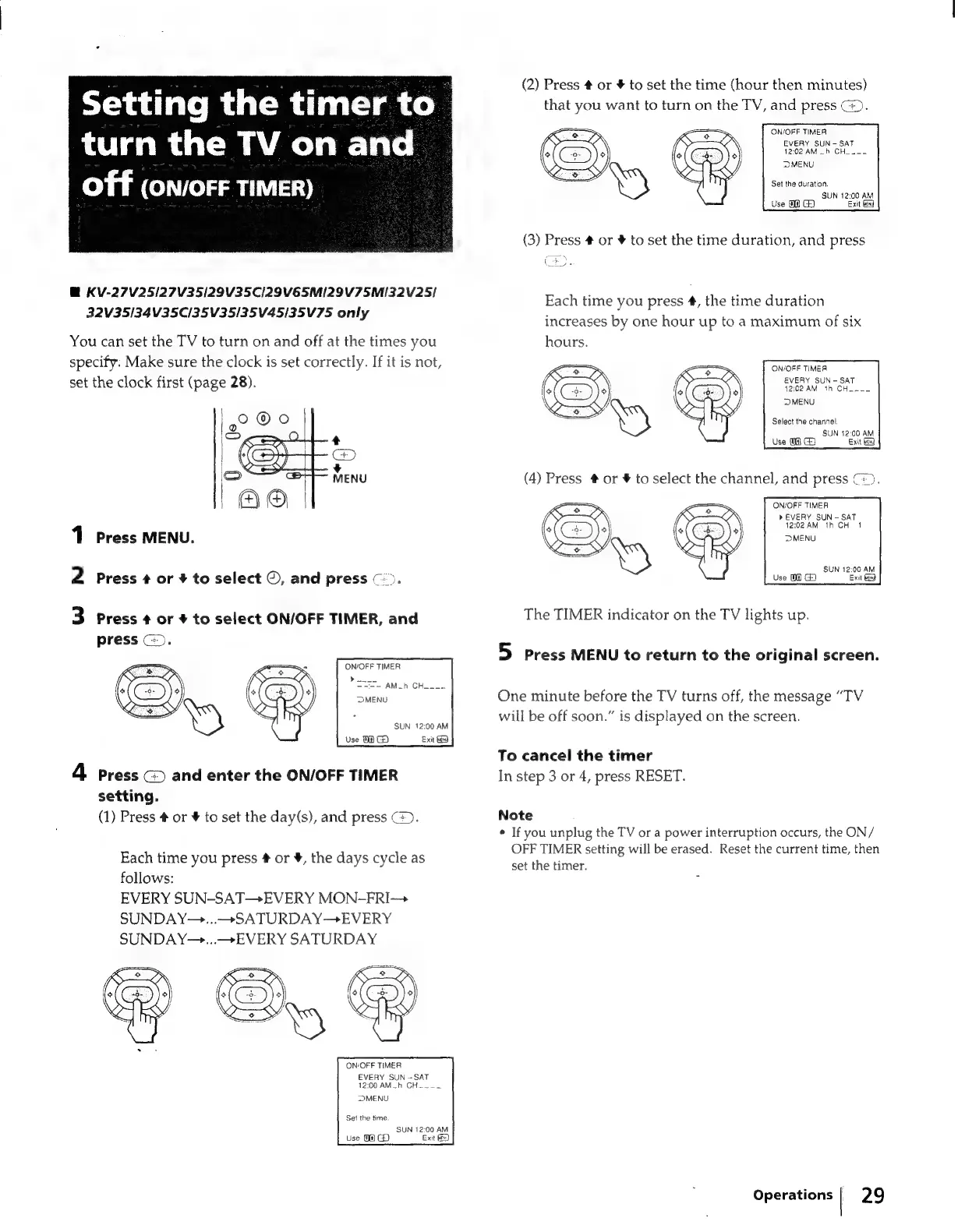
2
Press
+
or
#
to
select
©,
and
press
©).
Press
MENU.
3
Press
¢
or
+
to
select
ON/OFF
TIMER,
and
press
©).
ON/OFF
TIMER
»
===
-
AM_h
CH___~
SUN
12:00
AM
Use
TH
G)
Exit
tg
4
press
(>
and
enter
the
ON/OFF
TIMER
setting.
(1)
Press
#
or
#
to
set
the
day(s),
and
press
(>).
Each
time
you
press
#
or
¥,
the
days
cycle
as
follows:
EVERY
SUN-SAT—+EVERY
MON-FRI
SUNDAY~—...—SATURDAY—
EVERY
SUNDAY—...—>
EVERY
SATURDAY
ON/OFF
TIMER
EVERY
SUN
=
SAT
12:00
AM_h
CH
___
DMENU
Set
the
time
SUN
12:00
AM
Use
Of)
G
Exit
€)
(2)
Press
#
or
#
to
set
the
time
(hour
then
minutes)
that
you
want
to
turn
on
the
TV,
and
press
@).
ON/OFF
TIMER
EVERY
SUN
-
SAT
12:02
AM
—~h
CH___~
MENU
Set
the
duration.
SUN
12:00
AM
Use
M@ CA
Exit
bed
(3)
Press
#
or
4
to
set
the
time
duration,
and
press
Each
time
you
press
#,
the
time
duration
increases
by
one
hour
up
to
a
maximum
of
six
hours.
ON/OFF
TIMER
EVERY
SUN
-
SAT
12:02AM
th
CH.W~_-
DMENU
Select
the
channel
SUN
12:00
AM
Exit
ON/OFF
TIMER
»EVERY
SUN
-
SAT
12:02AM
th
CH
1
SUN
12:00
AM
Exit
3
Use
00
GH)
The
TIMER
indicator
on
the
TV
lights
up.
5
press
MENU
to
return
to
the
original
screen.
One
minute
before
the
TV
turns
off,
the
message
“TV
will
be
off
soon.”
is
displayed
on
the
screen.
To
cancel
the
timer
In
step
3
or
4,
press
RESET.
Note
°
If
you
unplug
the
TV
or
a
power
interruption
occurs,
the
ON/
OFF
TIMER
setting
will
be
erased.
Reset
the
current
time,
then
set
the
timer.
Operations
|
29