EasyManua.ls Logo

Sony Trinitron KV-35V35 - Audio Settings and Effects

Sony Trinitron KV-35V35
42 pages
Print Icon
To Next Page IconTo Next Page
To Previous Page IconTo Previous Page
Loading...
Adjusting
picture
brightness
automatically
(LIGHTSENSOR)
B
KV-27V25/27V35/29V35C/i29VESMI29V75M/32V25/
32V35/34V35C/35V35/35V45/35V75
only
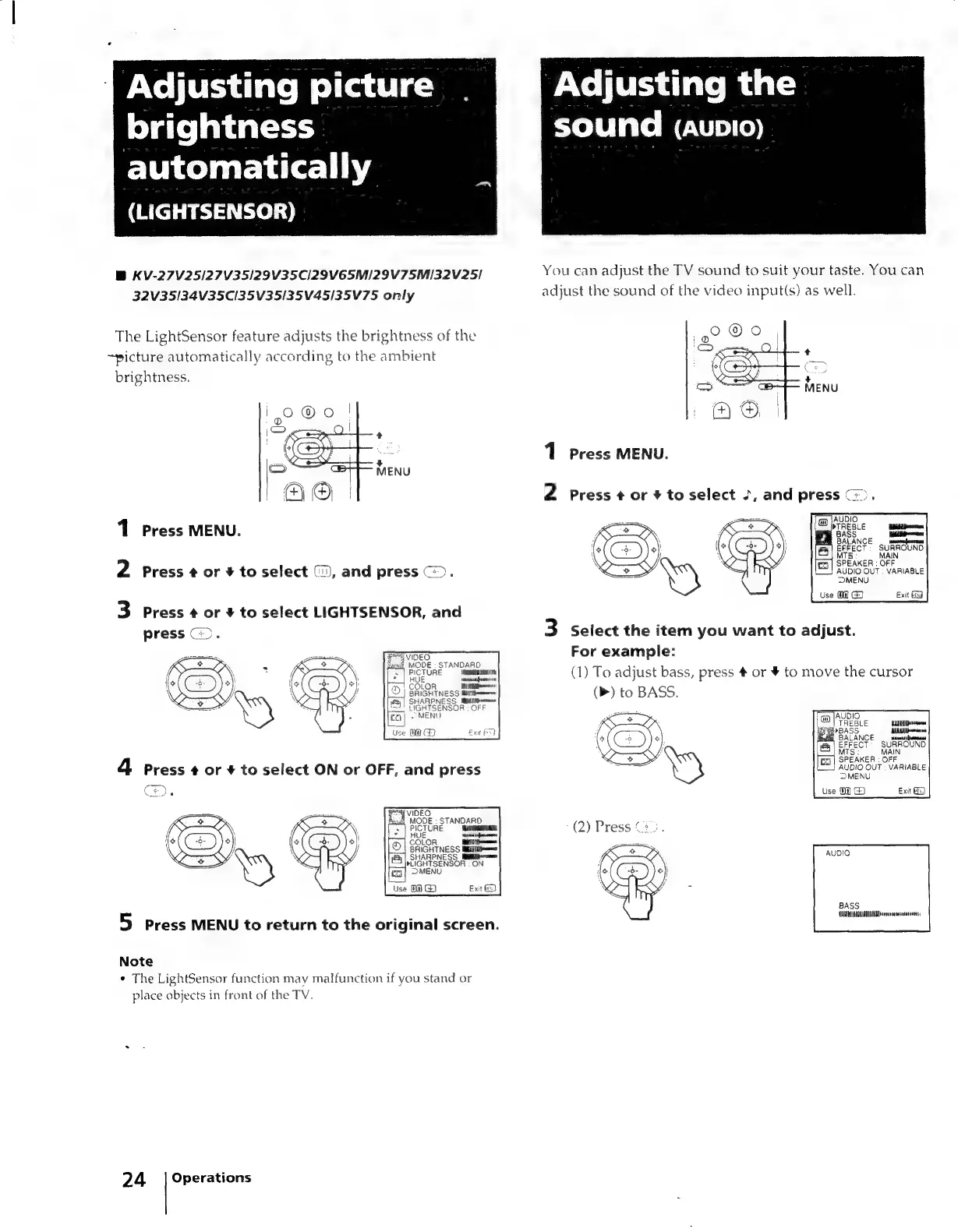
The
LightSensor
feature
adjusts
the
brightness
of
the
~picture
automatically
according
to
the
ambient
brightness.
1
Press
MENU.
2
Press
¢
or
+
to
select
(,
and
press
©).
3
Press
¢
or
¥
to
select
LIGHTSENSOR,
and
press
>.
Fravioeo
gece,
MODE
-
STANDARD
s
|
PICTURE
‘abana
ch
SHARPNESS
Militias
LIGHTSENSOR
:
OFF
MENU
Use
WO
G2
Ext
OD
VIDEO
DE
x
MODE
:
STANDARD
PICTURE
COLOR
eC
sec
BRIGHTNESS
Biiiiittesas
SHARPNESS
Westman
»LIGHTSENSOR
:
ON
MENU
Use
00
G)
Exit
@)
5
Press
MENU
to
return
to
the
original
screen.
Note
¢
The
LightSensor
function
may
malfunction
if
you
stand
or
place
objects
in
front
of
the
TV.
24
=
|
Operations
Adjusting
the
Yolblate
Me»)
(0)
You
can
adjust
the
TV
sound
to
suit
your
taste.
You
can
adjust
the
sound
of
the
video
input(s)
as
well.
1
Press
MENU.
2
Press
¢
or
#
to
select
J,
and
press
©).
&
AUDIO
Peete
erent
Y
BASS
Be
BALANCE
P
emevarerl
|
EFFECT
SURROUND
MT!
MAIN
S
lea]
SPEAKER
:
OFF
AUDIO
OUT
|
VARIABLE
DMENU
Use
O@
GD
Exit
3
Select
the
item
you
want
to
adjust.
For
example:
(1)
To
adjust
bass,
press
#
or
¥
to
move
the
cursor
(m)
to
BASS.
Cee
eatin
mH
ER
:
OFF
AUDIO
OUT
|
VARIABLE
MENU
Use
0)
G)
Exit
Gi
BASS
AIHA
arr

Related product manuals