EasyManua.ls Logo

Sony Trinitron KV-35V35 - Setting the Clock (CURRENT TIME SET); Timer

Sony Trinitron KV-35V35
42 pages
Print Icon
To Next Page IconTo Next Page
To Previous Page IconTo Previous Page
Loading...
eTotadiatemetch
alle
labs
|
saving
time
(DAYLIGHT
SAVING)
WB
KV-27V25/27V35/29V35C/29V6E5MI29V75M/32V25/
32V35/34V35C/35V35/35V45/35V75
only
1
Press
MENU.
2
Press
¢
or
¥
to
select
©,
and
press
©.
3
press
¢
or
¥
to
select
DAYLIGHT
SAVING,
and
press
©).
f
aay
|
TIMER
CURRENT
TIME
SET
.
------AM
Exit
@Q
Use
0
&
TIMER
CURRENT
TIME
SET
»
|
ON/OFE
TIME
R
|
¢
|~OAYLIGHT
SAVING:NO
$i¢¢
OMENU
Choose
To
YES
Set
for
daylight
saving
start.
The
current
time
automatically
moves
one
hour
ahead.
NO
Set
for
daylight
saving
end.
5
press
MENU
to
return
to
the
original
screen.
28
Operations
Setting
the
clock
(CURRENT
TIME
SET)
@
KV-27V25/27V35/29V35C/I29V65MI29V75M/32V25/
32V35/34V35C/35V35/(35V45/35V75
only
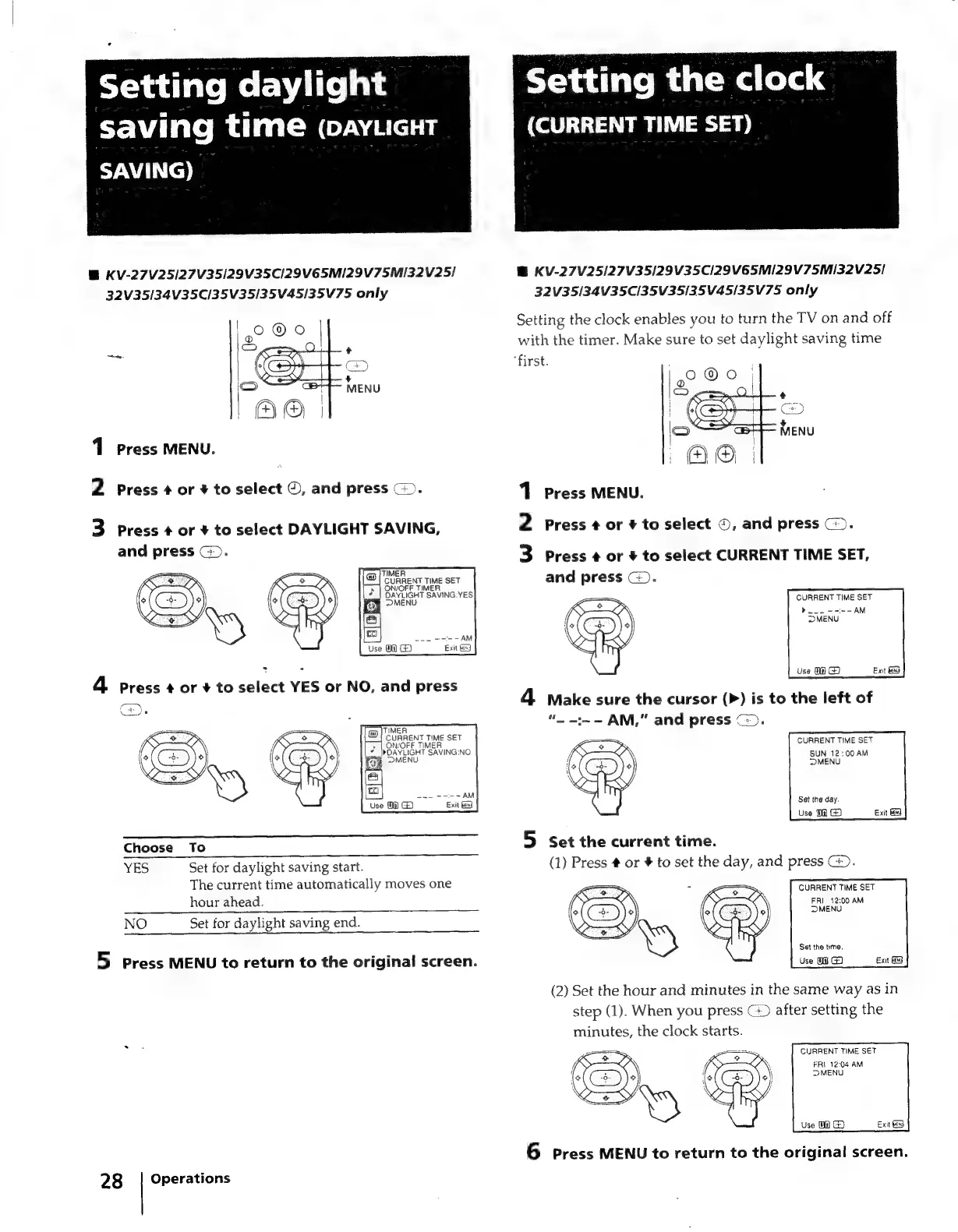
Setting
the
clock
enables
you
to
turn
the
TV
on
and
off
with
the
timer.
Make
sure
to
set
daylight
saving
time
‘first.
oa
Press
MENU.
N
Press
¢
or
¥
to
select
©,
and
press
(©).
ad
Press
¢
or
4
to
select
CURRENT
TIME
SET,
and
press
©).
=
CURRENT
TIME
SET
yl.
----
AM
MENU
4
Make
sure
the
cursor
(>)
is
to
the
left
of
“.
-:~-
AM,”
and
press
©).
CURRENT
TIME
SET
SUN
12:00
AM
MENU
Sat
the
day.
Use
0@
G)
5
Set
the
current
time.
(1)
Press
#
or
#
to
set
the
day,
and
press
@).
CURRENT
TIME
SET
FRI
_
12:00
AM
MENU
Set
the
time.
Use
O@
G3
(2)
Set
the
hour
and
minutes
in
the
same
way
as
in
step
(1).
When
you
press
(>
after
setting
the
minutes,
the
clock
starts.
CURRENT
TIME
SET
FRI
12:04
AM
6
Press
MENU
to
return
to
the
original
screen.

Related product manuals