EasyManua.ls Logo

Sony Trinitron KV-35V35 - Watching the TV

Sony Trinitron KV-35V35
42 pages
Print Icon
To Next Page IconTo Next Page
To Previous Page IconTo Previous Page
Loading...
Operations
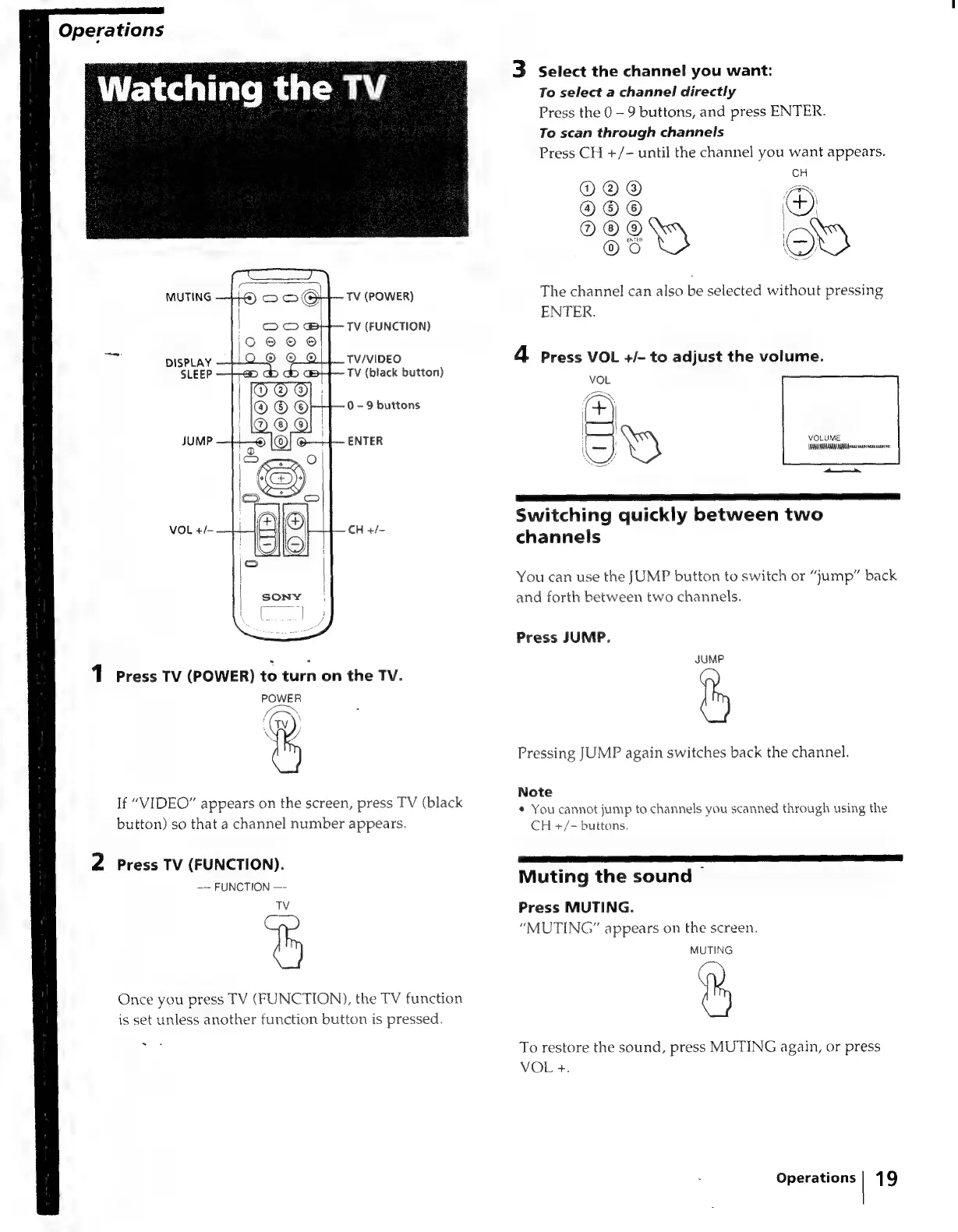
Watching
the
TV
_
3
Select
the
channel
you
want:
To
select
a
channel
directly
Press
the
0
-
9
buttons,
and
press
ENTER.
To
scan
through
channels
Press
CH
+/-
until
the
channel
you
want
appears.
CH
O©@®
AX
®®®
)
OO®
|
)
OS
o)
MUTING
TV
(POWER)
The
channel
can
also
be
selected
without
pressing
ENTER.
TV
(FUNCTION)
DISPLAY
TV/VIDEO
4
press
VOL
+/-
to
adjust
the
volume.
SLEEP
TV
(black
button)
0
-
9
buttons
JUMP
ENTER
VOL
+/-
|
CH
+/-
1
Press
TV
(POWER)
to
turn
on the
TV.
POWER
\
button)
so
that
a
channel
number
appears.
2
Press
TV
(FUNCTION).
—-
FUNCTION
TV
&
~
If
“VIDEO”
appears
on
the
screen,
press
TV
(black
Once
you
press
TV
(FUNCTION),
the
TV
function
is
set
unless
another
function
button
is
pressed.
VOLUME
AMAIA
AA
poesia
Switching
quickly
between
two
channels
You
can
use
the
JUMP
button
to
switch
or
“jump”
back
and
forth
between
two
channels.
Press
JUMP.
JUMP
Pressing
JUMP
again
switches
back
the
channel.
Note
¢
You
cannot
jump
to
channels
you
scanned
through
using
the
CH
+/-
buttons.
Muting
the
sound
Press
MUTING.
“MUTING”
appears
on
the
screen.
MUTING
To
restore
the
sound,
press
MUTING
again,
or
press
VOL
+.
Operations
|
19

Related product manuals