EasyManua.ls Logo

Sony Trinitron KV-35V35 - Page 18

Sony Trinitron KV-35V35
42 pages
Print Icon
To Next Page IconTo Next Page
To Previous Page IconTo Previous Page
Loading...
‘menu
language
©
@
Except
Canadian
models
If
you
prefer
Spanish
to
English,
you
can
change
the
menu
language.
You
do
not
have
to
do
this
procedure
if
you
select
the
language
during
AUTO
SET
UP
(page
15).
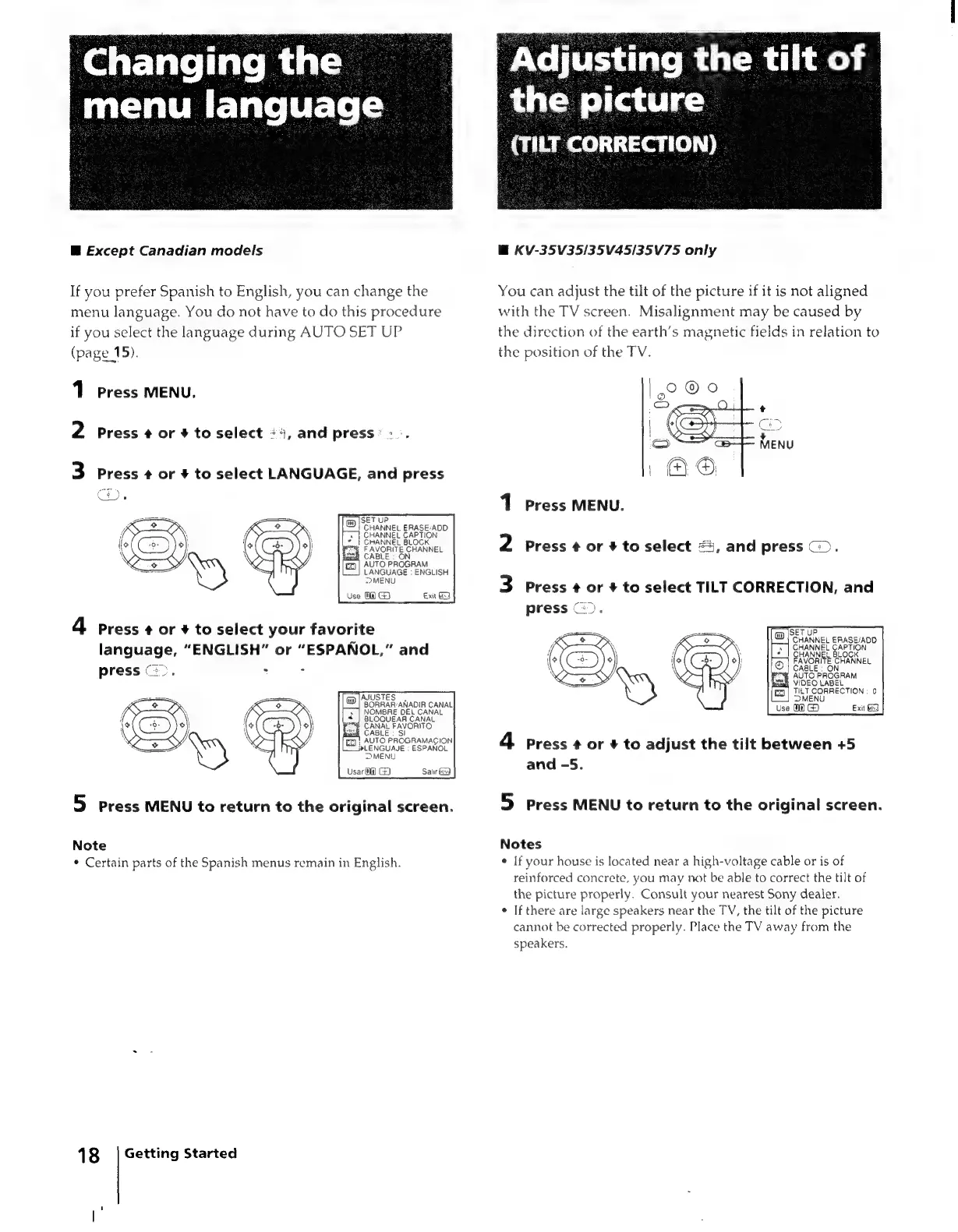
1
Press
MENU,
2
Press
¢
or
+
to
select
«
4,
and
press
|
3
Press
¢
or
#
to
select
LANGUAGE,
and
press
SET
UP
CHANNEL
ERASE/ADD
»
|
CHANNEL
CAPTION
«
|
CHANNEL
BLOCK
=
FAVORITE
CHANNEL
CABLE
;
ON
AUTO
PROGRAM
LANGUAGE
:
ENGLISH
MENU
Use
@@
GS
Exit
4
Press
¢
or
+
to
select
your
favorite
language,
“ENGLISH”
or
“ESPANOL,”
and
press
>.
7
:
5
press
MENU
to
return
to
the
original
screen.
Note
*
Certain
parts
of
the
Spanish
menus
remain
in
English.
18
‘|
Getting
Started
‘Adjusting
the
tilt
of
the
picture
(TILT
CORRECTION)
@
KV-35V35/35V45/35V75
only
You
can
adjust
the
tilt
of
the
picture
if
it
is
not
aligned
with
the
TV
screen.
Misalignment
may
be
caused
by
the
direction
of
the
earth’s
magnetic
fields
in
relation
to
the
position
of
the
TV.
1
Press
MENU.
2
Press
4
or
#
to
select
#4,
and
press
©).
3
Press
¢
or
+
to
select
TILT
CORRECTION,
and
press
©).
tm
[SET
UP
CHANNEL
ERASE/ADD
NEL
BLOCK
FAVORITE
CHANNEL
CABLE:
ON
ey
AUTO
PROGRAM
ea
VIDEO
LABEL
[eo]
TILT
CORRECTION
:
0
DMENU
Use
1)
Exit
4
press
¢
or
+
to
adjust
the
tilt
between
+5
and
-5.
5
press
MENU
to
return
to
the
original
screen.
Notes
¢
If
your
house
is
located
near
a
high-voltage
cable
or
is
of
reinforced
concrete,
you
may
not
be
able
to
correct
the
tilt
of
the
picture
properly.
Consult
your
nearest
Sony
dealer.
If
there
are
large
speakers
near
the
TV,
the
tilt
of
the
picture
cannot
be
corrected
properly.
Place
the
TV
away
from
the
speakers.

Related product manuals