EasyManua.ls Logo

Sony Trinitron KV-35V35 - Setting Caption Vision (CAPTION VISION)

Sony Trinitron KV-35V35
42 pages
Print Icon
To Next Page IconTo Next Page
To Previous Page IconTo Previous Page
Loading...
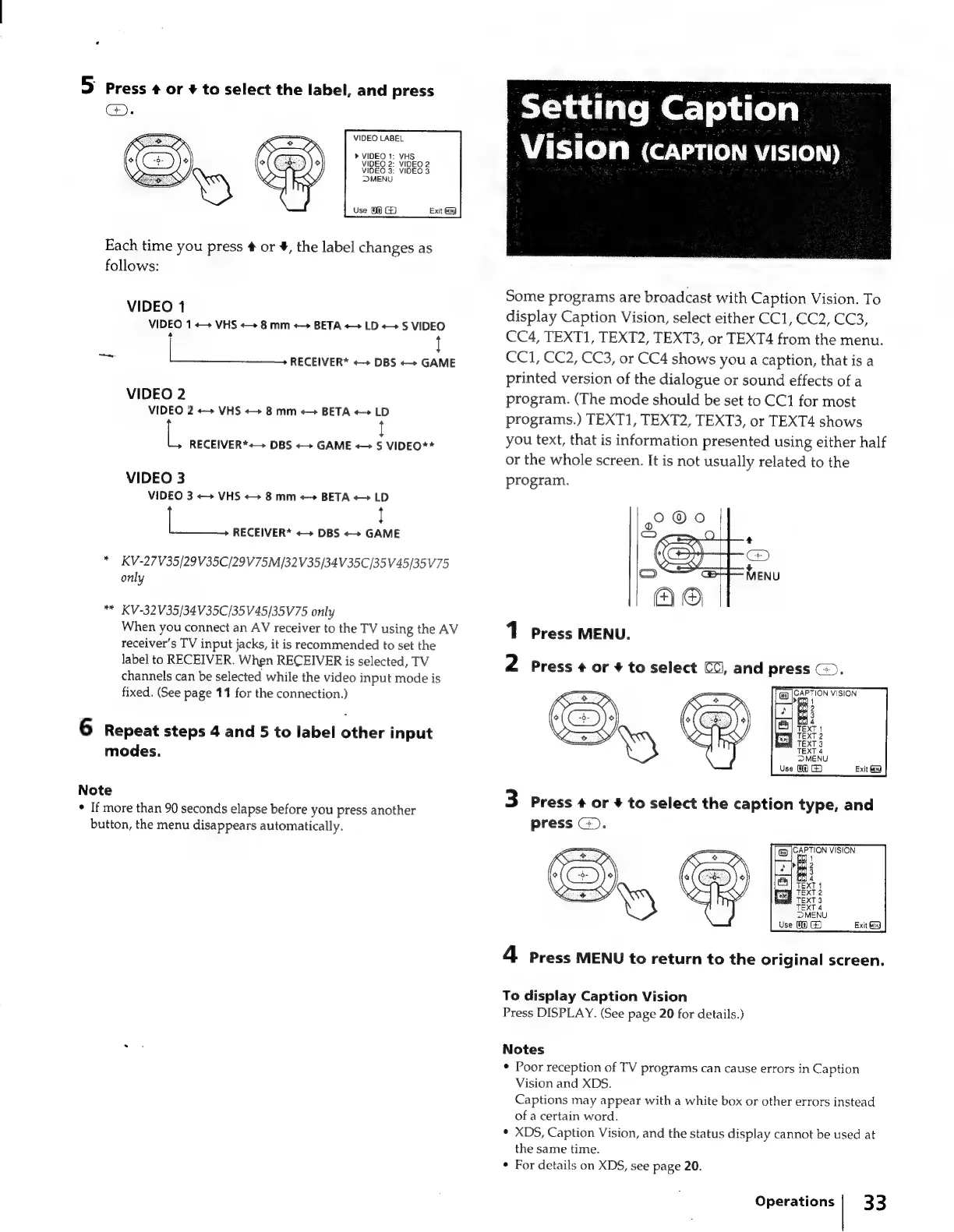
5
press
¢
or
+
to
select
the
label,
and
press
VIDEO
LABEL
»
VIDEO
1:
VHS
VIDEO
2:
VIDEO
2
VIDEO
3:
VIDEO
3
MENU
Use
09
Each
time
you
press
¢
or
#,
the
label
changes
as
follows:
VIDEO
1
VIDEO
1
++
VHS
«+
8
mm
«>
BETA
++
LD
«+
S
VIDEO
ae
=a
RECEIVER*
DBS
«+
GAME
VIDEO
2
VIDEO
2
«+
VHS
«+
8
mm
+>
BETA
++
LD
L,
RECEIVER*+—
DBS
++
GAME
«>
S
VIDEO**
VIDEO
3
VIDEO
3
++
VHS
«++
8
mm
«+
BETA
«+
LD
RECEIVER*
«+
DBS
++
GAME
*
KV-27V35/29V35C/29V75M/32V35/34V35C/35V45/35V75
only
KV-32V35/34V35C/35V45/35V75
only
When
you
connect
an
AV
receiver
to
the
TV
using
the
AV
receiver's
TV
input
jacks,
it
is
recommended
to
set
the
label
to
RECEIVER.
When
RECEIVER
is
selected,
TV
channels
can
be
selected
while
the
video
input
mode
is
fixed.
(See
page
11
for
the
connection.)
6
Repeat
steps
4
and
5
to
label
other
input
modes.
Note
*
If
more
than
90
seconds
elapse
before
you
press
another
button,
the
menu
disappears
automatically.
Setting
Caption
_
Vision
(CAPTION
VISION)
Some
programs
are
broadcast
with
Caption
Vision.
To
display
Caption
Vision,
select
either
CC1,
CC2,
CC3,
CC4,
TEXT1,
TEXT2,
TEXT3,
or
TEXT4
from
the
menu.
CC1,
CC2,
CC3,
or
CC4
shows
you
a
caption,
that
is
a
printed
version
of
the
dialogue
or
sound
effects
of
a
program.
(The
mode
should
be
set
to
CC1
for
most
programs.)
TEXT1,
TEXT2,
TEXT3,
or
TEXT4
shows
you
text,
that
is
information
presented
using
either
half
or
the
whole
screen.
It
is
not
usually
related
to
the
program.
1
Press
MENU.
2
Press
+
or
+
to
select
CCl,
and
press
G).
CAPTION
VISION
@
hen
1
3
Press
+
or
+
to
select
the
caption
type,
and
press
G).
4
Press
MENU
to
return
to
the
original
screen.
To
display
Caption
Vision
Press
DISPLAY.
(See
page
20
for
details.)
Notes
*
Poor
reception
of
TV
programs
can
cause
errors
in
Caption
Vision
and
XDS.
Captions
may
appear
with
a
white
box
or
other
errors
instead
of
a
certain
word.
*
XDS,
Caption
Vision,
and
the
status
display
cannot
be
used
at
the
same
time.
¢
For
details
on
XDS,
see
page
20.
Operations
|
33

Related product manuals