EasyManua.ls Logo

Sony Trinitron KV-35V35 - Blocking out a Channel (CHANNEL BLOCK); Setting Your Favorite Channels (FAVORITE CHANNEL)

Sony Trinitron KV-35V35
42 pages
Print Icon
To Next Page IconTo Next Page
To Previous Page IconTo Previous Page
Loading...
Blocking
out
a
channel
(cHannet
BLOCK)
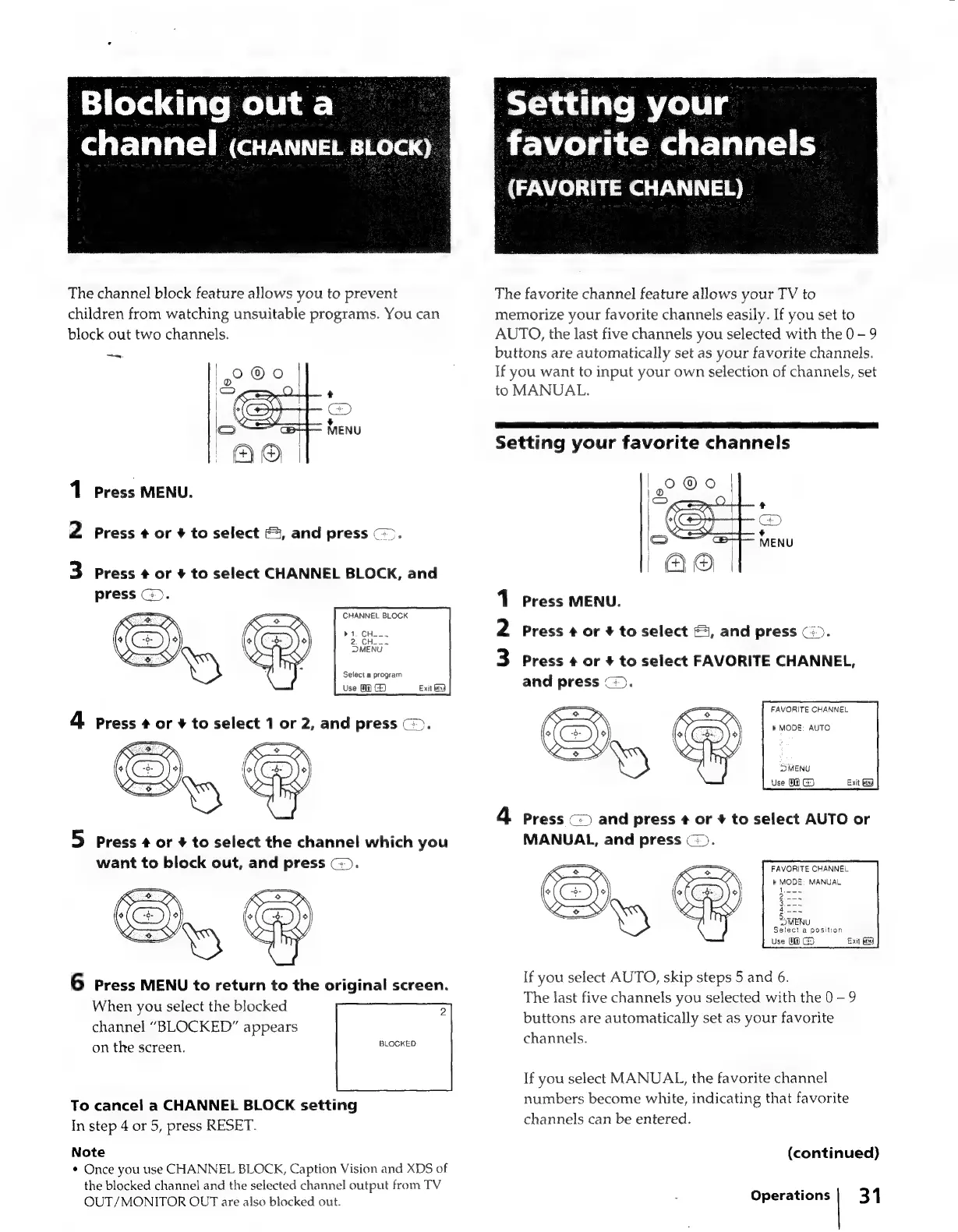
The
channel
block
feature
allows
you
to
prevent
children
from
watching
unsuitable
programs.
You
can
block
out
two
channels.
1
Press
MENU.
2
Press
¢
or
+
to
select
4,
and
press
©).
3
Press
¢
or
+
to
select
CHANNEL
BLOCK,
and
press
©).
CHANNEL
BLOCK
Select
a
program
Use
08
G)
Exit
Gd
5
Press
¢
or
+
to
select
the
channel
which
you
want
to
block
out,
and
press
C:).
2
O
Ky)
CED
SS
6
press
MENU
to
return
to
the
original
screen.
When
you
select
the
blocked
5
channel
“BLOCKED”
appears
on
the
screen.
BLOCKED
To
cancel
a
CHANNEL
BLOCK
setting
In
step
4
or
5,
press
RESET.
Note
¢
Once
you
use
CHANNEL
BLOCK,
Caption
Vision
and
XDS
of
the
blocked
channel
and
the
selected
channel
output
from
TV
OUT/MONITOR
OUT
are
also
blocked
out.
Setting
your
|
favorite
channels
(FAVORITE
CHANNEL)
The
favorite
channel
feature
allows
your
TV
to
memorize
your
favorite
channels
easily.
If
you
set
to
AUTO,
the
last
five
channels
you
selected
with
the
0-9
buttons
are
automatically
set
as
your
favorite
channels.
If
you
want
to
input
your
own
selection
of
channels,
set
to
MANUAL.
Setting
your
favorite
channels
1
Press
MENU.
2
Press
¢
or
#
to
select
&i,
and
press
(i).
3
Press
+
or
+
to
select
FAVORITE
CHANNEL,
and
press
©).
FAVORITE
CHANNEL
»
MODE:
AUTO
4
Press
c=)
and
press
¢
or
4
to
select
AUTO
or
MANUAL,
and
press
(=).
FAVORITE
CHANNEL
MODE:
MANUAL
errs
U
Select
a
position
Use
0
G5
Exit
(3
If
you
select
AUTO,
skip
steps
5
and
6.
The
last
five
channels
you
selected
with
the
0-9
buttons
are
automatically
set
as
your
favorite
channels.
If
you
select
MANUAL,
the
favorite
channel
numbers
become
white,
indicating
that
favorite
channels
can
be
entered.
(continued)
Operations
|
31

Related product manuals