EasyManua.ls Logo

Sony Trinitron KV-35V35 - Remote Commander Setup

Sony Trinitron KV-35V35
42 pages
Print Icon
To Next Page IconTo Next Page
To Previous Page IconTo Previous Page
Loading...
‘Step
3:
Setting
up
the
remote
commander
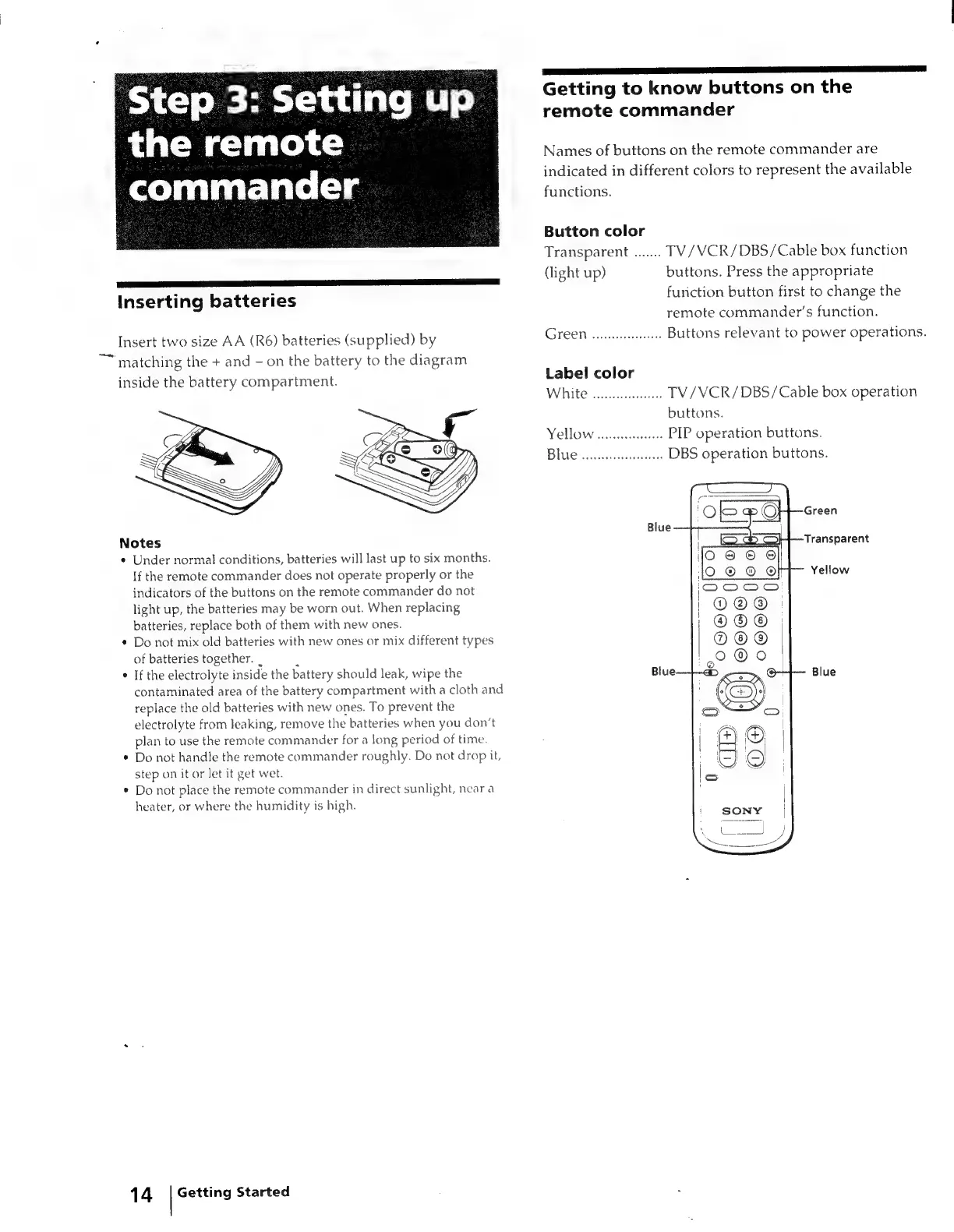
Inserting
batteries
Insert
two
size
AA
(R6)
batteries
(supplied)
by
~~
matching
the
+
and
-
on
the
battery
to
the
diagram
inside
the
battery
compartment.
Notes
*
Under
normal
conditions,
batteries
will
last
up
to
six
months.
If
the
remote
commander
does
not
operate
properly
or
the
indicators
of
the
buttons
on
the
remote
commander
do
not
light
up,
the
batteries
may
be
worn
out.
When
replacing
batteries,
replace
both
of
them
with
new
ones.
*
Do
not
mix
old
batteries
with
new
ones
or
mix
different
types
of
batteries
together.
|
;
If
the
electrolyte
inside
the
battery
should
leak,
wipe
the
contaminated
area
of
the
battery
compartment
with
a
cloth
and
replace
the
old
batteries
with
new
ones.
To
prevent
the
electrolyte
from
leaking,
remove
the
batteries
when
you
don’t
plan
to
use
the
remote
commander
for
a
long
period
of
time.
Do
not
handle
the
remote
commander
roughly.
Do
not
drop
it,
step
on
it
or
let
it
get
wet.
Do
not
place
the
remote
commander
in
direct
sunlight,
near
a
heater,
or
where
the
humidity
is
high.
14
|
Getting
Started
Se
I
Getting
to
know
buttons
on
the
remote
commander
Names
of
buttons
on
the
remote
commander
are
indicated
in
different
colors
to
represent
the
available
functions.
Button
color
Transparent
.......
TV/VCR/DBS/Cable
box
function
(light
up)
buttons.
Press
the
appropriate
function
button
first
to
change
the
remote
commander's
function.
CSTEOT
ctitiaecoegriles
Buttons
relevant
to
power
operations.
Label
color
White
oe
TV/VCR/DBS/Cable
box
operation
buttons.
Yellow
wcrc
PIP
operation
buttons.
Blue
ween
DBS
operation
buttons.