Operations
20
-EN
Viewing Teletext
Checking the contents of a Teletext
service (INDEX)
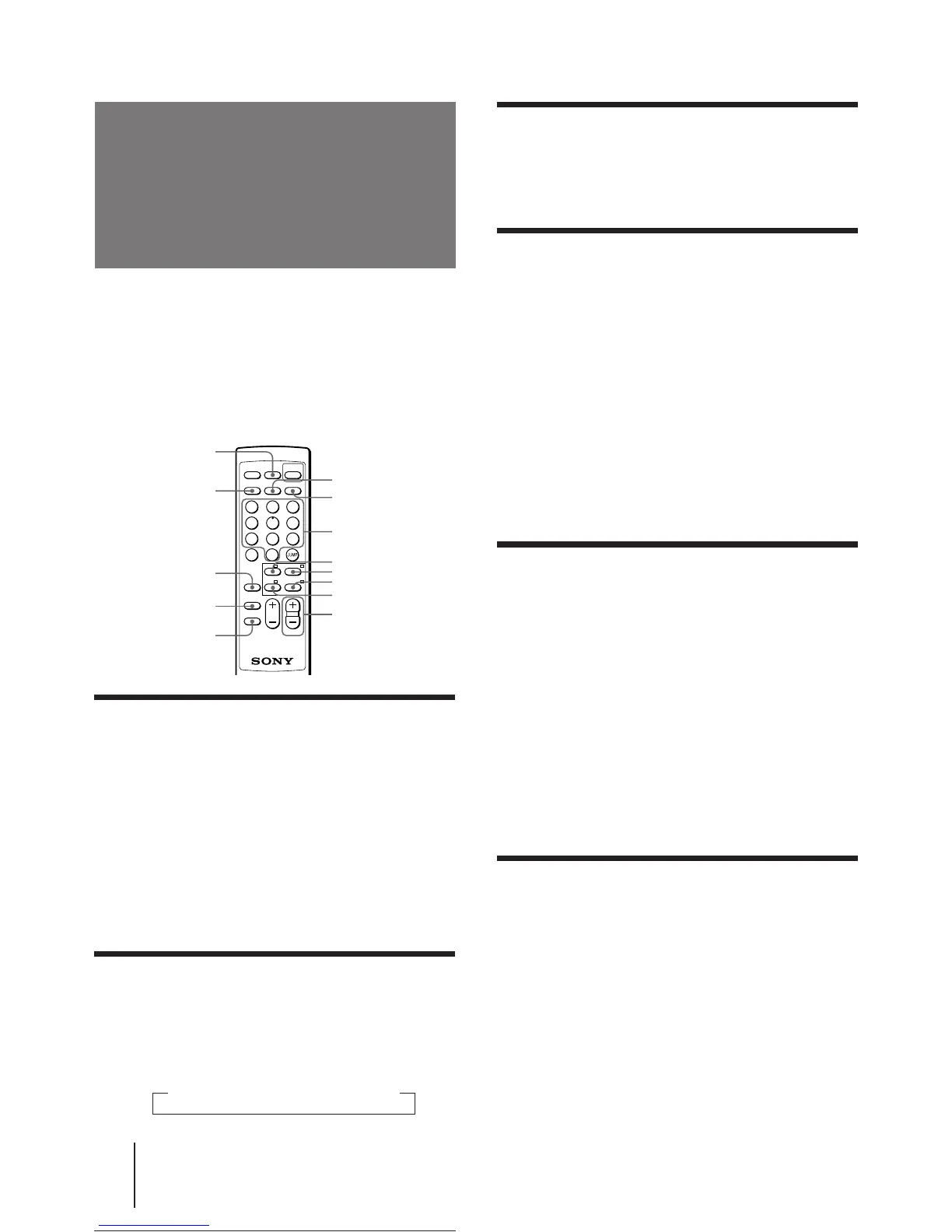
Press WAKE UP/INDEX to display an overview
of the Teletext contents and page numbers.
Using FASTEXT
This feature allows you to quickly access a Teletext
page that uses FASTEXT. When a FASTEXT program is
broadcasted, the colored menus appear at the bottom of
the screen. The colors of the menus correspond to the
red (+), green (MENU), yellow (–), and blue (ENTER)
color-coded buttons on the remote commander.
To access a FASTEXT menu
Press the color-coded button on the remote commander
that corresponds to the colored menu which appears at
the bottom of the screen.
The menu page appears on the screen after several
seconds.
Selecting a Teletext page
Press the number buttons to enter the three-
digit page number of the Teletext page you
want.
If you make a mistake, re-enter the correct page
number.
To access the next or previous page
Press PROGR +/–.
You can also access a Teletext page of any page
numbers that appear in the colored column at the
bottom of the screen using the corresponding color-
coded button on the remote commander.
Holding a Teletext page (HOLD)
A Teletext page may consist of several subpages. You
can stop the page scrolling in order to read the text at
your own pace.
Press VIDEO/HOLD.
The HOLD symbol “H” appears at the top left corner
of the screen.
To resume normal Teletext operation
Press VIDEO/HOLD again or TEXT.
DISPLAY/REVEAL
SLEEP/TEXT CLR
TEXT
A/B/ENLARGE
WAKE UP/INDEX
PROGR +/–
Number
VIDEO/HOLD
TV
1
2
3
4
5
6
7
8
9
MUTING
DISPLAY
REVEAL
TEXT
VIDEO
HOLD TV
POWER
A/B
ENLARGE
WAKE
INDEX
SLEEP
TEXT CLR
–
ENTER
VOL PROGR
0
-/--
+ MENU
Yellow
Blue
Red
Green
p KV-J25MN21/J29MN21 only
TV stations broadcast an information service called
Teletext via a TV channel.
Teletext service allows you to receive various
information such as market shares, weather forecasts or
news at any time.
Displaying Teletext
1 Select a TV channel that carries the Teletext
broadcast you want to watch.
2 Press TEXT to display the Teletext.
A Teletext page (normally the index page) is
displayed. If there is no Teletext broadcast, “100” is
displayed at the top left corner of the screen.
To turn off Teletext
Press TV.
Superimposing a Teletext page on the
TV picture
Press TEXT.
Each time you press TEXT, the screen changes as
follows:
n Teletext n Teletext and TV n TV





 To Next Page