Getting Started
6
-EN
Connections
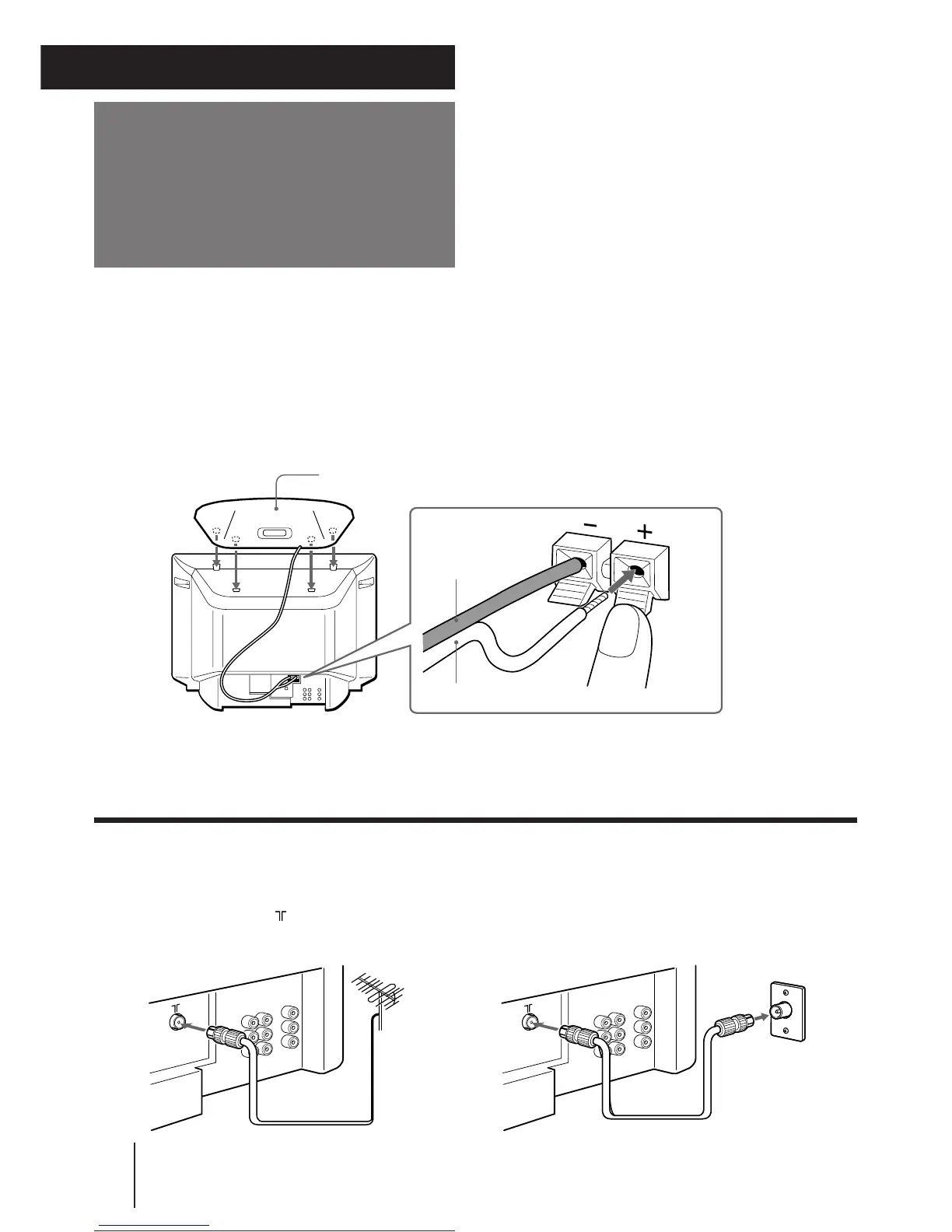
Connecting the 3D WOOFER
p KV-J25MH2/J29MH2/J25MN21/J29MN21 only
1 Attach the 3D WOOFER into the footholds on the top of the TV.
2 Connect the wires to the 3D WOOFER (8Ω) terminals at the rear of the TV.
The red wire should be connected to the ‘ red terminal and the black wire to the ’ black terminal.
Notes
• Connect only the supplied 3D WOOFER; otherwise the TV may malfunction.
• Unplug the TV from the wall outlet when connecting the 3D WOOFER.
• Make sure that none of the 3D WOOFER wire strands stick out, making contact with the neighbouring speaker terminal, to prevent a
malfunction caused by a short circuit of the terminals.
Connecting a VHF antenna or a combination VHF/UHF antenna
— 75-ohm coaxial cable (round)
Attach an optional IEC antenna connector to the 75-ohm coaxial cable.
Plug the connector into the (antenna) socket at the rear of the TV.
Red wire
Black wire
Rear of TVRear of TV
or
3D WOOFER
1
2
On a wall
Getting Started





 To Next Page