Getting Started
10
-EN
You can preset TV channels easily by storing all the
receivable channels automatically. You can also preset
channels manually or disable program positions (see
page 11 ).
Presetting channels automatically
You can preset up to 100 TV channels in numerical
sequence from the program position 1. You can preset
channels automatically using the button on the TV or
the menu.
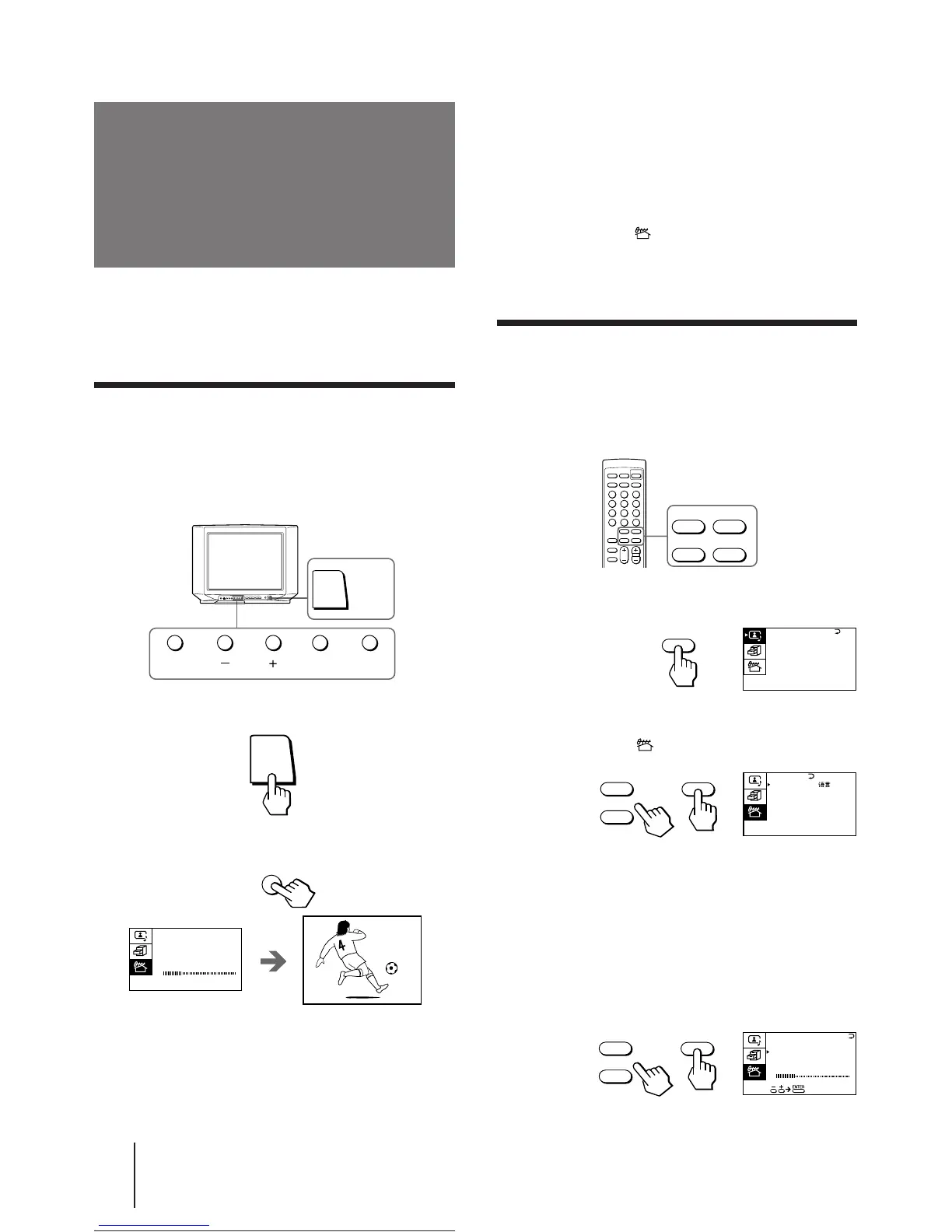
1 Press POWER to turn on the TV.
2 Press AUTO PROGR.
The TV starts scanning and presetting channels
automatically. When all of the receivable channels
are stored, the first preset TV program appears on
the screen.
Presetting channels
To preset channels automatically using
the menu
1 Press MENU.
2 Press + or – to move the cursor (z) to the
PRESET menu ( ), and press ENTER.
3 Press + or – to move the cursor (z) to AUTO
PROGRAM, and press ENTER.
Presetting channels manually
To change the program position for a channel or to
receive a channel with a weak signal which you cannot
receive by automatic presetting, preset the channel
manually.
1 Press MENU.
2 Press + or – to move the cursor (z) to the
PRESET menu ( ), and press ENTER.
3 Select your local TV system.
(1) Press + or – to move the cursor (z) to TV SYS, and
press ENTER.
(2) Press + or – until your local TV system appears on
the menu, and press ENTER.
4 Press + or – to move the cursor (z) to
MANUAL PROGRAM, and press ENTER.





 To Next Page