Getting Started
-EN
9
Changing the menu
language
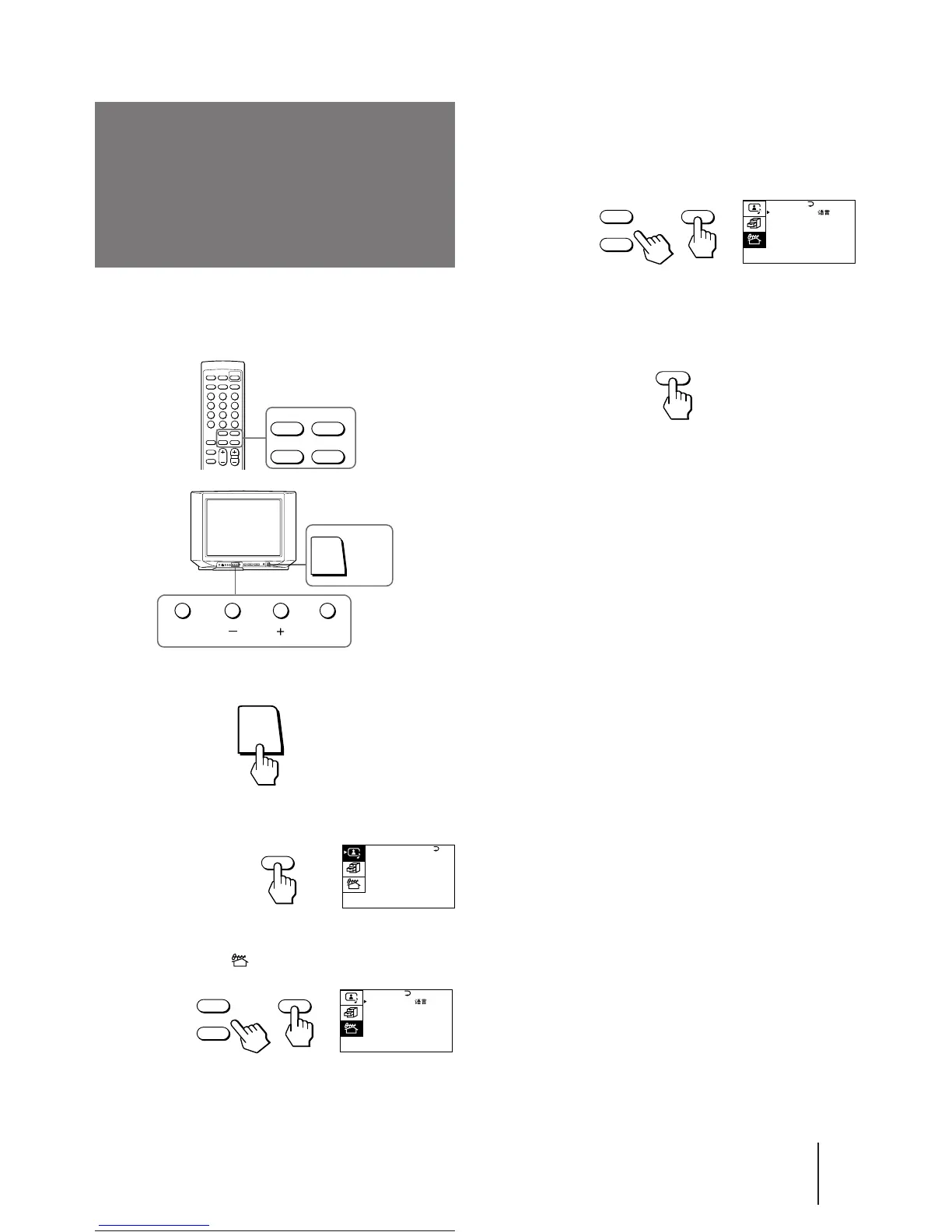
4 Make sure the cursor (z) appears beside
LANGUAGE/ ###, and press ENTER.
5 Press + or – to select ###, and press ENTER.
All of the menus change to Chinese.
6 Press MENU to return to the normal screen.
MENU
ENTER
+
–
POWER
A / V CONTROL
DYNAMIC
SOFT
STANDARD
PERSONAL
V I DEO ADJUST
AUD I O ADJUST
MENU
If you prefer Chinese to English, you can change the
menu language. You can use buttons on the remote
commander or the TV.
1 Press POWER to turn on the TV.
2 Press MENU.
3 Press + or – to move the cursor (z) to the
PRESET menu ( ), and press ENTER.
ENTER MENU
POWER
ENTER
+
–
PRESET
SKIP: PR02 OFF
TV SYS: B/G
COL SYS : AUTO
ENGL I SH
AUTO PROGRAM
MANUAL PROGRAM
LANGUAGE /
:





 To Next Page