35
Additional Information
Sony KV-SA32M36 Group F12 (GB)_2-348-392-11 (1)
120W MAX 8
c
120W MAX 8
C –
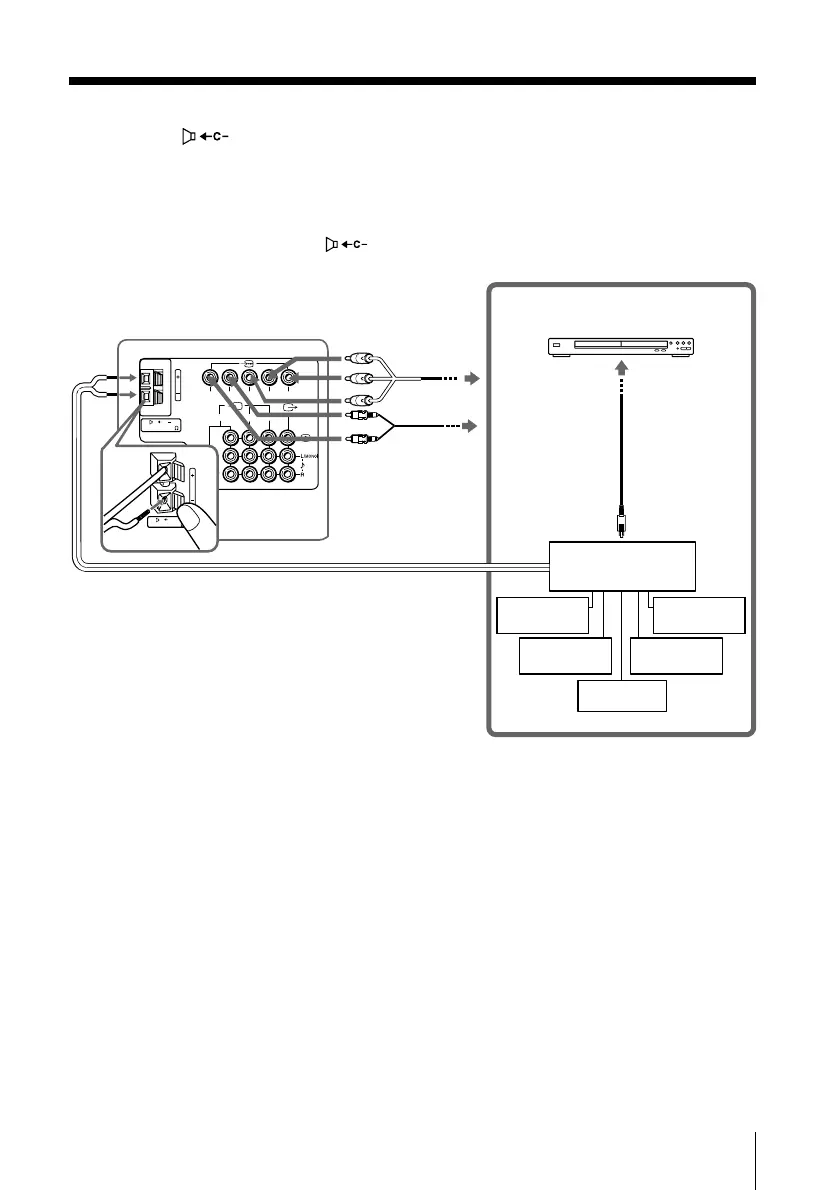
Connecting an amplifier to the center speaker input
terminal (
)
If you use an amplifier with a Dolby* surround decoder instead of the TV’s audio
system, you can use the TV’s speakers as the center speaker for your audio system.
Using the speaker cords supplied with the amplifier, connect the center speaker
terminals of the amplifier to the (center speaker input) terminals on the TV.
Notes
• To use the TV’s speakers as the center speaker, you can press the CENTER SP button on the
remote control (see page 10) or display the “WEGA Theatre Setup” from “Setup” menu and
select “CENTER IN” for “Speaker” (see page 31).
• If your TV is set to “CENTER IN Speaker” and nothing is connected to the center speaker
input terminals on the rear of TV, or the sound source emitted from the amplifier does not
contain the center speaker channel, no sound will be heard from the TV’s speaker.
* “Dolby” is a trademark of Dolby Laboratories.
TV rear panel
Component
video cable
(not supplied)
Audio cable
(not supplied)
Optical digital
cable
(not supplied)
Woofer
Rear
speaker (L)
Rear
speaker (R)
Front
speaker (L)
Front
speaker (R)
Amplifier
DVD player
01GB08ADV-STMOce.p65 10/14/04, 6:08 PM35
Black








 To Next Page