13
Advanced Operations
Sony KV-SA32M36 Group F12 (GB)_2-348-392-11 (1)
x Using the wide screen mode
The wide screen mode feature allows you to watch the picture filling the 16:9
screen of the TV.
Watching the picture in wide screen mode automatically –
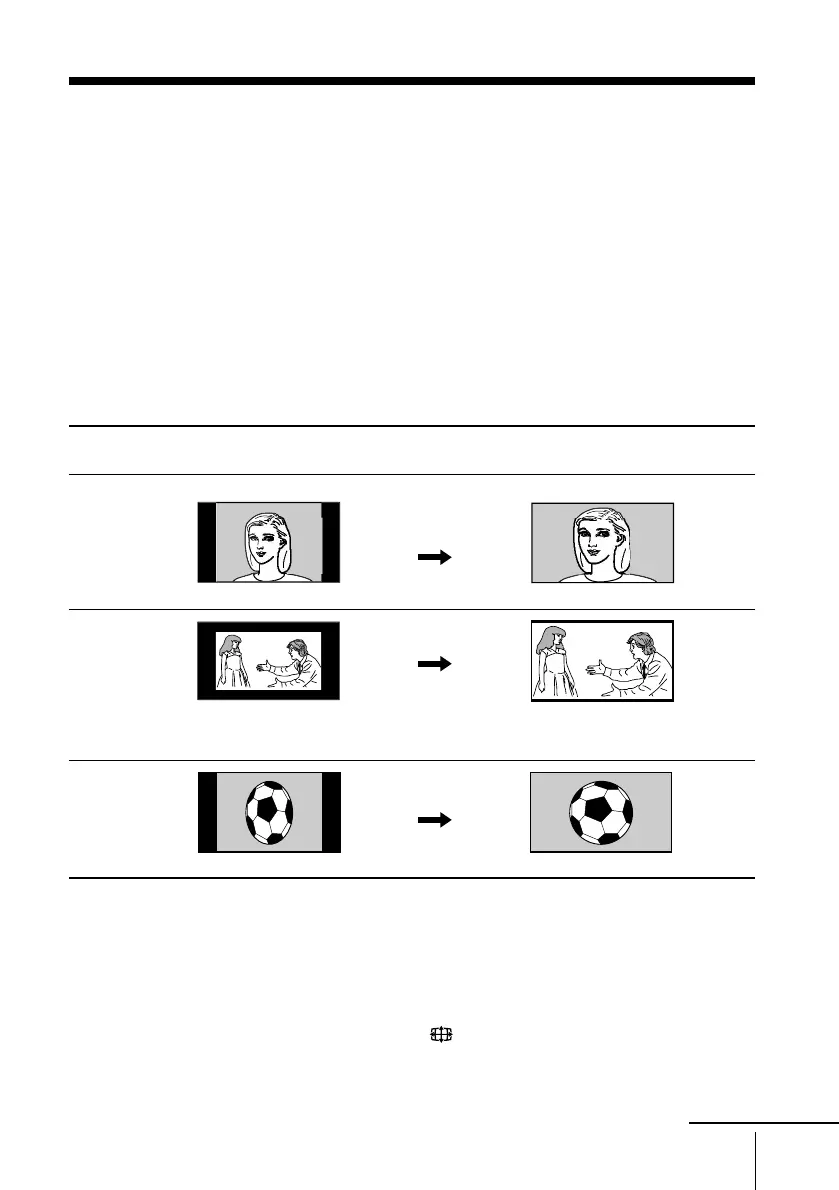
Auto Wide
The TV automatically selects optimum wide screen mode according to the signal
input and displays the picture to fill the 16:9 screen.
The examples in the table below show the settings preset at the factory; “Auto Wide”
is set to “On” and “4:3 Default” is set to “Wide Zoom” in the “Wide Screen” menu
(see page 27).
* When a normal 4:3 picture is received, “Wide Zoom” mode is automatically selected with the
factory setting. You can display picture as it is without enlarging it (“Normal” mode) if you set
“4:3 Default” in the “Wide Screen” menu to “Normal” (see page 27).
Note
• The Auto Wide feature may not work correctly depending on the quality of signal. In this case,
select the wide screen mode manually using the button (see page 14).
When receiving … Auto Wide The picture changes to
functions to select …
normal 4:3
aspect ratio
picture with
or without an
ID-1 or WSS
signal.
letter box
picture with an
ID-1 or WSS
signal.
squeezed
picture with
an ID-1 or WSS
signal.
Black bands may appear on the
top and bottom of the screen.
Wide
Zoom*
Zoom
Full
continue
01GB05AVD-STMOce.p65 10/14/04, 6:07 PM13
Black








 To Next Page