34 Additional Information
Sony KV-SA32M36 Group F12 (GB)_2-348-392-11 (1)
continued
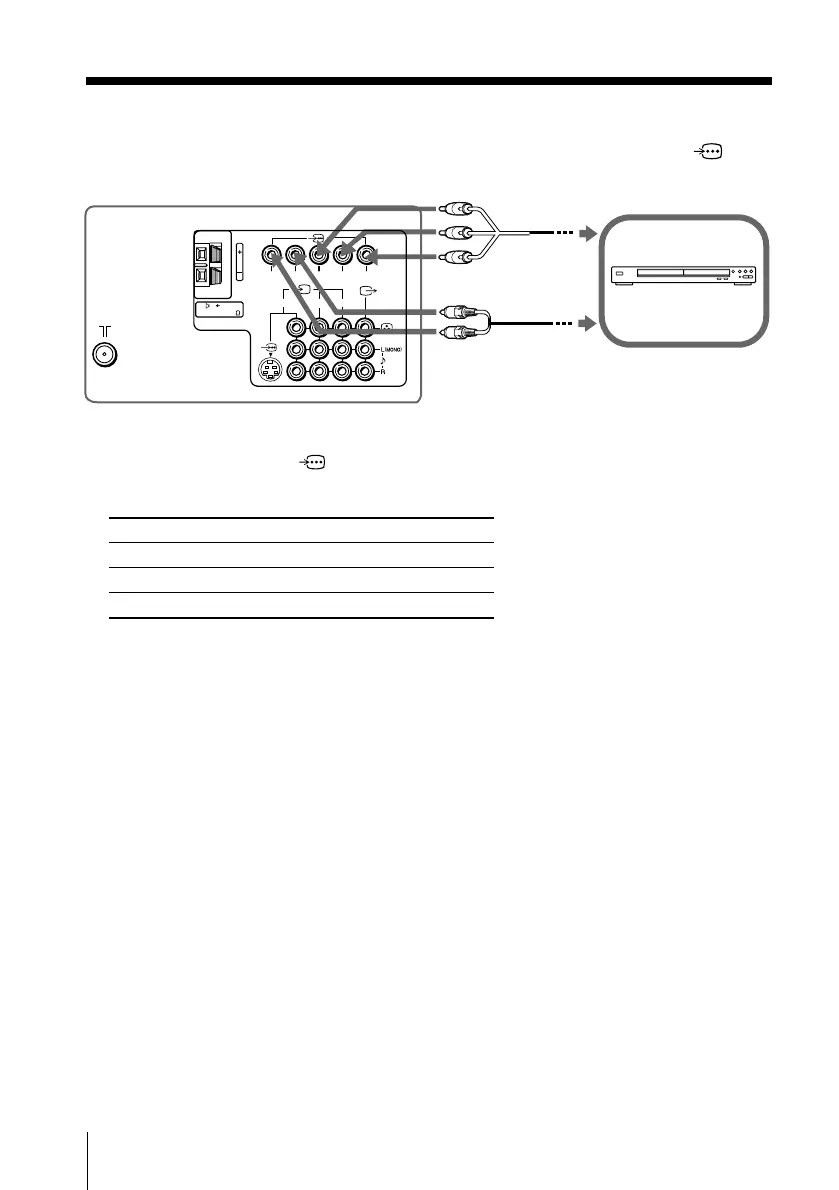
Connect To (on the DVD player)
Y (green) Y
CB (blue) CB, PB, Cb or B-Y
CR (red) CR, PR, Cr or R-Y
Connecting to the component video input terminal ( )
Notes
• If your DVD player can output interlace and progressive mode signals, select the interlace
output when connecting to
(component video input) on your TV. Your TV can receive
either 525i/60Hz or 625i/50Hz interlace signals.
• Some DVD player terminals may be labeled differently:
• If you select “DVD” on your TV screen, the signal from the
T (monitor output) jacks will not
be output properly. This does not indicate a malfunction.
DVD player
TV rear panel
Component
video cable
(not supplied)
Audio cable
(not supplied)
123
RLY
C
B
C
R
120W MAX 8
c –
01GB07ADJ-STMOce.p65 10/14/04, 6:08 PM34
Black








 To Next Page