10 Overview of Controls
Sony KV-SA32M36 Group F12 (GB)_2-348-392-11 (1)
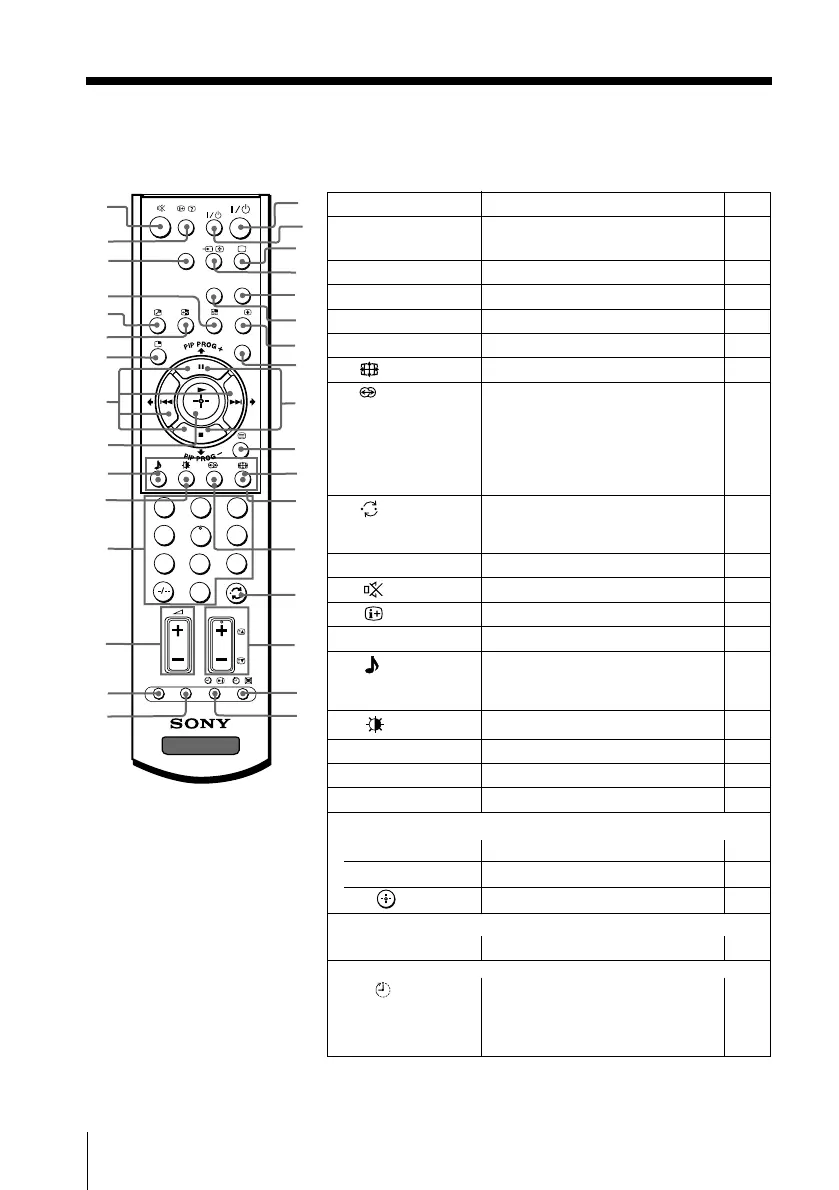
x Using the remote control and basic
functions
1
2
3
4
6
7
8
9
0
5
DVD
MENU
TV
PROG
VIDEO
wg
wd
wf
wk
wj
9
1
4
5
qh
qg
qa
8
7
6
ql
qs
w;
q;
qj
A/B
wl
e;
ea
es
OPTION RESET
qk
qf
qd
wa
ws
wh
CENTER
SP
WEGA
THEATRE
2
3
Button Description Page
1 ?/1 Turn off temporarily or turn –
on the TV.
3 a Display the TV program. –
4 t Select video input. 33
5 WEGA THEATRE Select WEGA Thearte Mode. 15
6 CENTER SP Select TV’s center speaker mode. 15
qa Change the picture size. 14
qd Select surround mode options: –
“TruSurround” (surround sound
that spreads out to the rear of a
room), “WOW” (full, deep bass
sound), “Simulated” (stereo-like
monaural sound), “Off”.
qf Jump to last program number –
that has been watched for at
least five seconds.
qg PROG +/– Select program number. –
qk Mute the sound. –
ql
Display on-screen information. –
w; DVD
Select component video input. 34
wj Select sound mode options. 12
5-Band Graphic Equalizer
display will appear.
wk Select picture mode options. 12
wl 0 – 9, - Input numbers. –
e; 2 +/– Adjust volume. –
es RESET Set TV to factory setting. 36
Menu operations
8 MENU Display or cancel the menu. 22
wg V, v, B, b Select and adjust items. 22
wh Confirm selected items. 22
Stereo/bilingual operations
7 A/B Select stereo/bilingual mode. 17
Timer operations
qh Set TV to turn off automatically
–
(Sleep Timer) according to the desired period
of time (max. of one hour and
30 min.).
01GB04INS-STMOce.p65 10/14/04, 6:07 PM10
Black








 To Next Page