40
Using Network Features
To use the wireless LAN network, a USB
wireless LAN module IFU-WLM3 (not
supplied) is necessary.
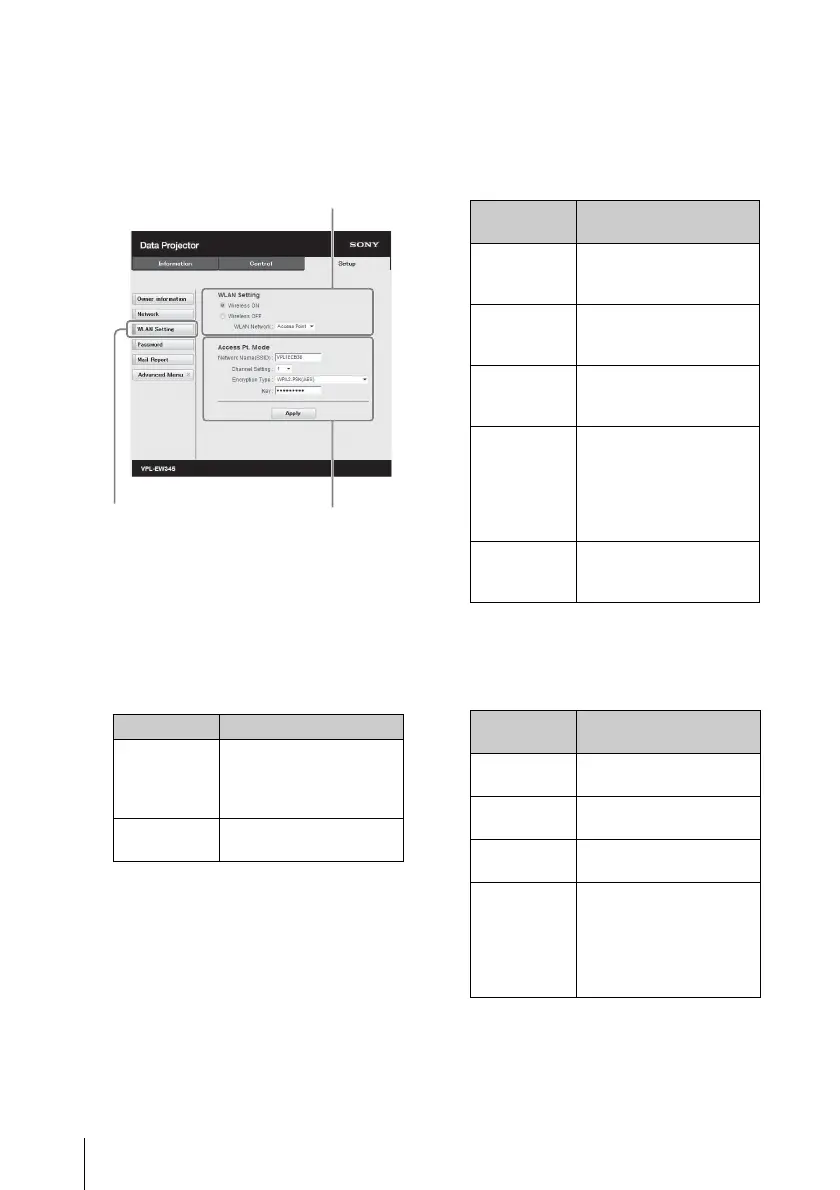
1 Click the [WLAN Setting] to open the
WLAN Setting page.
2 Enable or disable the radio wave
output of USB wireless LAN module.
Wireless ON: Enables radio wave
output of USB wireless LAN module.
Wireless OFF: Disables radio wave
output of USB wireless LAN module.
WLAN Network: Set the modes for
USB wireless LAN module.
3 (a) Input the settings for Access
Point Mode.
When the USB wireless LAN module is
activated as an access point, set the items
for the access point.
Network Name (SSID): Input the SSID
of the access point if “WLAN
Network” is set to “Access Point”
(page 40).
The factory setting is “VPL + the
MAC address of the LAN.”
Channel Setting: Select the channel of
the access point if “WLAN Network”
is set to “Access Point” (page 40).
Encryption Type: Select the security
method of the access point from the
followings if “WLAN Network” is set
to “Access Point” (page 40).
Key: Input the password for security
method of the access point according
to the selected encryption type as
below;
The factory setting of the security
method and its password are set as
follows.
Security method: WEP 64bit
Password: sony1
Items Descriptions
Access Point Activates USB wireless
LAN module as an access
point. Set the items for
WLAN manually.
Client Activates USB wireless
LAN module as a client.
3-(a)
2
WLAN Setting button
Encyption
Type
Descriptions
Open Sets the security method
of the access point to open
system authentication.
WEP 64bit Sets the security method
of the access point to
WEP (64bit).
WEP 128bit Sets the security method
of the access point to
WEP (128bit).
MIX (WPA-
PSK/WPA2-
PSK (TKIP/
AES))
Sets the security method
of the access point to
MIX. (corresponding to
both WPA-PSK (TKIP/
AES) and WPA2-PSK
(AES) security methods).
WPA2-
PSK(AES)
Sets the security method
of the access point to
WPA2-PSK (AES).
Encyption
Type
Password
Open The password cannot be
input.
WEP 64bit Input 5 ASCII characters
for a password.
WEP 128bit Input 13 ASCII characters
for a password.
MIX (WPA-
PSK/WPA2-
PSK (TKIP/
AES)) or
WPA2-PSK
(AES)
Input 8-63 ASCII
characters for a password.



 To Next Page