5
Preparation
Available computer
CPU: Intel Pentium III 600 MHz or higher,
and CPU recommended by OS
Memory: 64 MB or more, recommended
128 MB or more, and Memory
recommended by OS
Hard disc: free capacity 10 MB or more
Other hardware requirements: CD-ROM
drive
Available OS
• Microsoft Windows 98SE
• Microsoft Windows Me
• Microsoft Windows 2000
• Microsoft Windows XP Home Edition
• Microsoft Windows XP Professional
Edition
• Microsoft Windows Vista Home Basic
• Microsoft Windows Vista Home Premium
• Microsoft Windows Vista Business
• Microsoft Windows Vista Ultimate
(Uses Windows Vista 32-bit version.)
Supported display
Color resolution: 16 bit, 24 bit, 32 bit
Usable browser
Internet Explorer 5.0 or higher
Available network
RJ45 (10BASE-T/100BASE-TX)
Projector Station for Air Shot Version 2 will
not work on some computers and OS even
though they satisfy the above requirements.
Preparation
For using the network presentation function,
install the application software Projector
Station for Air Shot Version 2 (Version 2.00
or higher) in the computer, or copy the folder
to the hard disk or external memory*
(“Memory Stick”, USB memory, etc.).
* In the case that the folder is copied to the
external memory, it is not necessary to install
Projector Station for Air Shot Version 2 into
the computer.
Use the supplied CD-ROM for installation
or copy from the folder.
If you use Windows 2000 Professional,
Windows XP Home Edition/Professional
Edition or Windows Vista Home Basic/Home
Premium/Business/Ultimate on your computer,
log on using the administrator privileges.
Installing Projector Station for Air
Shot Version 2
1 Insert the supplied CD-ROM into the
CD-ROM drive of the computer.
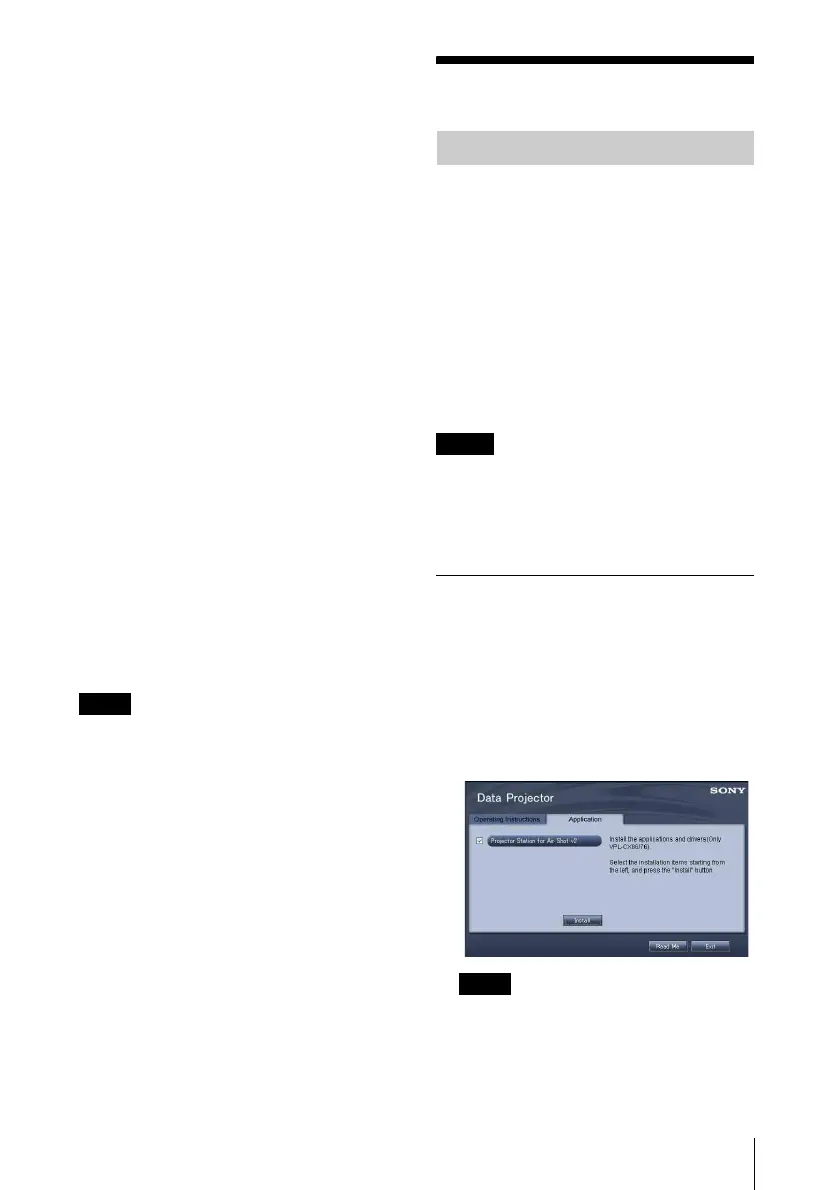
The application installation window
appears.
The window for installing the Projector
Station for Air Shot Version 2 appears.
• If the above window does not appear,
click [My Computer]-[CD-ROM]-
[Dp_Inst].
• [Computer] is displayed instead of
[My Computer] in Windows Vista.
Note
Preparing the Computer
Note
Notes



 To Next Page