16
Connection
This is used for the settings of Projector
Station for Air Shot Version 2.
Displaying the setting window of
Projector Station for Air Shot
Version 2
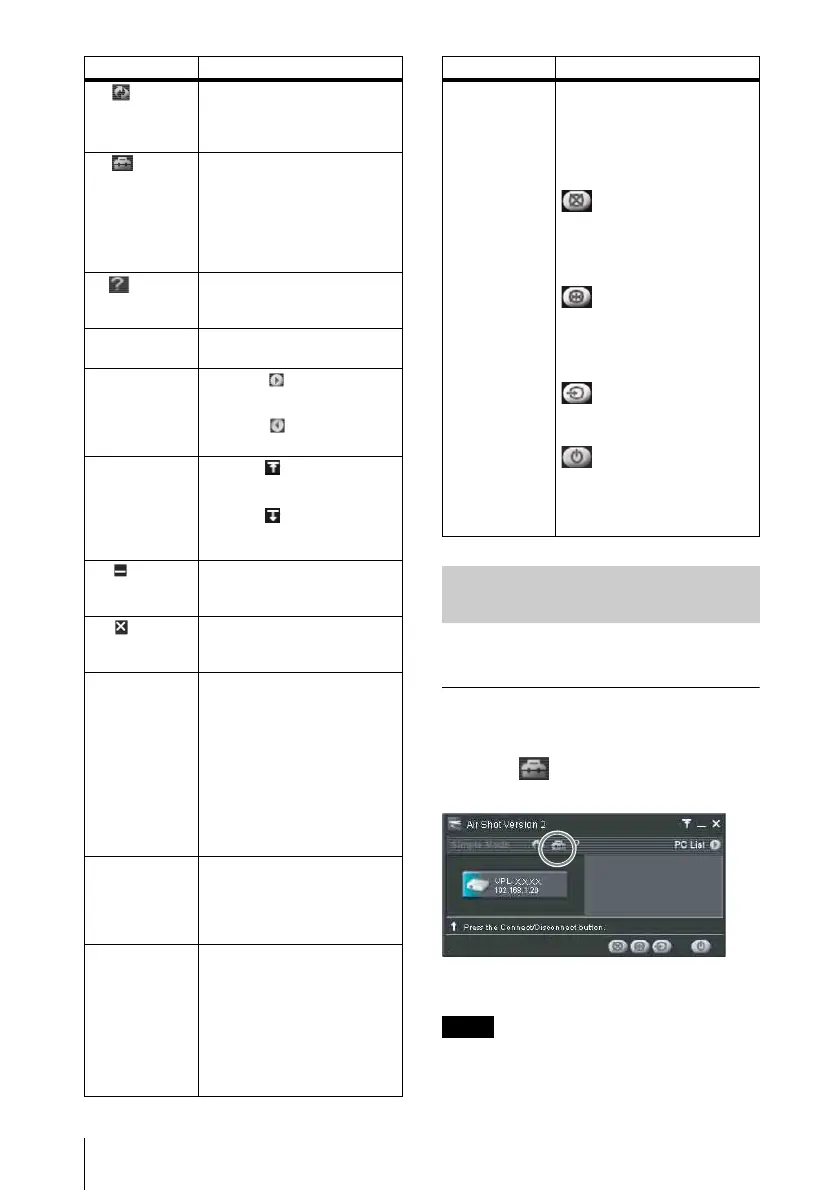
Click the [] button in the main window
of Projector Station for Air Shot Version 2.
The [Option Setting] dialog box appears.
When the computer is not connected to the
projector, the [Option Setting] dialog box is
opened.
Items Functions
1 [Refresh]
button
The projector list, connected
computer list, and connectable
computer list are refreshed
manually.
2 [Option
Setting] button
The [Option Setting] window
for setting the Projector Station
for Air Shot Version 2 is
displayed. When the computer
is not connected to the
projector, you can display the
window.
3 [Help]
button
Projector Station for Air Shot
Version 2 help topics will be
displayed.
4Scroll bar The scroll bar is displayed
when 6 or more projectors exist.
5[PC List]
buttons
When the button is clicked,
the connectable computer list is
displayed.
When the button is clicked,
the list is closed.
6[Tool bar
select] button
When the button is clicked,
only the tool bar for the
projector control is displayed.
When the button is clicked,
the whole main window is
displayed.
7 [
Minimum]
button
The Projector Station for Air
Shot Version 2 main window is
reduced minimum.
8 [Close]
button
The Projector Station for Air
Shot Version 2 main window is
closed.
9Projector
button
The icon of the connectable
projector, projector name (or
Nickname, if specified) and IP
address are displayed on the
button. Click the button to
connect to or disconnect from
the projector. By right-clicking
on the button and selecting
[Show Projector Web], the Web
display of the projector appears
on the computer.
q;Controlled
projector select
menu
Select the projector to be
operated by the projector
control buttons. When only one
projector is connected, this
menu is not displayed.
qa Connected
computer
display
The icon, computer name, and
IP address of the computer
being connected to the projector
are displayed. The computer
name is changed in the [Option
Setting] window.When no
computer is connected to the
projector, this display does not
appear.
qsProjector
control buttons
With the buttons, you can
operate the projector selected
on the controlled projector
select menu.When only one
projector is connected, the
projector will be operated.
[Picture Muting] button: Click
the button to clear the picture
temporally. Click it again to
display the picture.
[Freeze] button: Click the
button to stop the motion of the
picture. Click it again to restart
the picture.
[Input Select] button: Click the
button to select the input signal.
[Power On/Standby] button:
Click to turn on the power of
the projector or set it in standby
mode.
Using the [Option Setting]
Dialog Box
Note
Items Functions



 To Next Page