17
Connection
Names and Functions of the tabs
on the [Option Setting] dialog box
For the details, click the [ ] button on the
main window to display the online help.
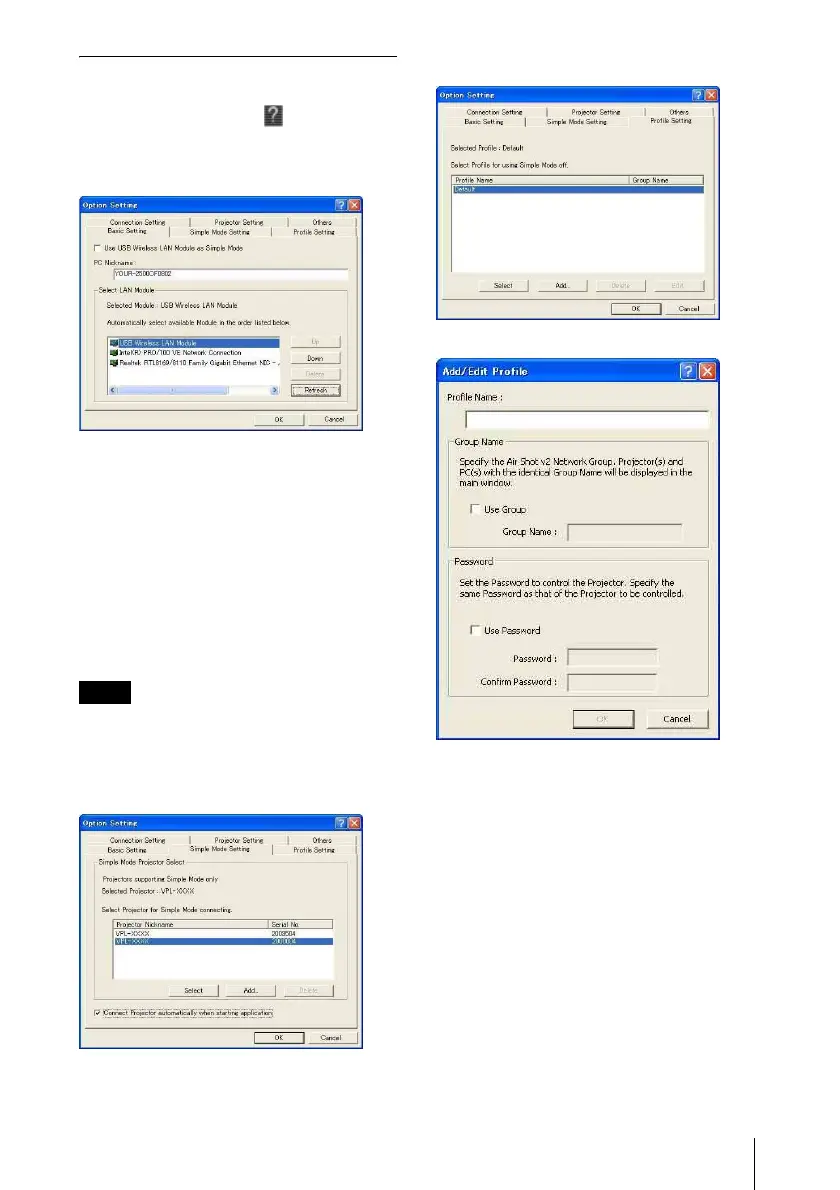
[Basic Setting] tab
The [Basic Setting] tab provides the basic
setting items.
When the connectable projector cannot be
detected with the selected LAN module, the
connectable projector is being searched
according to the priorities of the LAN
modules.
When the network cable (RJ45) is not
connected to the computer, the connectable
projector may not be searched automatically.
[Use USB Wireless LAN Module as Simple
Mode] is not available for this unit.
Do not check the check box.
[Simple Mode Setting] tab
This is not available for this unit.
[Profile Setting] tab
The [Profile Setting] tab provides the profile
settings for connecting to the projector.
The [Group Name] and [Password] should
be set when limiting the connection of the
projector. The projector button on the
application software is displayed, or you can
connect the projector only when the [Group
Name] and [Password] set in [Profile
Setting] tab correspond to those of the
projector to be connected.
Note



 To Next Page