18
Connection
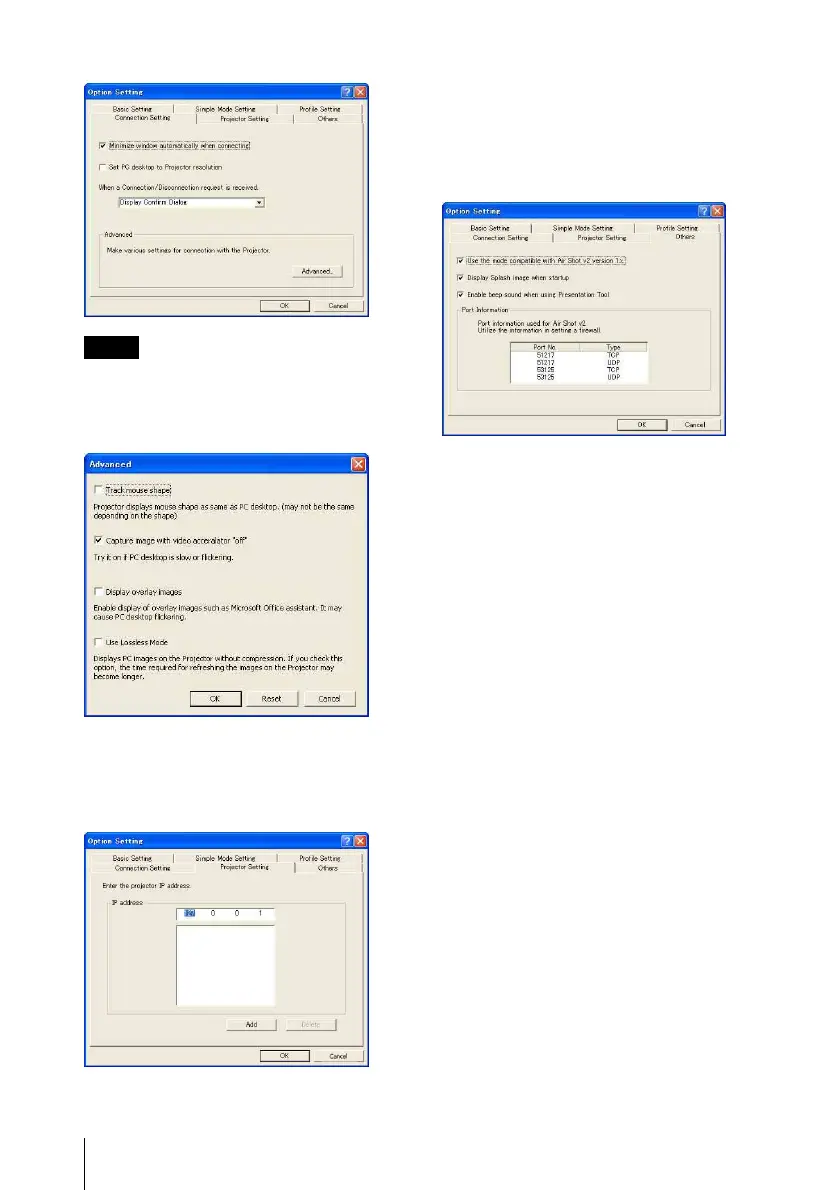
[Connection Setting] tab
When [Set PC desktop to Projector resolution]
is checked, the window may be shown outside
of the display due to the position of the window
of ProjectorStation for AirShot Version2.
The [Connection Setting] tab provides
detailed settings for connecting to the
projector.
[Projector Setting] tab
The IP address of the projector must be
specified when the projector has the
different network segment (subnet) from the
computer.
Up to 100 projectors can be entered.
[Others] tab
The [Others] tab provides other settings.
To use the Simple Mode in this version of
Projector Station for Air Shot Version 2,
check the check box of [Use the mode
compatible with Air Shot v2 version 1.x.].
[Use USB Wireless LAN Module as Simple
Mode] of the [Basic Setting] tab and the
[Simple Mode Setting] tab can be used.
Check only when the VPL-CX86/CX76
series projector is used at the same time.
Note



 To Next Page