14
Connection
• When the projector and a computer that has a
different network segment (subnet) are
connected, set [PC Registration List] (page
10) on the projector and [Projector Setting]
(page 18) on the computer.
• A maximum of 100 computers can be
displayed in the list.
• It may take time to project an image due to
the computer.
• External monitor signal of notebook type
computer may not be output when you use
Projector Station for Air Shot Version 2.
• When [When a connection/Disconnection
request is received] is set to [Always Yes] or
[Always No] in the setting of the application
software, the connection confirmation
message does not appear and the application
software always permits/refuses connection/
disconnection.
• Do not change the resolution of the computer
desktop while the projector and the computer
are connected. They may become
disconnected.
Disconnecting
1 Press the AIR SHOT key on the
remote commander.
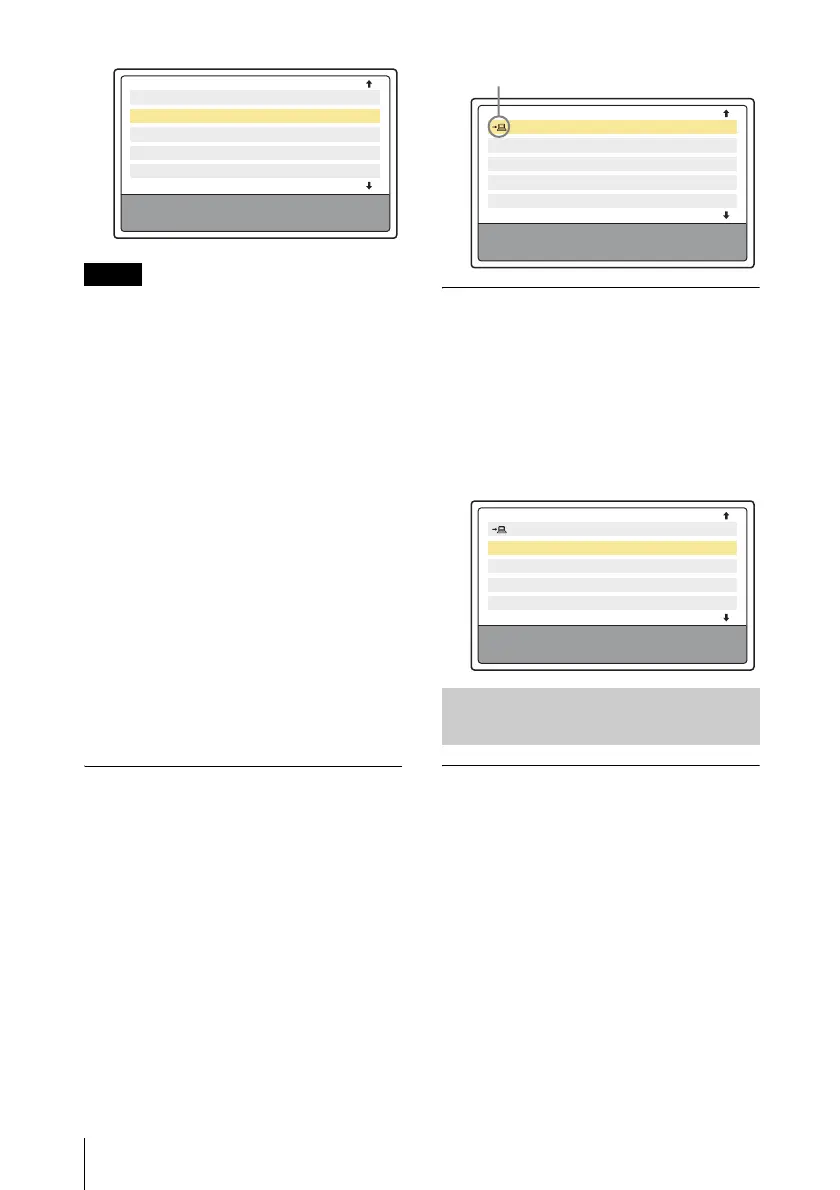
2 Press the M or m key on the remote
commander to select the connecting
computer from the list, then press the
ENTER key.
When the confirmation message appears
in the computer, click [Yes] to
disconnect.
Switching
1 Press the AIR SHOT key on the
remote commander.
2 Press the M or m key on the remote
commander to select the computer to
be connected from the list and then the
ENTER key.
Connecting
1 Perform steps 1 and 2 of
“Connecting” on page 13.
2 Click the projector button of the
projector to be connected.
Notes
Yamada PC
Connect PC?
Connecting PC: Tanaka PC
(xxx. xxx. xx. x)
Tanaka PC ( xx. x. xx. xx )
Suzuki PC (xxx. xxx. xx. x)
Saito PC ( xx. x. xx. xx )
Sakuma PC (xxx. xxx. xx. x)
Connecting/Disconnecting/
Switching from the Computer
Yamada PC
Disconnect PC?
Disconnecting PC: Yamada PC
(xxx. xxx. xx. x)
Tanaka PC ( xx. x. xx. xx )
Suzuki PC (xxx. xxx. xx. x)
Saito PC ( xx. x. xx. xx )
Sakuma PC (xxx. xxx. xx. x)
Appears when the computer is connected.
Yamada PC
Switch connected PC?
Disconnecting PC: Yamada PC
Connecting PC: Tanaka PC
(xxx. xxx. xx. x)
Tanaka PC ( xx. x. xx. xx )
Suzuki PC (xxx. xxx. xx. x)
Saito PC ( xx. x. xx. xx )
Sakuma PC (xxx. xxx. xx. x)



 To Next Page