13
Into the function menu: Press
Menu Navigation: Press to switch menu items.
Exit menu: Press for long time to return weighing mode, or press for short time to
return to last menu.
4.2 Function Menu Operation
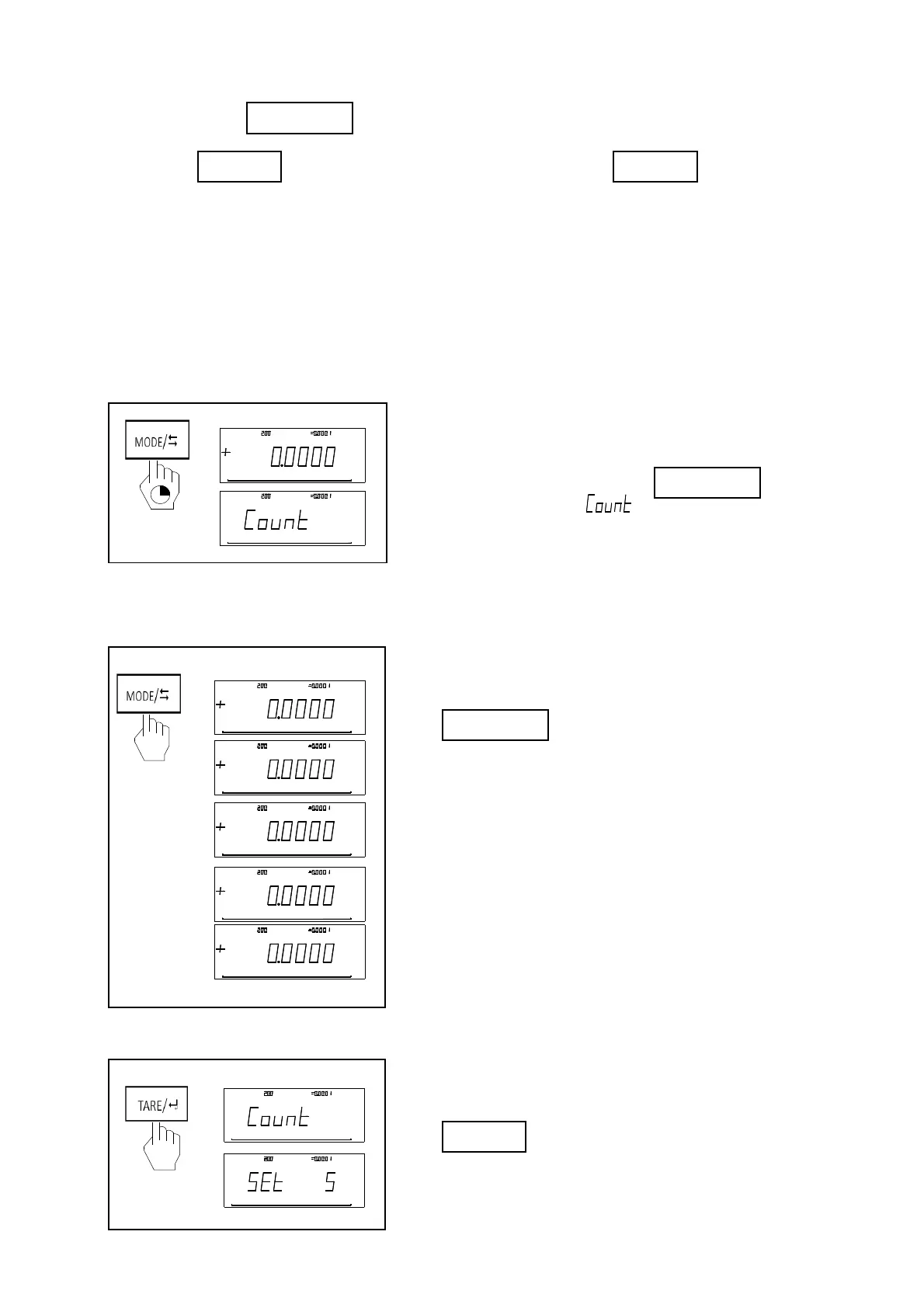
Enter the function mode.
In the mode of basic weighing, press for long
time untill screen displys “ ”. It now in the piece mode.
Function menu switch
Press for short time to switch different items
Function menu enter
Press for short time to into the next menu
Max: g
d
g
g
100%0
Max: gd
p
g
100%0
Max:
g
d
g
100%0
oz
Max: gd
g
g
100%0
oz
Max: g
d
g
100%0
ct
能
功
能功
Max:
g
d
g
g
100%0
Menu
Max: gd
pcs
g
100%0
Menu
Max:
g
d
pcs
g
100%0
Max:
g
d
pcs
g
100%0
皮
去



 To Next Page