25
End
5.3 Balance Setting Funcation Explain
【Adapting the balance to ambient conditions】:Room to place the balance uses ordinary air-condition, generally
select C113. If the air is large, should select C114.
【Ambient conditions Stability range】:If need to weighing quickly, can extend the display range. If the air is
lager,should extend the range.
【Display】:Select your desired mode.
【Remove the container】:Please operate carefully if you select 141.
【Auto zero】:To do measurement ranging from a few to tens of digit around zero, please choose C152, and please
pay attention to drifting of the zero digit, that might affect the precision of the measurement.
5.4 Balance Setting for Quick Weighing
【Adapting the balance to ambient conditions】:Select C111or C112, the speed is more fast.
5.5 Balance Setting for Strong Air Enviroment
Avoid strong air , select C114, C126, C127, C128, C129, C141 or C211.
5.6 Balance Setting for Linear Correction
Balance completely preheating, first to calibraion, then shutdown the balance. Restart the balance, thenenter the
setting mode. Choose linear correction function (C312)
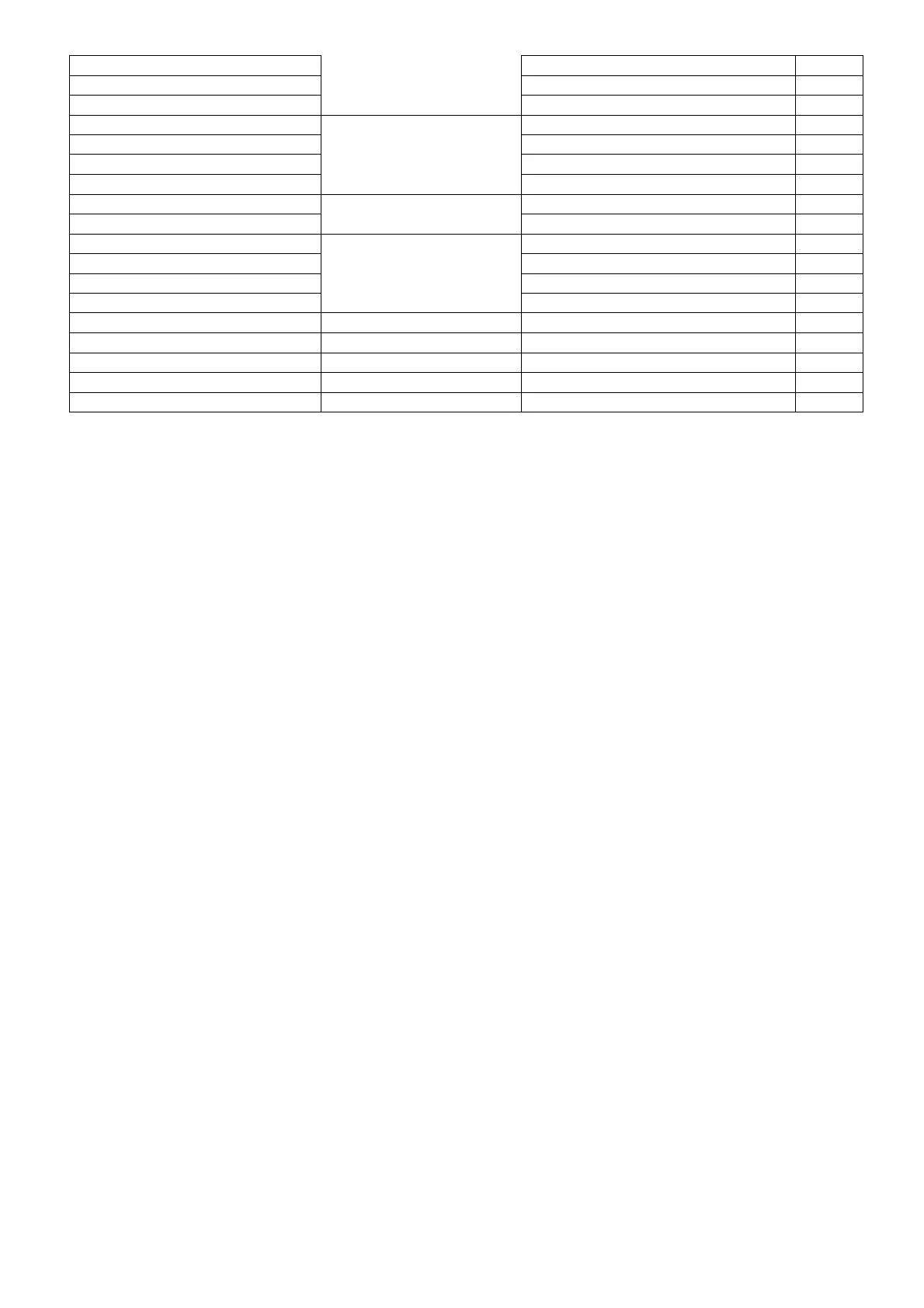
C 2 2 6 38400
C 2 2 7 57600
C 2 2 8 115200
C 2 3 1
Data Bit
5
C 2 3 2 6
C 2 3 3 7
C 2 3 4 8 *
C 2 4 1
Stop Bit
1 *
C 2 4 2 2
C 2 5 1
Parity
无 *
C 2 5 2 Odd
C 2 5 3 Even
C 2 5 4 Retention for 1
C 2 3 5 Retention for 0
C 3 1 1 Version
C 3 1 2 Linear correction
C 3 1 3 Recovery factory set



 To Next Page