Sorensen DLM-E Series Advanced Operation
Operation Manual
43
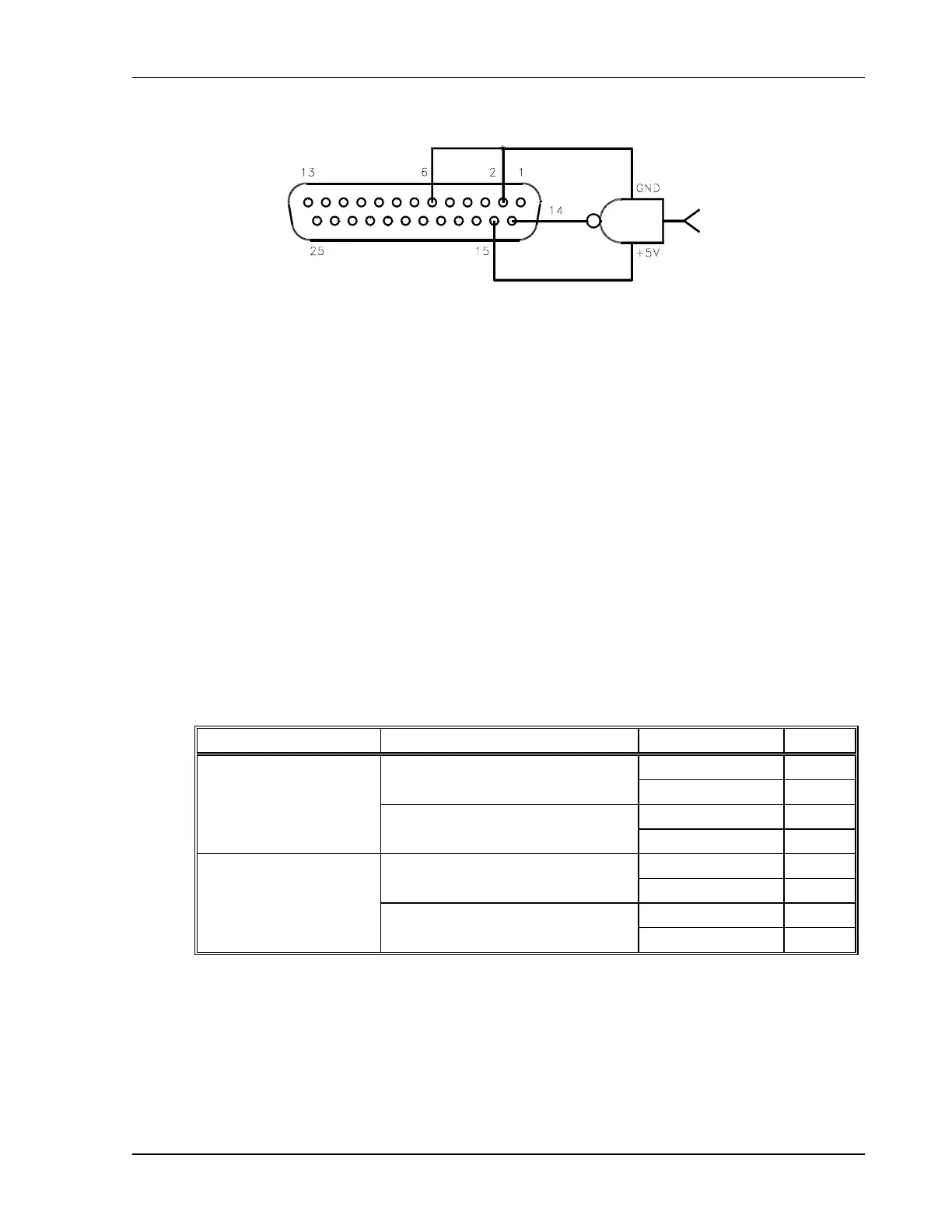
Figure 4–12. Using Shutdown with a DC Input (Positive Logic)
4.5.3 Shutdown Application – Contact Closure
An external relay, whether normally open or normally closed, may be used to activate the
Shutdown circuit. Either positive or negative logic may be used.
To activate the Shutdown function using an external relay:
1. Turn off the power supply.
2. Connect one side of the external relay to pin 15 (+5 VDC Auxiliary Output) on connector
J3. Connect the other side of the relay to J3-pin 14 (Remote Shutdown Input). Also
connect pin 2 (Shutdown Return) to pin 6 (Status Indicator Return). See Figure 4–13
through Figure 4–16.
3. Set rear panel DIP switch S1 to select the desired circuit logic as defined in the following
table.
Relay Switch S1-6 Setting Relay Coil State Output
Energized OFF
UP–Open (Positive Logic)
De-energized ON
Energized ON
Normally Open Relay
DOWN–Closed (Negative Logic)
De-energized OFF
Energized ON
UP–Open (Positive Logic)
De-energized OFF
Energized OFF
Normally Closed Relay
DOWN–Closed (Negative Logic)
De-energized ON
The red S/D (Shutdown) LED on the front panel lights up when the Shutdown circuit is
activated.



 To Next Page