Setup
91369 Service Manual 2-18
Printers Tab
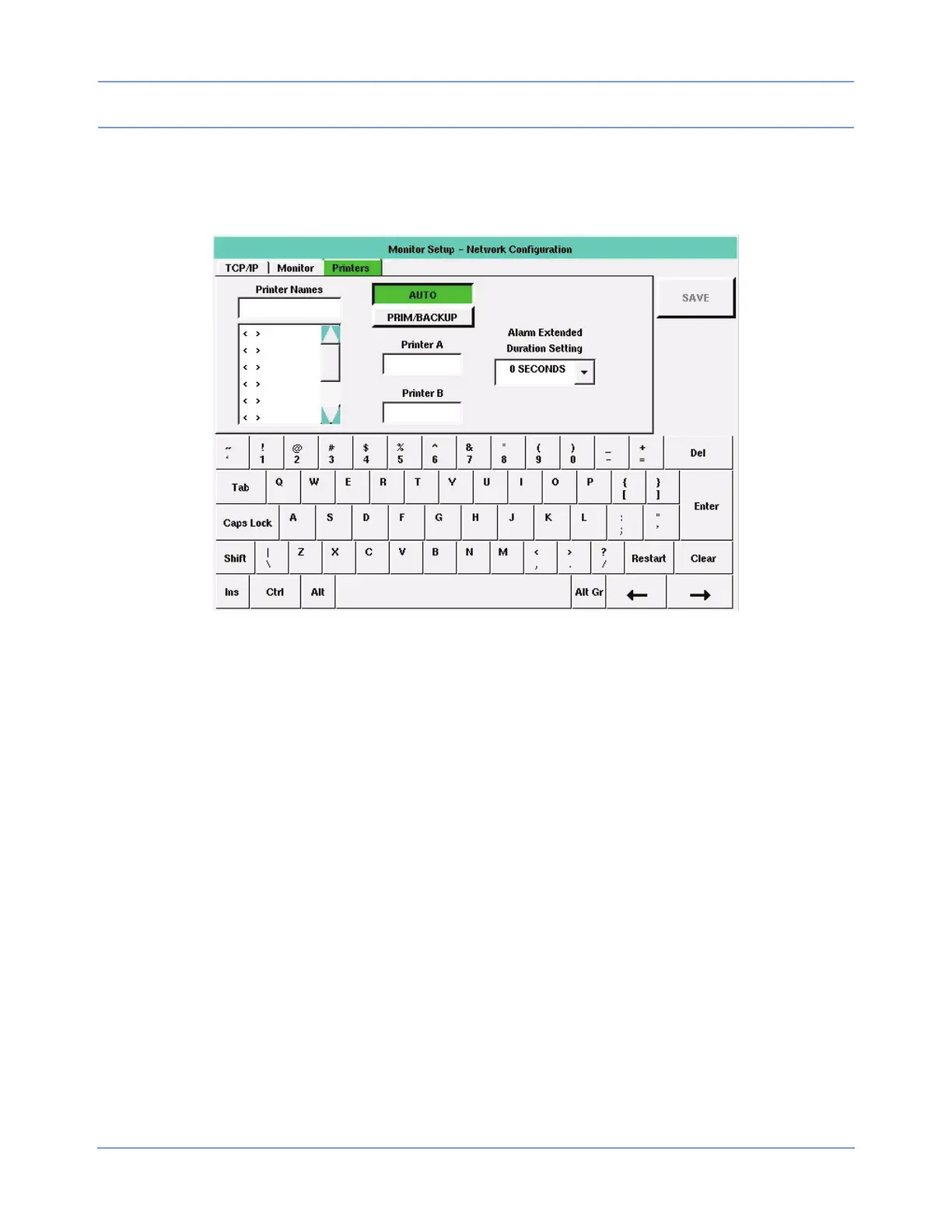
The Printers tab enables you to display controls for defining and storing printer names, choosing rules for
printer selection, and selecting one or two network printers.
Figure 2-12: Printers tab
Editing is performed as described in Editing Tab Fields on page 2-13. The tabbing order is AUTO / PRIM/
BACKUP >> Printer A (or Primary) >> Printer B (or Backup) >> Printer Names (refer to Figure 2-13 on
page 2-19). Changes made to this tab’s settings take effect after a successful save and monitor reset.
Printer Names
The Printer Names list displays up to eight, selectable printer names previously stored in the monitor, in the
order in which they were stored. To display a new or changed name in the list, select that printer name from the
list. Printer names contain up to five characters (default is five blanks).
Note:
• Printer names are explicitly entered and may be duplicated. To clear a printer name from the list, select
that name, touch Clear, touch Enter, and then touch SAVE.
• A local (SDLC) printer can be either a bedside printer or network printer, depending on the printer name
selected in this list. A local printer is configured as a network printer if the local monitor’s name is
selected. Otherwise, a local printer functions as the bedside printer.


 To Next Page