Setup
91369 Service Manual 2-38
WLAN
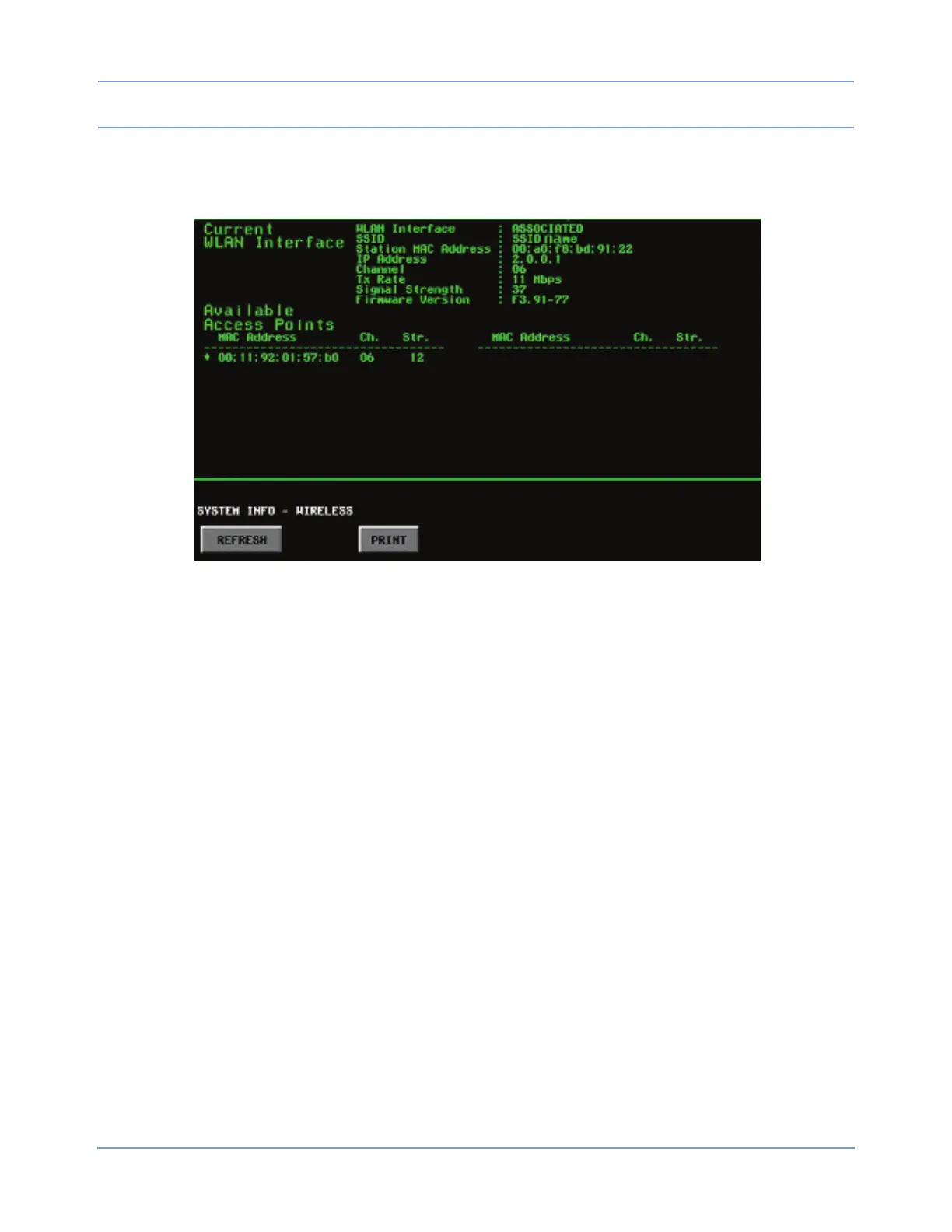
Selecting the WLAN key (only displayed if a radio is detected) displays the WLAN page.
Figure 2-24: WLAN interface information
Information related to the current use of the wireless monitor’s WLAN operation appears at the top of this page.
The radio’s list of detected APs displays below Available Access Points.
Current WLAN Interface
• WLAN Interface indicates whether the WLAN card is currently communicating with an access point
(“ASSOCIATED” = it is communicating; “UNASSOCIATED” = it is not communicating).
• SSID lists the text string input for the SSID entered in the WLAN tab of the BIOMED LEVEL menu, under
Network Setup.
• Station MAC Address and IP Address list the current MAC address and IP address of the WLAN card,
respectively.
• Channel identifies which of the available wireless channels (01 to 14 decimal) the WLAN card is currently
using to communicate.
• Tx Rate indicates which data rate (in Mbps) the WLAN card is currently using.
• Signal Strength indicates the current received signal strength (value from 1 to 100).
• Firmware Version indicates the version of the firmware (software) in the WLAN card.
Available Access Points
The list of available access points lists the MAC address, the channel (Ch.), and the signal strength (Str.) of all
APs that match the displayed SSID value. An asterisk (*) to the left of an AP indicates that the WLAN card is
currently associated with this AP.



 To Next Page