Setup
91369 Service Manual 2-42
START/END CASE OPTIONS
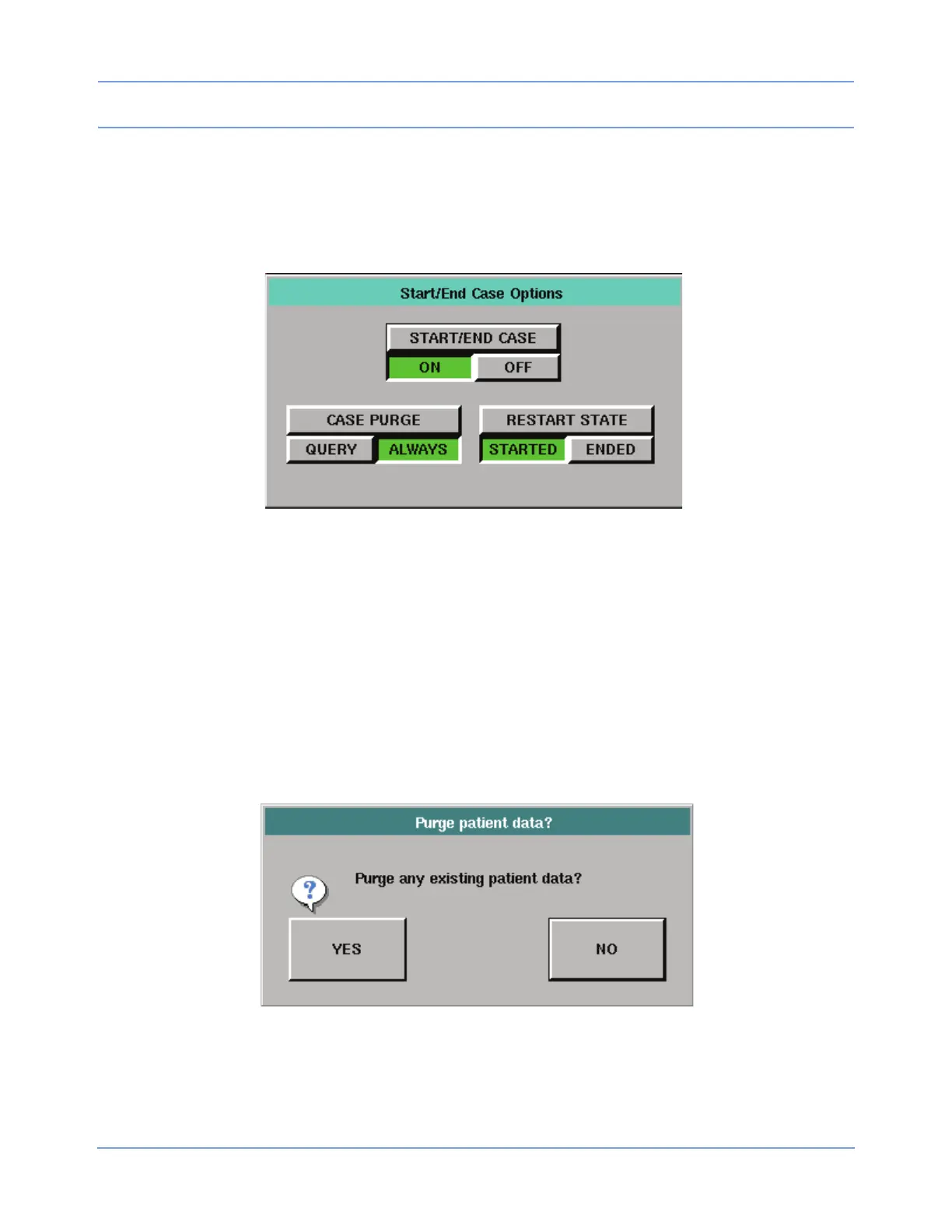
Touch the START/END CASE OPTIONS key to display the Start/End Case Options dialog box.
Note:
If option D, Perioperative, is not activated, the START/END CASE OPTIONS key does not appear.
Figure 2-27: Start/End Case dialog box
Touch START/END CASE /ON to turn ON Start Case/End Case features, or touch START/END CASE /OFF to
turn the features OFF. The monitor must be reset for these changes to take effect, and the Reset Monitor
dialog box (refer to Figure 2-30 on page 2-44) displays after any change in the Start/End Case Options dialog
box.
The START/END CASE ON/OFF setting determines whether the following keys are enabled or disabled.
CASE PURGE QUERY/ALWAYS
The CASE PURGE /QUERY key determines whether the Purge patient data? confirmation window (refer to
Figure 2-28 on page 2-42) displays after the user touches KEEP SETTINGS on the Keep Settings? dialog
box.
Figure 2-28: Purge patient data confirmation window
Touch CASE PURGE /QUERY to prompt the user with the Purge Data confirmation window when the user
touches END CASE.
Touch CASE PURGE /ALWAYS to purge all patient data when the user touches END CASE.



 To Next Page