91369 Service Manual 4-19
Maintenance
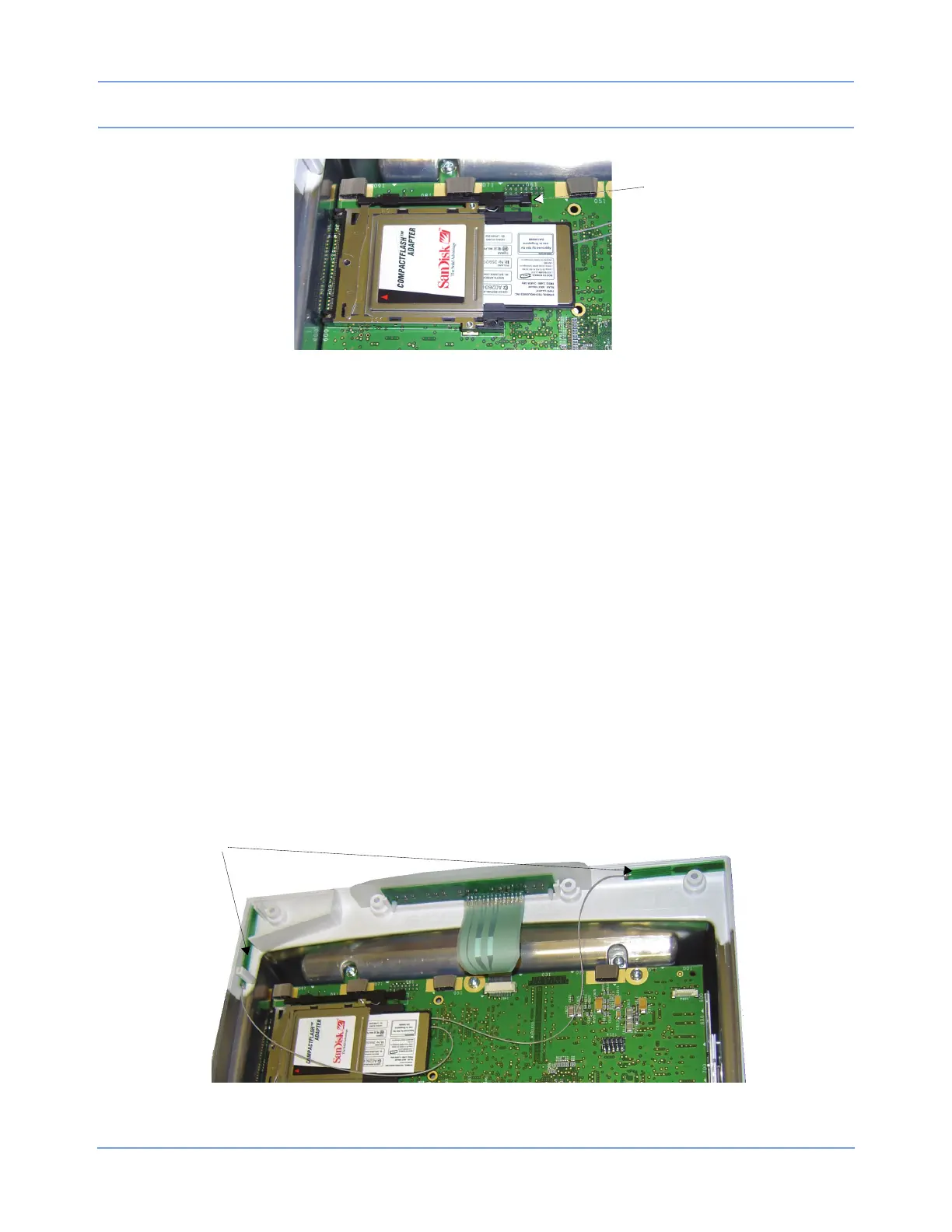
Figure 4-13: Radio card fully seated into the PCMCIA card adapter
Replacing the Radio Card Antennas
1 Remove the radio card as described in Replacing the Wireless Radio Card on page 4-17.
2 Detach the antennas from the radio card.
3 Detach the antennas from the side bezel of the monitor. Use a thin bladed knife, if necessary, to remove
any remaining foam tape adhesive.
4 Remove the replacement antennas (P/N 117-0165-xx) from their packaging.
5 Carefully connect the two antennas by inserting the antenna connectors into the micro-coaxial connector
receptacles on the radio card (either antenna can be connected to either connector). Ensure that the
connector and the receptacle in the radio card are properly aligned before applying pressure to connect
them (refer to
Figure 4-12). Do not stress the antenna cables.
6 Refer to Figure 4-14 for the correct antenna placement ().
To attach the antennas:
a Remove the peel-off covering over the foam tape adhesive.
b Apply the antenna’s adhesive pad to the tip of a thin-bladed knife or small flat screwdriver.
c Use the knife or screwdriver to guide the antenna to the correct installation point (refer to Figure 4-15).
Ensure that the antenna cable is not stressed or kinked.
Figure 4-14: Antenna placement



 To Next Page