32
② Open the PTZ sub menu by selecting the submenu button.
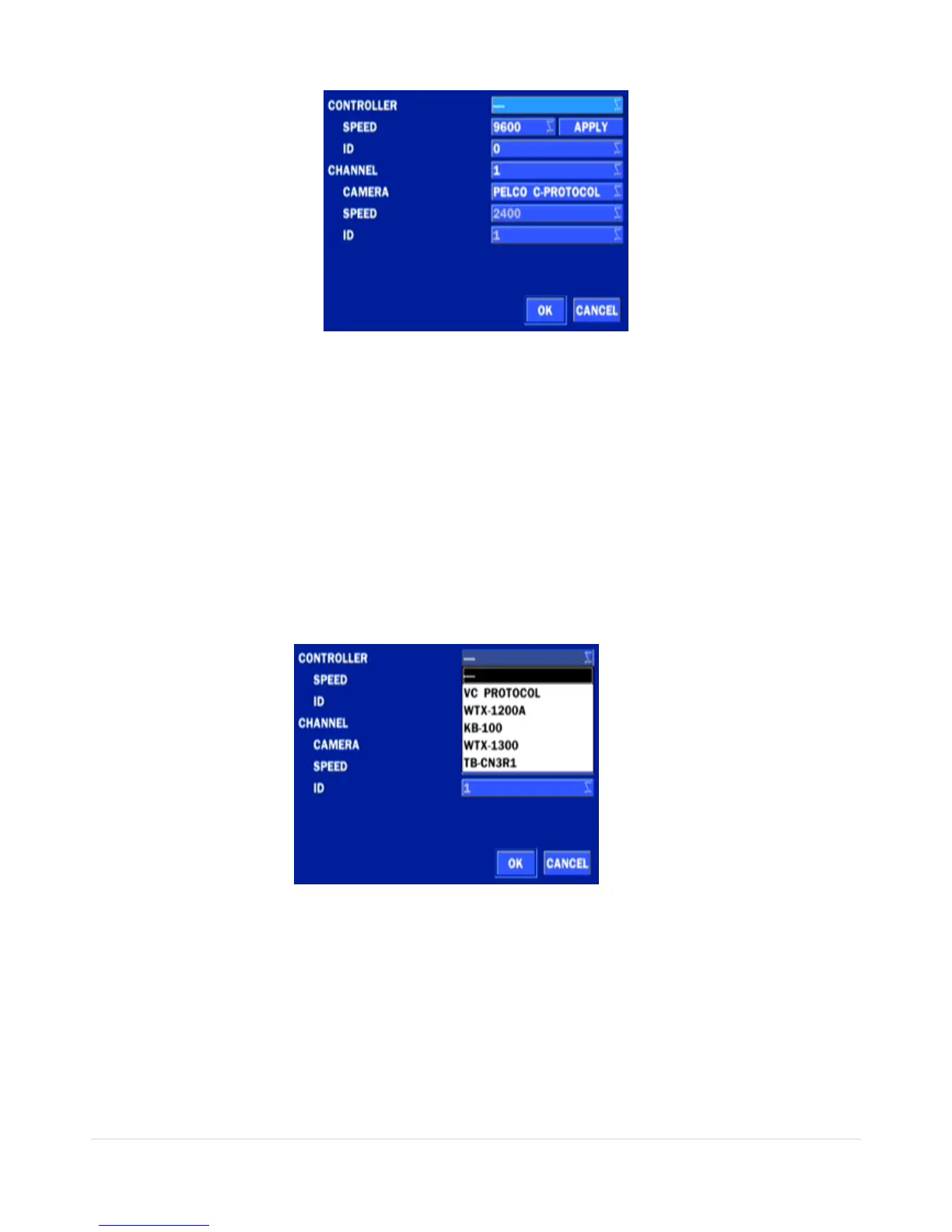
Figure 4.4.5. PTZ Control Setup Screen
Note: Connect PTZ cameras that support RS-485 directly to the RS-485 port. If the camera is controlled
through an RS-232C interface, use an RS-232C to RS-485 to RS-232C signal converter.
Use the PTZ setup screen to select the following options for the camera PTZ controller:
- CHANNEL: Channel connected to a PTZ device
- CAMERA: Protocol Type
- SPEED: 19200, 14400, 9600, 4800, 2400 (Baud rate)
- ID: 0-63
Controller (Keyboard Controller): If a PTZ controller is used, select a controller protocol from Controller
menu. Set SPEED (Baud Rate) and ID number.
Figure 4.4.6. Controller Selection Screen
Notice : DxxVT series can use UTC feature.
: UTC(Up The Coax) allows for control of the camera’s OSD menu via the coax cable.
User does not need extra connection via RX-485 to control the camera’s OSD menu
- How to set (Setup – Device – PTZ & Controller – PELCO C-PROTOCOL)



 To Next Page