Using GMOS 18
12:30
TOP
0
KMH
-
+
NO TRACK FOUND
PRESS ANY KEY TO
SET A NEW TRACK
12:30
TOP
0
KMH
-
+
SET NEW, TRACK 15
TIMER STARTS AT 90KMH
OVERWRITE TRACK 15
TIMER STARTS AT 90KMH
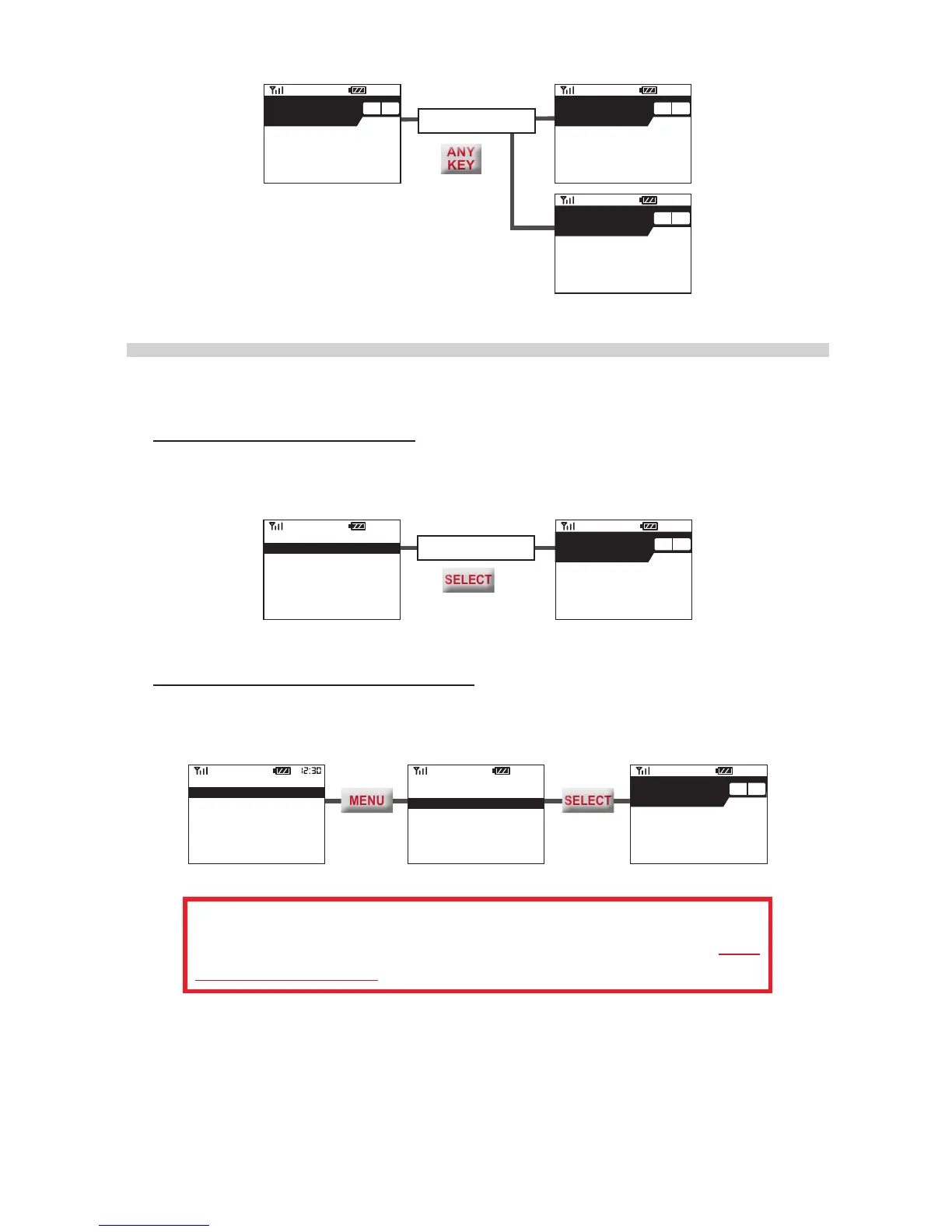
If There Are Tracks Found
If there are Track(s) found, you will see them listed as the Search Result.
• If there is only one Track found, GMOS will list it and wait 90 seconds. Do noth-
ing, or press
SELECT
to conrm and skip the wait. GMOS will display this Track
setting on Standby Screen, preparing to use it to produce lap times later.
90 seconds later
or
12:30
TOP
0
KMH
-
+
SACUIT WEST
TIMER STARTS AT 90KMH
SEARCH RESULT:
SACUIT WEST
SET A NEW TRACK
• If there are more than one Track found, GMOS will list them and wait 90 seconds
so that you have time to select one. Press
MENU
to go to the Track you want,
and then press
SELECT
to conrm. Then GMOS will enter Standby Mode.
SACUIT WEST
TIMER STARTS AT 90KMH
PLEASE SELECT ONE:
SACUIT EAST
SACUIT WEST
08
_
25
_
12 14-38
SET A NEW TRACK
PLEASE SELECT ONE:
SACUIT EAST
SACUIT WEST
08
_
25
_
12 14-38
SET A NEW TRACK
If none of them is selected in 90 seconds, as GMOS will not be
able to know which one to use, it will automatically prepare to set a
new Track at Track 15, or overwrite it if it has already been taken.
In either case, if you don’t want to use the track found and would like to set a new
Track instead, please press
MENU
to go to “SET A NEW TRACK”, and then press
SELECT
to conrm. GMOS will enter Standby Screen, preparing to set a new Track
at (or overwrite) Track 15.


 To Next Page