PLEASE SELECT ONE:
SACUIT EAST
SACUIT WEST
08
_
25
_
12 14-38
SET A NEW TRACK
PLEASE SELECT ONE:
SACUIT EAST
SACUIT WEST
08
_
25
_
12 14-38
SET A NEW TRACK
12:30
TOP
0
KMH
-
+
SET NEW, TRACK 15
TIMER STARTS AT 90KMH
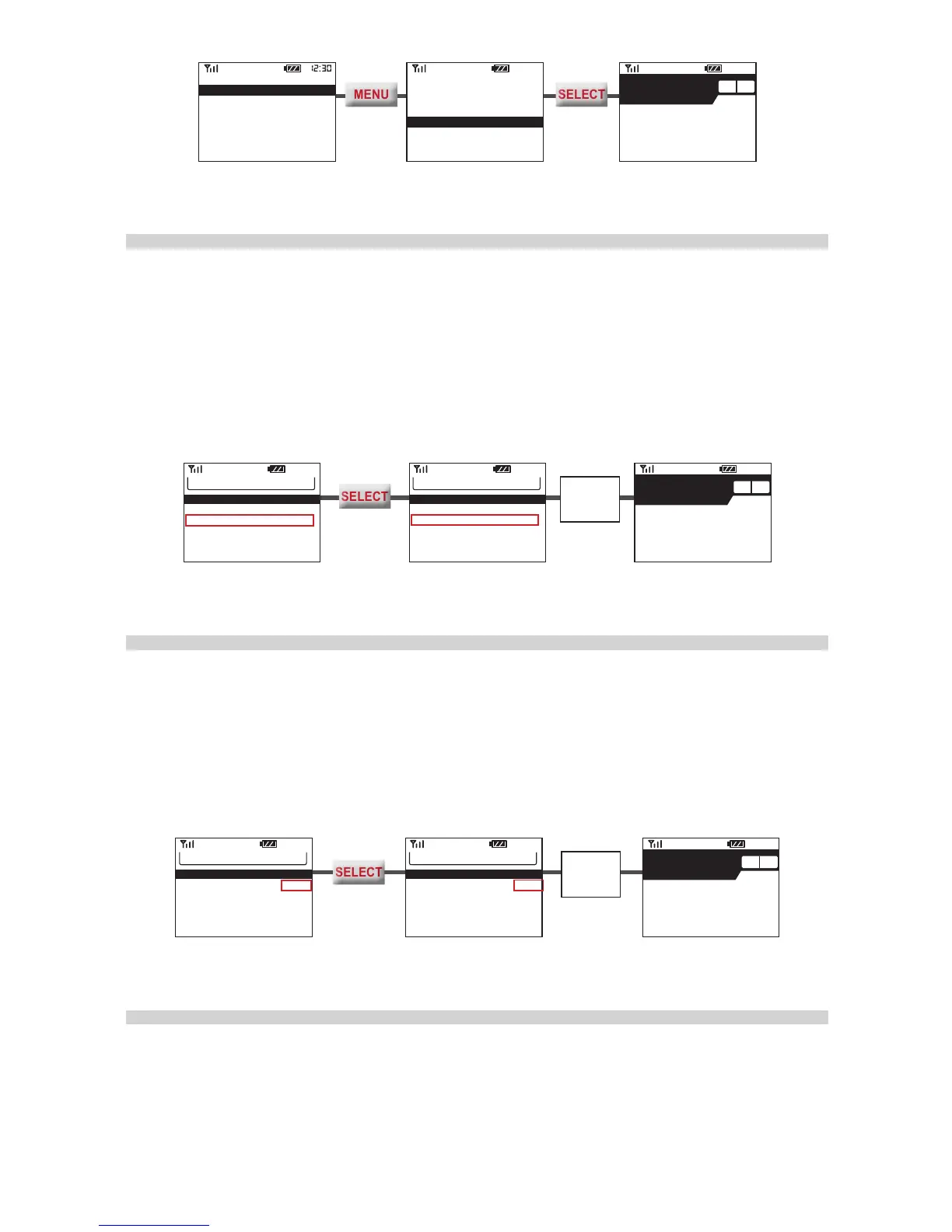
Selecting A Track To Use Manually
If you regret your choice and would like to select a Track manually, press
MENU
in
Standby Screen to enter Laptimer Menu. Then follow the steps below.
• Make sure “SET FL AT TRACK15” is off.
• Press
MENU
to go to “TRK #”.
• Press
SELECT
till you nd the Track that you want.
• Exit the Laptimer Menu. GMOS will list your selection on the Standby Screen.
LAPTIMER 12L, 75%LEFT
VIEW LATEST RECORD
SET FL AT TRCK15 OFF
TRK 07: SACUIT FULL
START TIMER: 90KMH
STOP TIMER: 20s IDLE
LINE WIDTH: 100M
12:30
Exit the
Menu.
12:30
TOP
0
KMH
-
+
SACUIT FULL
TIMER STARTS AT 90KMH
LAPTIMER 12L, 75%LEFT
VIEW LATEST RECORD
SET FL AT TRCK15 OFF
TRK 01: SACUIT WEST
START TIMER: 90KMH
STOP TIMER: 20s IDLE
LINE WIDTH: 100M
12:30
Activatng Auto Set Track 15 Manually
If you regret your choice and would like GMOS to set a new Track, press
MENU
in
Standby Screen to enter Laptimer. Then follow the steps below.
• Press
MENU
to go to
“
SET FL AT TRACK15”.
• Press
SELECT
to switch it on.
• Exit the Menu. GMOS will prepare to set a new Track at (or overwrite) Track15.
Exit the
Menu.
LAPTIMER 12L, 75%LEFT
VIEW LATEST RECORD
SET FL AT TRCK15 OFF
TRK 07: SACUIT FULL
START TIMER: 90KMH
STOP TIMER: 20s IDLE
LINE WIDTH: 100M
LAPTIMER 12L, 75%LEFT
VIEW LATEST RECORD
SET FL AT TRCK15 ON
TRK 01: SACUIT WEST
START TIMER: 90KMH
STOP TIMER: 20s IDLE
LINE WIDTH: 100M
12:30
TOP
0
KMH
-
+
SET NEW, TRACK 15
TIMER STARTS AT 90KMH
Starting Timer and Data Logging
Start your session when GMOS is in Standby Screen. Just ride along. Once the
starting speed is reached, GMOS will set a new Finish Line (only when designated
to), start the Timer and data logging automatically, and then use the Track selected
or newly set to produce lap times every time a Line is crossed.


 To Next Page