Using GMOS 26
Connecting GMOS to a Computer
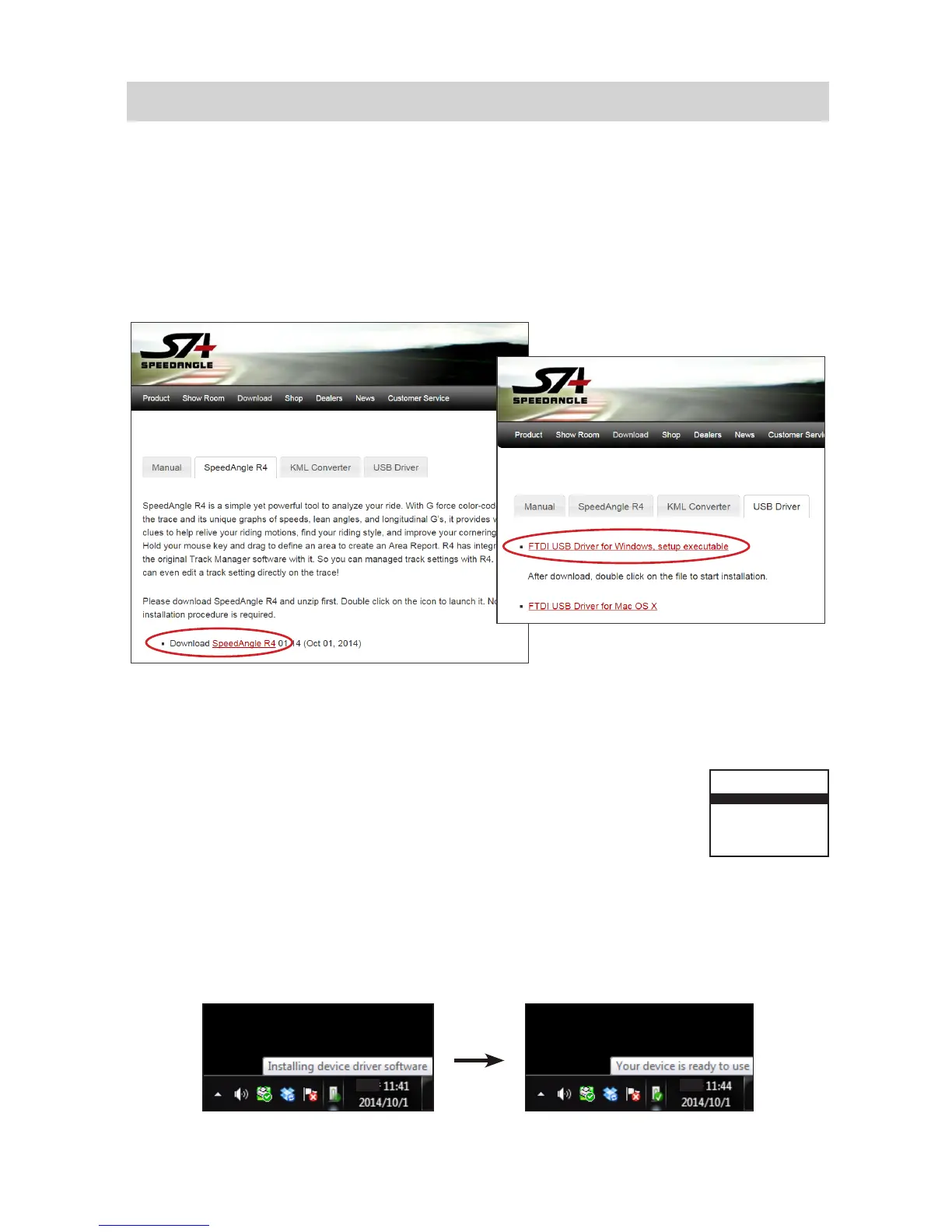
Before connectinig GMOS to a computer for the rst time, please go to www.speed-
angle.com/download, and
1. go to the SpeedAngle R4 section to download the latest version of SpeedAngle
R4.zip, and then
2. go to the USB Driver section to download FTDI USB driver.
1
2
Then follow the steps below:
1. Unzip R4. Double click on the USB driver to start installation.
2. Connect the dashboard unit and your computer with the sup-
plied USB cable. Power on your GMOS dashboard unit. GMOS
will enter USB mode automatically and display “USB CON-
NECTED” on the device screen.
3. If this is your rst time connecting to this computer, your Windows will search for
the driver and install it automatically. Wait till it shows “Your Device Is Ready to
Use”. Sometimes this may take up to a few minutes.
USB CONNECTED
AFTER USE, TURN THE
POWER OFF TO CHARGE
THE BATTERY FULLY


 To Next Page