113
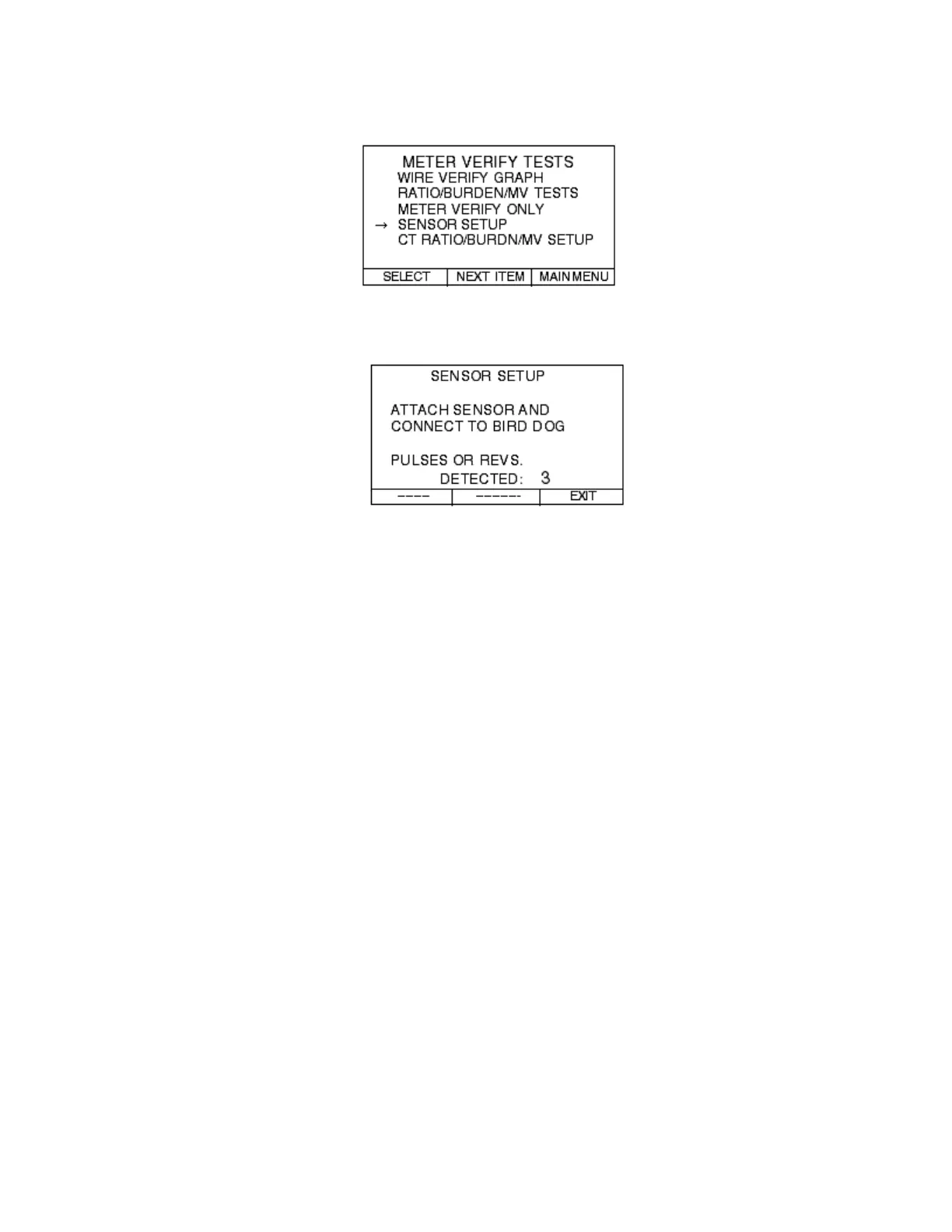
From the METER VERIFY TESTS menu move your curser down to SENSOR
SETUP and press SELECT:
The next screen you will see will be the SENSOR SETUP screen:
Once you enter this screen, watch the PULSES OR REVS. DETECTED. If it is
incrementing, then your sensor is working properly. If not, continue to position the
sensor until you see it increment. (You can also see the revolutions or pulses
increment on the phase selection screen before you perform the
RATIO/BURDEN/MV TEST or the METER VERIFY ONLY test.) Once you
see the screen increment press the EXIT button and perform either the
RATIO/BURDEN/ MV TEST or the METER VERIFY ONLY test.
Note—How to Get Pulses Out of Electronic Meters: When you
walk up to an electronic meter, you might believe that it is
generating pulses. This is not the case. In many cases, you have to
do something to the meter to get it to generate pulses. All meters
are different, but as a rule of thumb to get pulses to come out of the
meter you might do the following:
Cycle power to the meter
Put the meter in TEST mode
Consult your meter’s instruction manual, call the meter manufacturer,
or contact Spinlab for more advice.



 To Next Page