8
Mayhem 130/150 Geometry Adjuster Operaon
Your Mayhem frame can quickly and easily be switched between a High Mode and a Low Mode to ne tune
its handling behavior. The High Mode will provide quicker steering response and beer pedal clearance,
which can be benecial at lower speeds and when pedaling along rougher terrain. The Low Mode delivers
more relaxed steering and a lower center of gravity, which will make the bike more stable at higher speeds
and in faster corners. Follow the instrucons below to switch between the modes. The selected mode is
indicated on the top of the shock yoke adjacent to the adjuster cap.
Switching from High Mode to Low Mode will slacken the head tube and seat tube angles by ~0.5°
and lower the boom bracket by 7mm (1/4in).
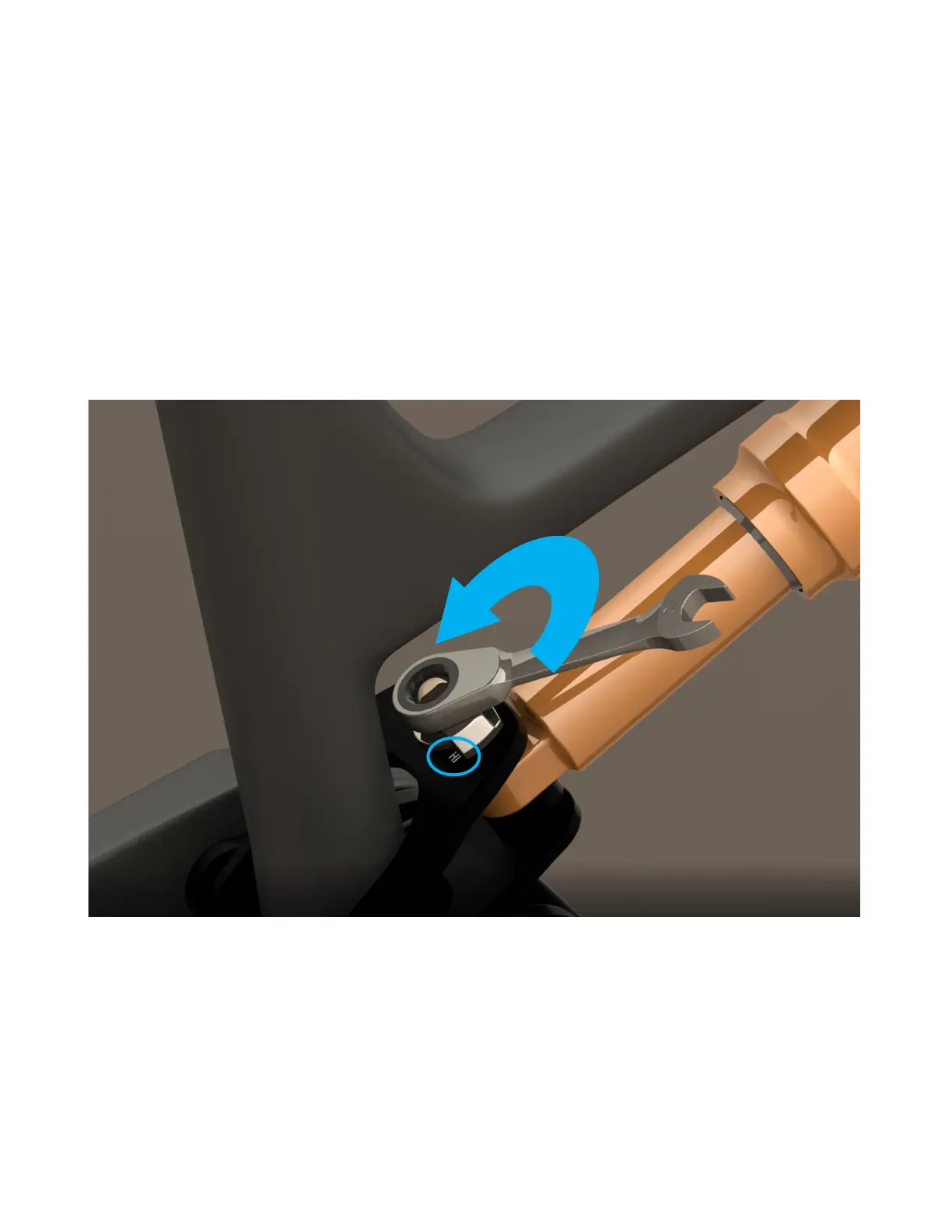
1. Using a 10mm 12-point wrench, unscrew the rear shock nut two full turns (720°). Hold a
nger underneath the shock yoke at the pin to ensure that unscrewing the nut causes the
adjuster cap to rise, instead of pushing the pin down out of the yoke.


 To Next Page