STACK Dash-2 Kart Logger 8. Summary of Switch Functions
Users Guide 43
8. Summary of Switch Functions8. Summary of Switch Functions
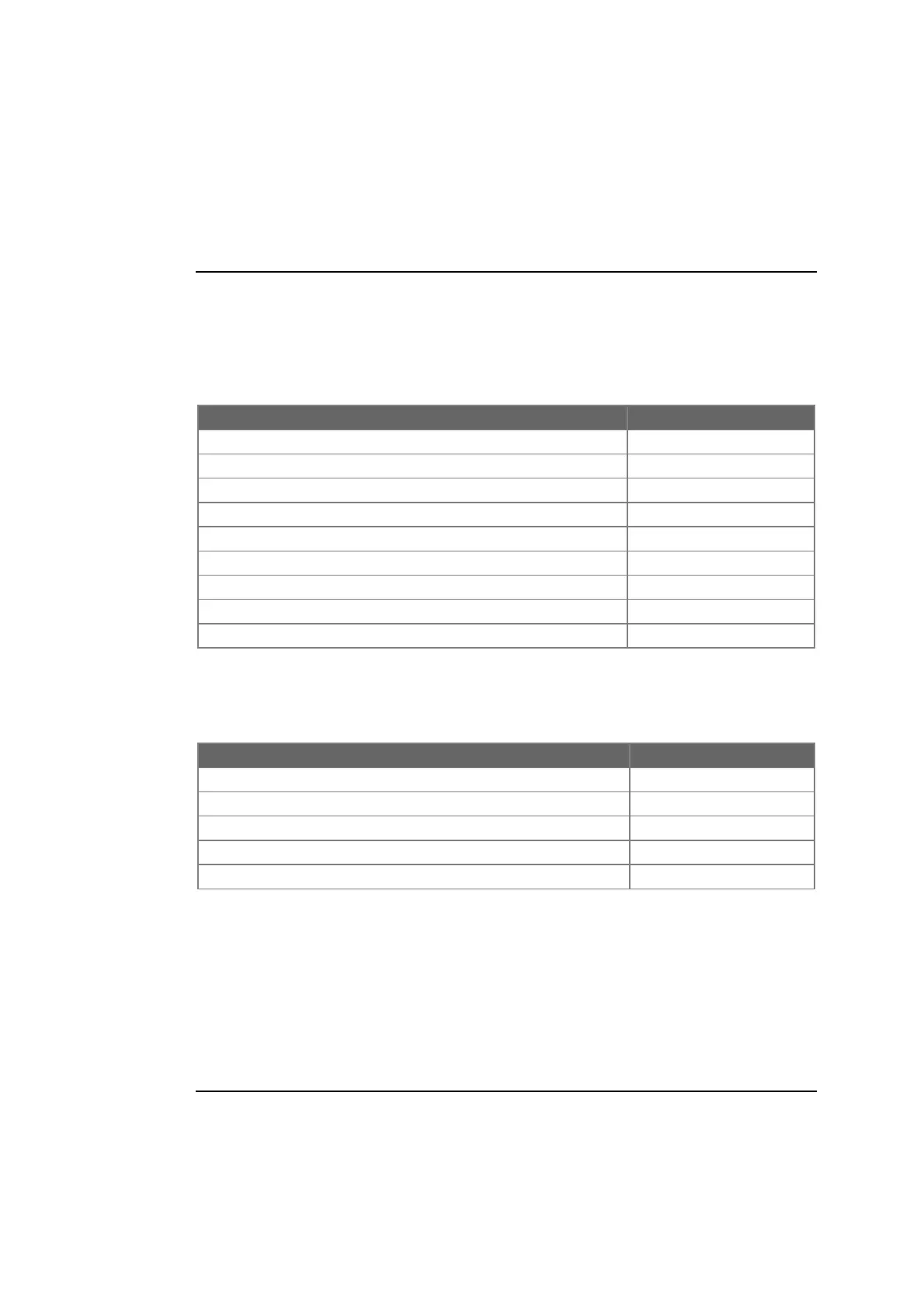
Normal Operation
Function Press
Show Peak Values Switch 1
Change Display Layer Switch 2
Clear Alarm Switch 2
Start / Stop Recording Switch 3
Reset Logger Switches 1 & 3 together
Manual Lap Marker Switch 4
Reset Peak Values Switches 1 & 4 together
Reset lap count and lap time to zero Switches 1 & 4 together
Put system into configuration mode Switches 1 & 2 together
System Configuration Mode
Function Press
Decrease the value of the parameter being displayed Switch 1
Increase the value of the parameter being displayed Switch 2
Enable or disable an alarm for the parameter being displayed Switches 1 & 2 together
Display the next configurable parameter Switch 3
Quit configuration mode and return to normal mode Switch 4



 To Next Page