Page 26
Maintenance Mode allows access to service and diagnostic information, as well as provides the ability to adjust
certain program default parameters. To enter Maintenance Mode
1
:
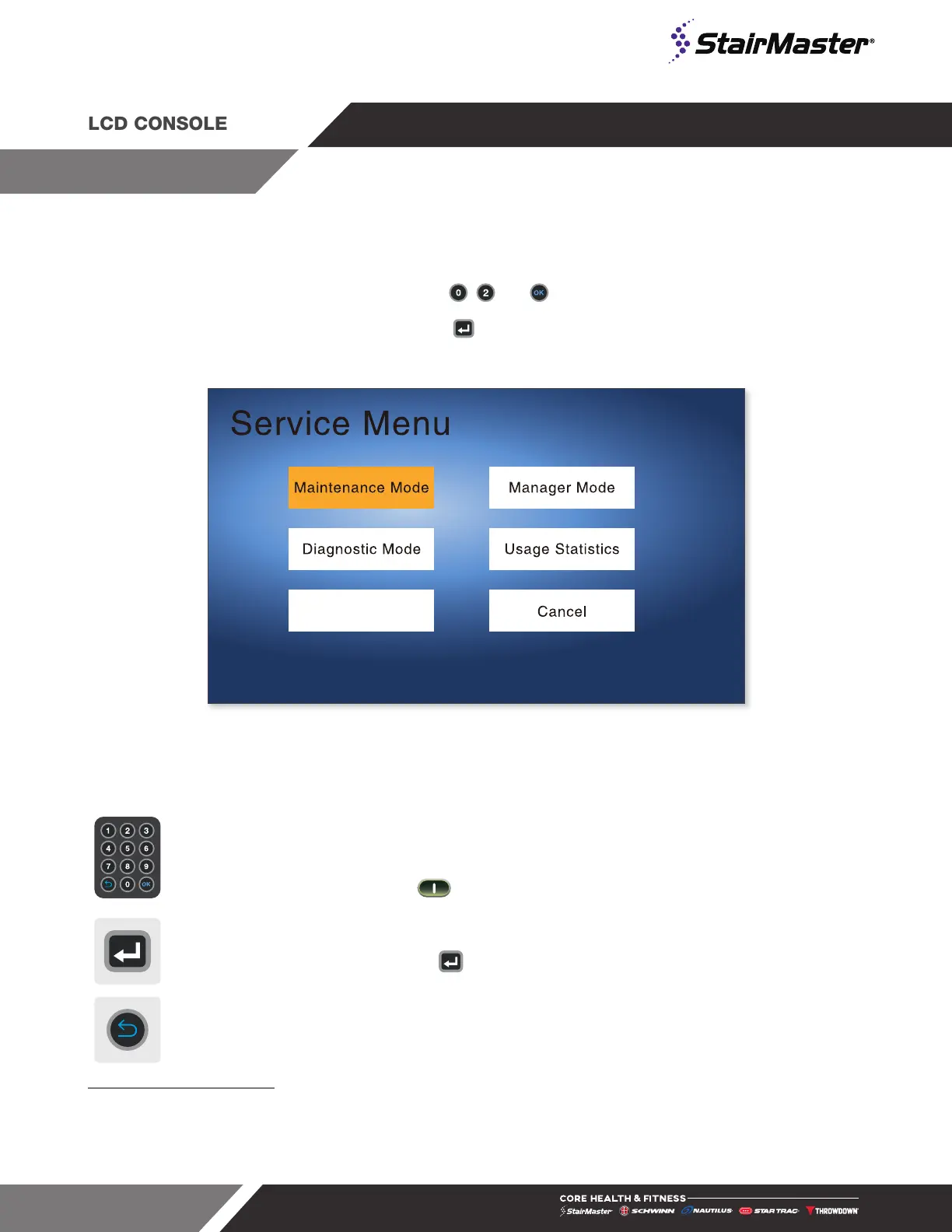
1. On the numeric keypad, press and hold the , and keys together. Service Menu will display.
2. Use direction buttons to navigate. Press the button to enter maintenance mode
Software Upgrade
Fig. 31
Service Menu
The following keys are available in MAINTENANCE MODE:
Numeric Keypad
Allows you to enter specific values for numeric parameters.
These keys do not save the new value.
NOTE: To exit Maintenance Mode without saving any values or settings,
press the key.
Save Changes
Use the keypad directional arrows to navigate to the “Save and Exit” box
then use the key to save.
UNDO/BACK Key On the Numeric Keypad. Exits Maintenance Mode.
1 10” Touchscreen: Touch the top left corner, then the center and then the top left corner again. Service Menu will display. Tap Maintenance Mode
15” Embedded: On the top of the touchscreen, tap the upper left corner, then upper right, then upper left again. Password Screen will display.
Enter password 214 then tap OK. Service Menu will display. Tap Maintenance Mode.
The maintenance menus for the embedded displays contain many of the same options as for the LCD displays, as well as a few extra options related
directly to embedded touchscreens, such as touchscreen calibration and an option to upload background images. Refer to the embedded manual for
more information.
MAINTENANCE MODE





 To Next Page