Page 49
Import Images
Using the integrated USB port, it is
possible to upload custom graphics
and images.
1. Upload up to 7 custom images
to be used as the background
for the home and setup screens
2. Upload a custom logo for the
top center of the home screen
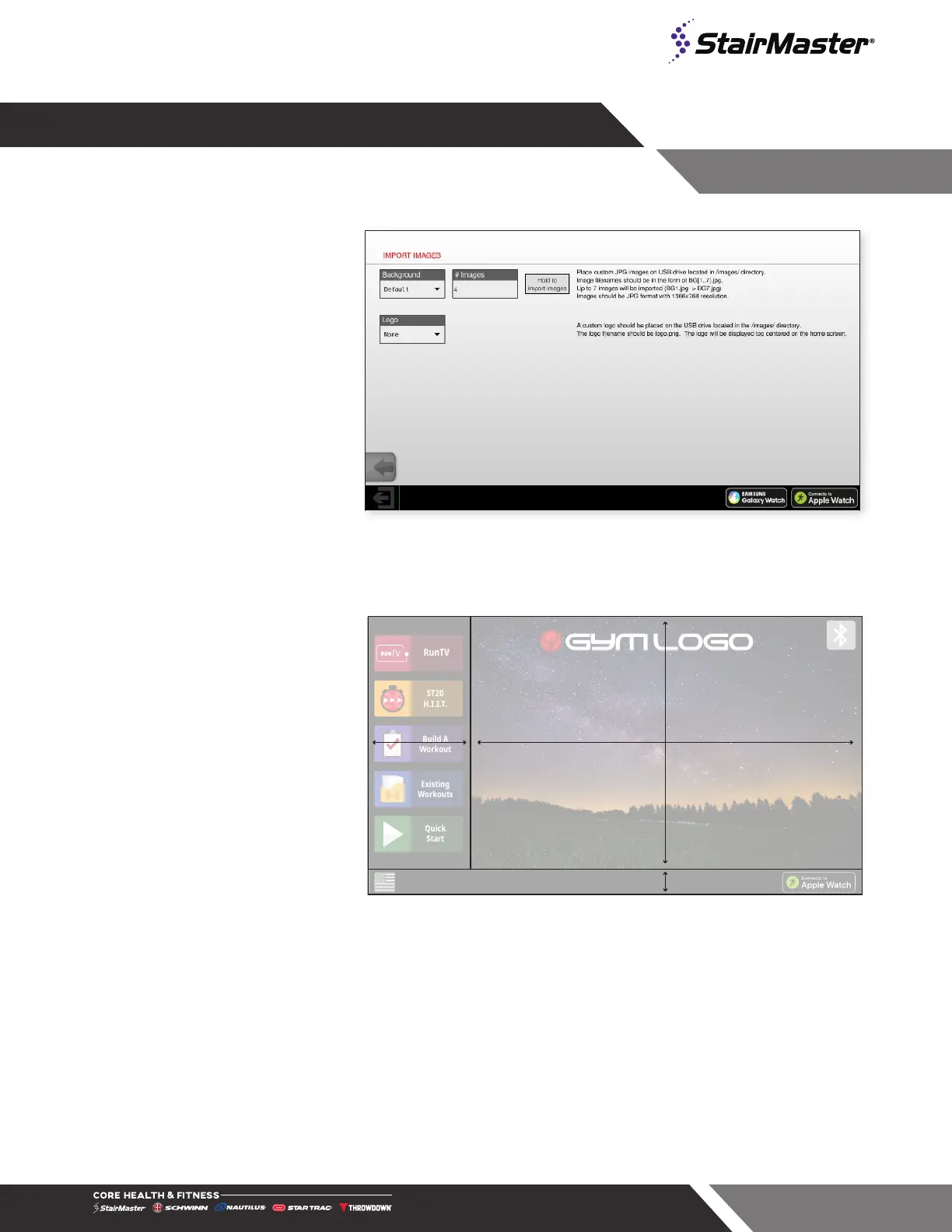
Fig. 64
Import Images
File Specifications
ST20
H.I.I.T.
Build A
Workout
Existing
Workouts
Quick
Start
RunTV
Visible Background Area
1083 x 698 px
1366 x 768 px
Bottom Bar
70 px
Main Menu Bar
283 px
Fig. 65
File Specifications
It is important that the image les follow
the specications listed below so they
appear properly on screen.
For Custom Logo Images:
• The graphic file must be .png
format with a transparent back-
ground.
• The size of the file should be
approximately 100x640 pixels.
• The logo will be displayed in the
top center replacing “GYMLO-
GO” as shown
For Custom Background Images:
• The graphic files must be .jpg format
• The size of these files must be exactly (in pixels) 768 tall x 1366 wide
• Upload a maximum of 7 images, the files must be named “BG1”, “BG2” etc
• Note that on the screen, there are sections of this full size that will be covered by the left side bar
(283px wide) and the bottom black bar (70 px tall) – take this into account when creating images




 To Next Page